
SEO & GEO
The Best SEO Tools (2026)

Copy for AI
What is the best SEO tool? Honest answer: it does not exist. There is, however, a best tool per task. For keyword research, technical audits, content optimisation and rank tracking you pick something different each time, and most teams run on a combination of an all-in-one plus a few focused tools. In this article we line up the most important SEO tools per job, with what each tool is strongest at and what it costs.
How we tested: every screenshot below was taken in our own accounts or on the tool’s own site on 17 October 2026, using customerimpact.be as the test site. Prices come from each tool’s pricing page on the same day, in the currency the page showed us. We do not get paid by any of these vendors.
Apply it right away: translate rankings into revenue with our SEO ROI calculator.
Which SEO tools are the best per task?
| Tool | Best for | Free option | Paid from |
|---|---|---|---|
| Google Search Console | Your own search data, indexing, AI feature reports | Fully free | Free |
| Bing Webmaster Tools | Bing data, Copilot citations, keyword research | Fully free | Free |
| Google Keyword Planner | Search volume straight from Google | Free with an Ads account | Free |
| Ahrefs | Backlinks, keywords, AI visibility | Ahrefs Free (own site) | Starter €27/mo, Lite €119/mo |
| Semrush | Broad SEO plus marketing research | Free plan, 10 reports a day | €134/mo |
| Moz Pro | Accessible all-in-one for small teams | Free trial | $49/mo |
| Screaming Frog | Technical crawl audits | Up to 500 URLs | €245/year |
| Sitebulb | Audits with explained priorities | 14-day trial | Cloud from £95/mo |
| Surfer | Content optimisation and AI visibility | Free start | €49/mo (yearly) |
| Clearscope | Content reports for editors | 14-day trial | $129/mo |
| AccuRanker | Fast, accurate rank tracking | None listed | $224/mo (2,000 keywords) |
Want to know first which tool serves which task and where free is enough? Read the best SEO tools per task. Below we go into each tool, grouped by job.
How do you recognise a good SEO tool?
- It solves a concrete task. Do not start with the tool, but with the question: do I want to find keywords, check my technical setup or track my positions?
- The data is reliable and current. Search volumes and backlink indexes differ per tool. Look at the size and freshness of the index, not the prettiest interface.
- It fits your scale. A freelancer has different needs than an agency tracking dozens of domains. Do not pay for seats and projects you do not use.
- It delivers action, not a mush of numbers. A good tool points you to what you should do, not just to what is wrong.
- Free where it can be. Google Search Console and a few free tools already cover a surprisingly large part of the work.
Which free SEO tools does every site need?
1. Google Search Console (free, indispensable)
Best for: your own clicks, impressions, positions and indexing status, straight from Google. Price: free. Biggest strength: first-party data no other tool can replace.
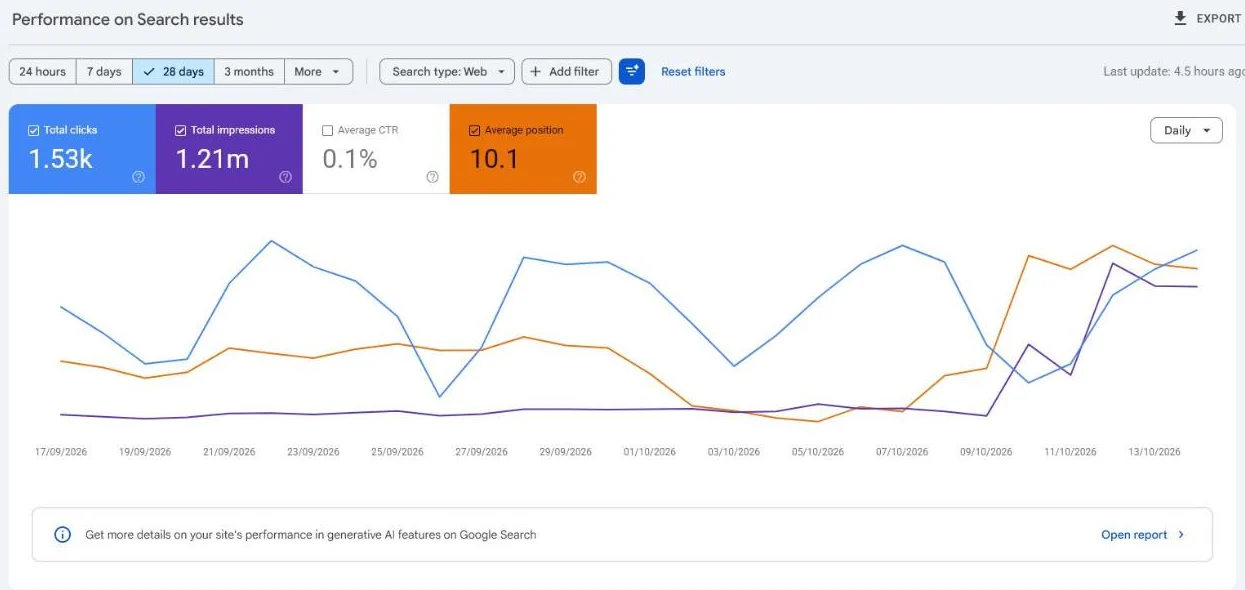 Our own Search Console, last 28 days. The banner under the chart links to the new generative AI features report.
Search Console is Google’s own free tool and belongs in every stack. You see which search terms you appear for, your click figures, indexing status and Core Web Vitals. No paid tool replaces this data about your own site, because every other tool estimates what Search Console measures.
What we use most: the Performance report filtered per page, to see which queries a page really ranks for, and the new generative AI features report (beta), which shows how often your pages appear in Google’s AI answers. For our own site that report counted 632,000 AI-feature impressions in three months, a number no third-party tool can show you.
| Pros | Cons |
|---|---|
| Free, accurate, first-party data | Only your own sites |
| Indexing and Core Web Vitals in one place | 16 months of history, max 1,000 rows in the interface |
| Now reports AI feature impressions | No competitor or backlink research |
2. Bing Webmaster Tools (free, the AI angle)
Best for: Bing search data and, uniquely, how often Microsoft Copilot cites your pages. Price: free. Biggest strength: free Copilot citation data per page and per query.
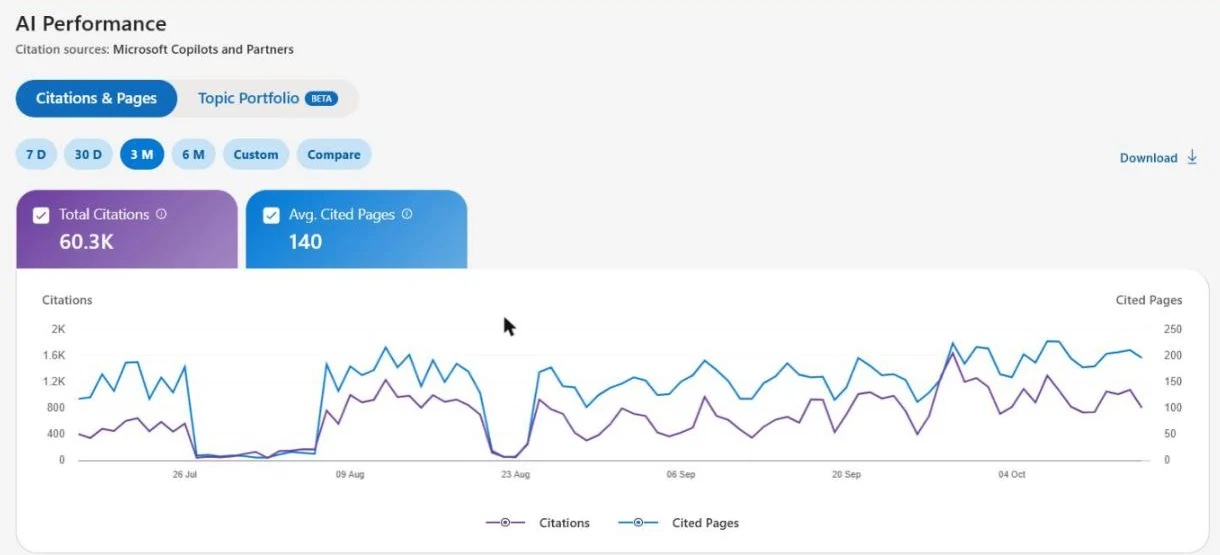 The AI Performance report (beta) in our own Bing Webmaster Tools: 60.3K citations in Copilot and partner answers over three months.
Bing Webmaster Tools does for Bing what Search Console does for Google, with free keyword research and a site scan on top. Its real advantage today is the AI Performance report: it shows how many times Copilot and Bing’s partners cited your pages and for which grounding queries. Because Bing’s index feeds part of the AI answers people read, this second account is more useful than Bing’s market share suggests.
| Pros | Cons |
|---|---|
| Free AI citation data, per page and per query | Smaller search volumes than Google |
| Free keyword research tool | Interface changes often (beta features) |
| IndexNow support for fast indexing | Few teams check it, so issues go unnoticed |
3. Google Keyword Planner (free with an Ads account)
Best for: search volume and related terms straight from Google. Price: free, you only need a Google Ads account. Biggest strength: search demand straight from Google, plus CPC as a value signal.
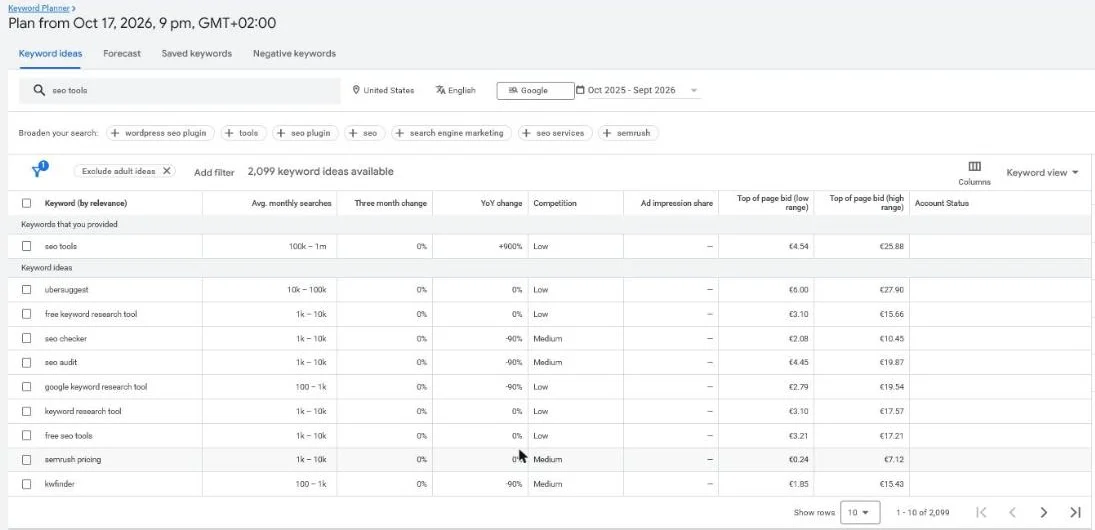 Keyword Planner for “seo tools”, United States. Without active campaigns you only get ranges like 100K to 1M.
The Keyword Planner is made for advertisers, but it also gives SEOs a free view of search demand and related terms, straight from the source. The catch is visible in the screenshot: without running campaigns the volumes come in broad ranges, and the data leans towards advertising potential. Use it as a complement alongside a paid tool or to start on a low budget. Deepen your approach with our guide on keyword research and, specifically for B2B, B2B keyword research.
| Pros | Cons |
|---|---|
| Data from Google itself | Broad volume ranges without ad spend |
| Shows CPC, a good proxy for commercial value | Built for ads, not for organic intent |
| Location and language targeting | No difficulty or SERP data |
Which all-in-one SEO platform is best?
4. Ahrefs (backlinks, keywords and AI visibility)
Best for: teams that work on SEO structurally and need the deepest link data. Price: Starter €27/mo, Lite €119/mo, Standard €229/mo, Advanced €419/mo (pricing page). Ahrefs Free covers your own verified site. Biggest strength: the depth and freshness of the backlink index.
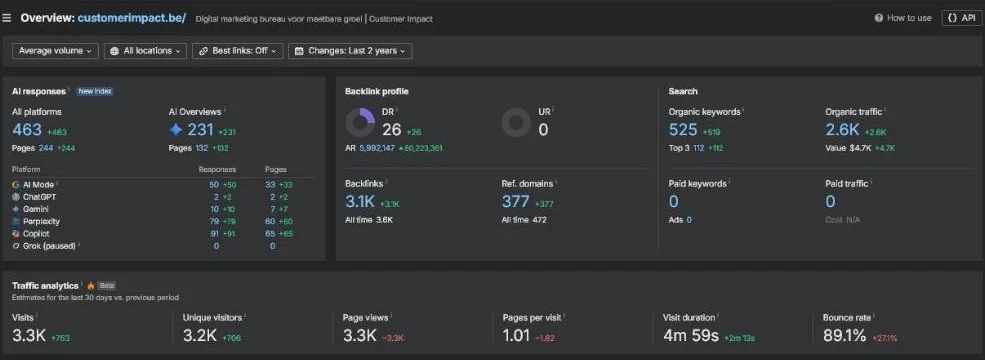 Ahrefs Site Explorer for our own domain. The AI responses block now sits next to backlinks and organic search.
Ahrefs is known for one of the largest backlink indexes on the market and for reliable keyword research. You use it for keyword research, competitor analysis, site audits and rank tracking in one package. The overview now also counts AI responses: for customerimpact.be it found 463 answers across AI Mode, AI Overviews, Perplexity, Copilot, Gemini and ChatGPT that mention the site. For deeper AI tracking Ahrefs sells Brand Radar separately.
| Pros | Cons |
|---|---|
| Deep, fresh backlink data | Price climbs with seats and add-ons |
| Keyword and competitor research in one place | Credit and usage limits per plan |
| AI responses next to classic metrics | Brand Radar AI is an extra cost |
Alternative: Semrush, if you also want advertising and content research in the same subscription.
5. Semrush (broad and marketing-focused)
Best for: marketing teams that want SEO, content and advertising research in one platform. Price: SEO plan €134/mo or €112.52/mo billed yearly; free plan with 10 reports a day (pricing page). Biggest strength: the breadth, handy if you also steer ads and content.
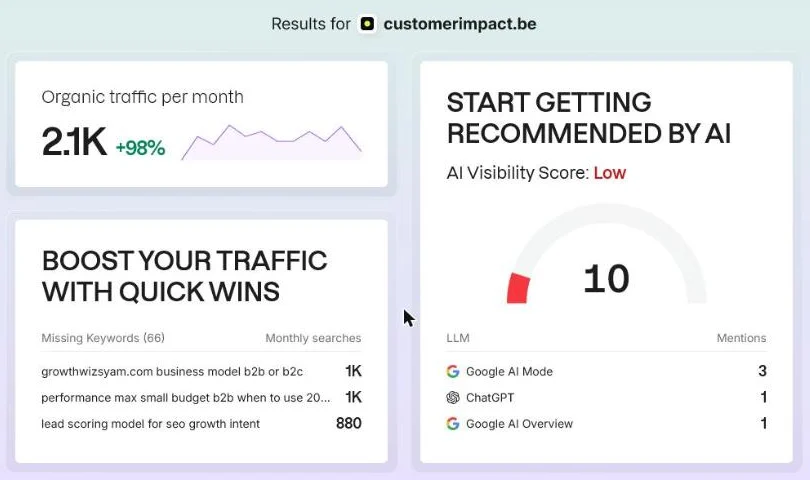 What Semrush shows for free when you enter a domain on its homepage, no account needed.
Semrush is the broad all-rounder: SEO, content ideas, advertising intelligence and social in one platform. It is strong in keyword and competitor research and has an enormous feature set. Semrush is now part of Adobe, and it pushes AI visibility hard: even the free domain check gives an AI Visibility Score next to organic traffic.
| Pros | Cons |
|---|---|
| Widest feature set, including ads research | Easy to pay for modules you never open |
| Useful free plan and free domain snapshot | Extra users and add-ons add up fast |
| AI visibility built into the platform | Data depth varies per country |
Alternative: Ahrefs, if link data matters more to you than marketing breadth.
6. Moz Pro (accessible entry level)
Best for: beginners and small teams who want an all-in-one without the learning curve. Price: $49/mo for one site, Standard $99/mo or $79/mo billed yearly (pricing page). Biggest strength: the learning curve, with AI prompt tracking in every plan.
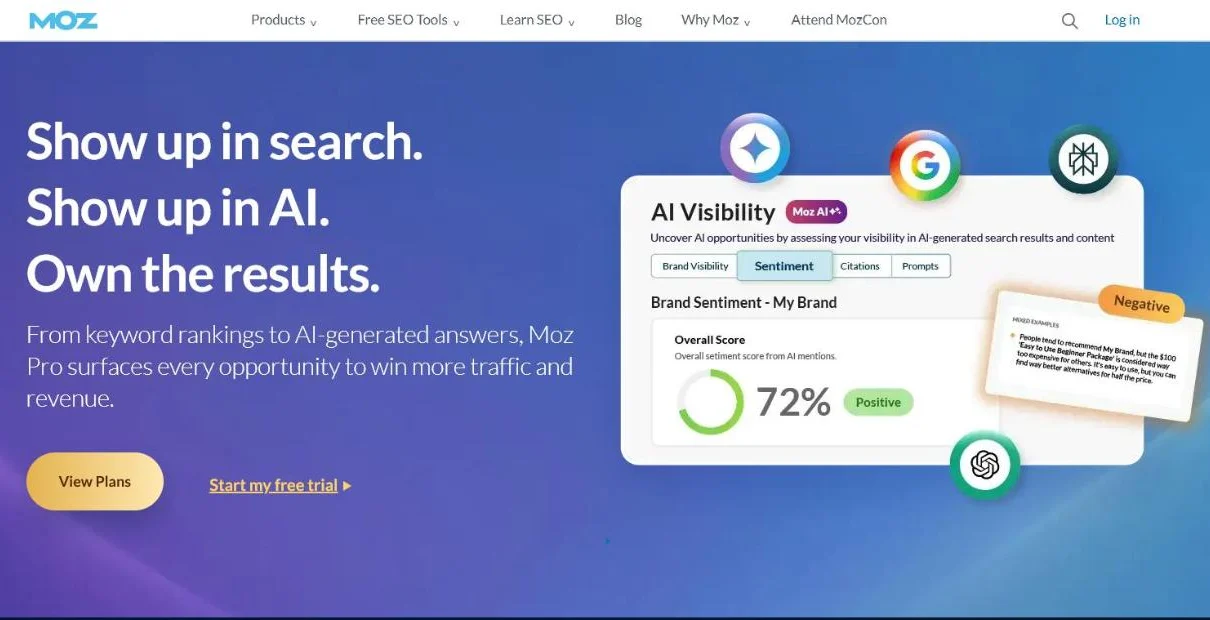 Moz now leads with AI visibility: every Pro plan tracks prompts in GPT, Gemini, Google AI Mode and Perplexity.
Moz is the more accessible all-in-one, with a friendly interface and familiar metrics like Domain Authority. The index and feature depth are smaller than those of Ahrefs or Semrush, but for smaller sites that is often enough. Every Pro plan now includes prompt tracking across four AI models, which makes it one of the cheapest ways to combine rankings and AI visibility. Read more in our Moz SEO guide.
| Pros | Cons |
|---|---|
| Gentle learning curve, strong education | Smaller index than Ahrefs or Semrush |
| AI prompt tracking included in every plan | Keyword query limits on lower plans |
| Low entry price | Fewer advanced competitor features |
Which tool is best for a technical SEO audit?
7. Screaming Frog (the standard crawler)
Best for: anyone working seriously on the technical side. Price: free up to 500 URLs, €245 per year for a licence (product page). Biggest strength: thorough, verifiable technical data at a low price.
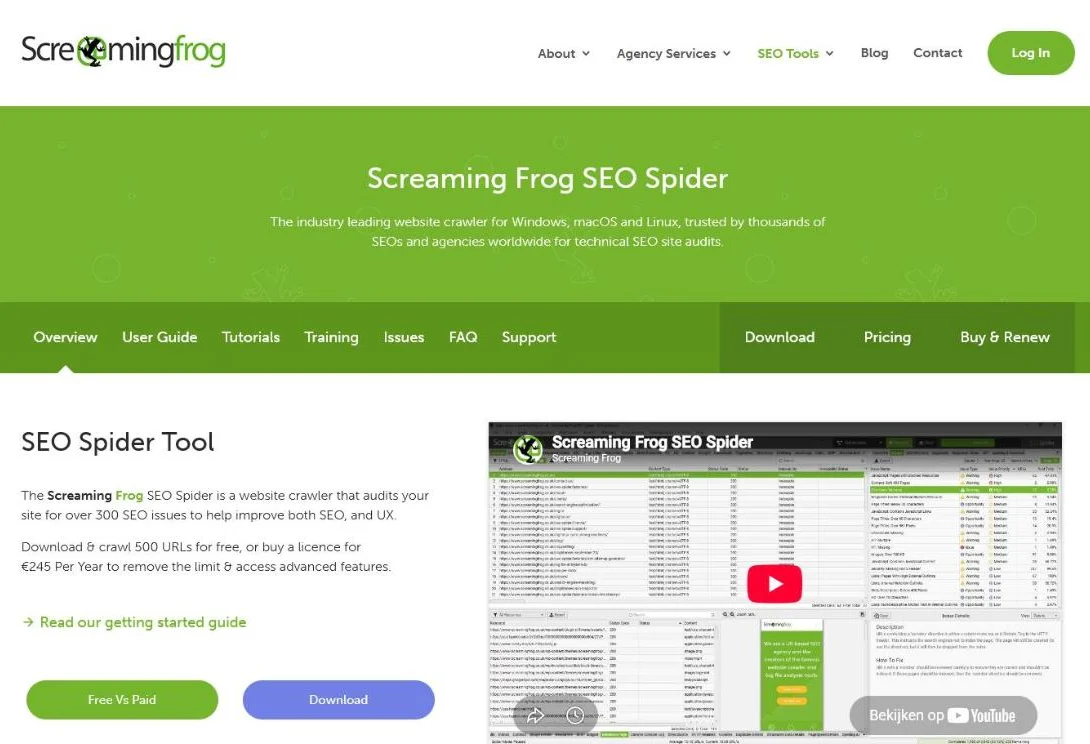 Screaming Frog runs on Windows, macOS and Linux and checks over 300 SEO issues per crawl.
Screaming Frog is the desktop crawler that virtually every SEO uses for technical audits. It crawls your site like a search engine and exposes broken links, redirect chains, duplicate titles and indexing problems. The free version is enough for small sites; above 500 URLs the licence is cheap for what you get.
| Pros | Cons |
|---|---|
| Thorough, verifiable technical data | Raw output, you interpret it yourself |
| Free for small sites | Runs on your own machine and memory |
| Integrates with Search Console and GA4 | Steep curve for non-technical marketers |
Alternative: Sitebulb, if you want the crawl explained and prioritised.
8. Sitebulb (audits with explanation and priority)
Best for: teams that want to understand their audits, not just run them. Price: 14-day free trial on desktop; Sitebulb Cloud from £95 per month (pricing page). Biggest strength: it turns raw crawl data into priorities you understand.
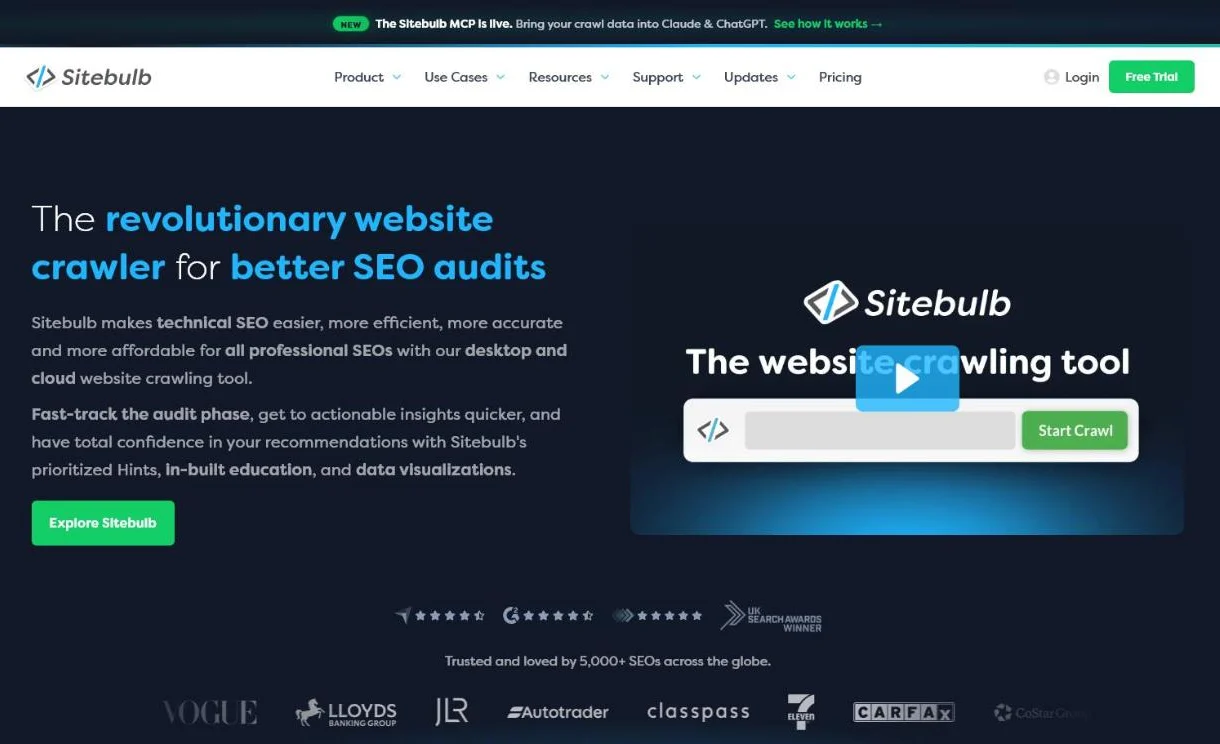 Sitebulb comes as a desktop and a cloud crawler, and now has an MCP to bring crawl data into AI assistants.
Sitebulb is the more accessible alternative to Screaming Frog: the same kind of crawl, but with visual reports and hints that explain why something is a problem and how heavily it weighs. Handy when technical work is not your daily job.
| Pros | Cons |
|---|---|
| Prioritised hints with explanations | Paid after the trial |
| Visual, client-ready reports | Cloud plans priced in pounds |
| Desktop and cloud options | Fewer custom extraction options than Screaming Frog |
Which tool is best for content optimisation?
9. Surfer (content optimisation, now AI visibility)
Best for: teams that publish a lot of content and want data-driven briefs. Price: from €49/mo billed yearly, Standard €99/mo (pricing page). Biggest strength: concrete, repeatable content briefs.
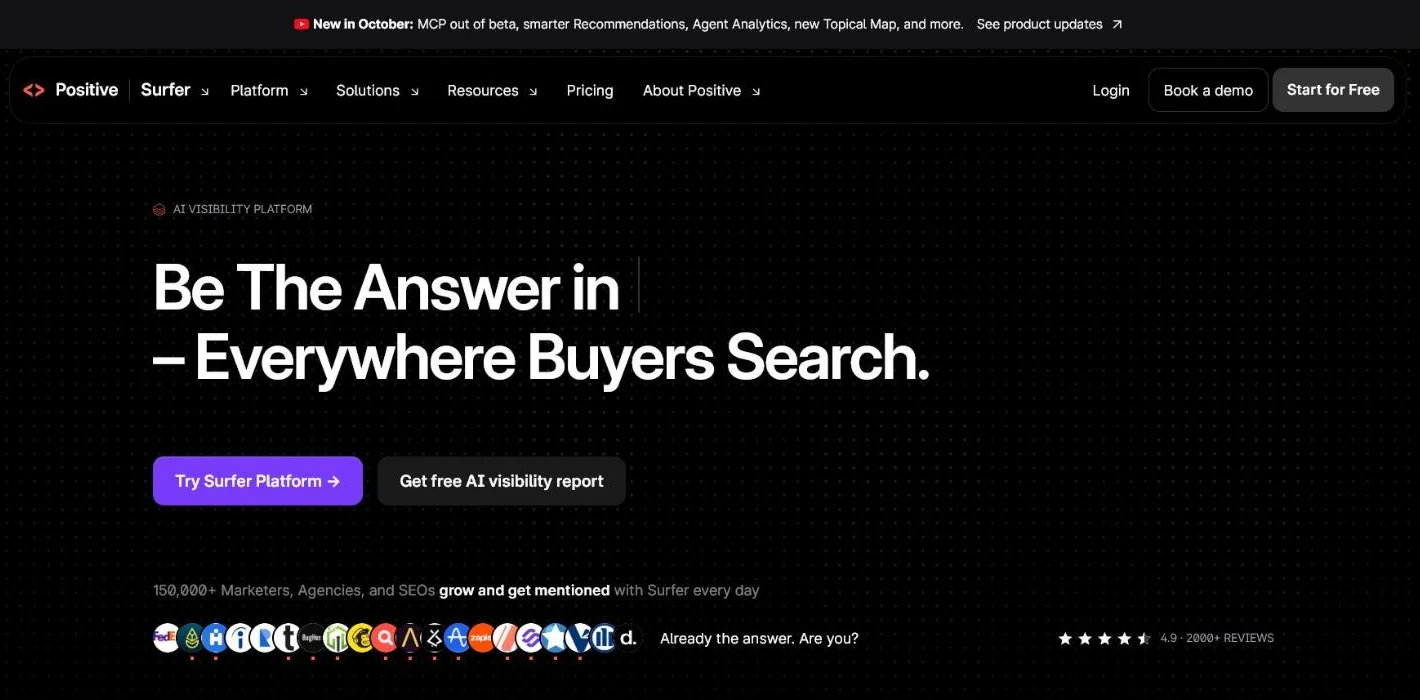 Surfer now operates under the Positive brand and positions itself as an AI visibility platform.
Surfer analyses the best-performing pages for a search term and suggests topics, terms and structure, so content optimisation becomes concrete and repeatable. It has moved hard towards AI search: tracking how often you appear in AI Mode, ChatGPT and other assistants is now part of the platform. Use it as an aid, not as a replacement for real insight into your reader.
| Pros | Cons |
|---|---|
| Concrete, repeatable content briefs | Easy to over-optimise for term counts |
| AI visibility tracking in the same tool | Plan lineup changes often |
| Good editor integrations | Value depends on how much you publish |
10. Clearscope (clean reports for editors)
Best for: editorial teams that want simple, readable content grades. Price: Essentials $129/mo, Business $399/mo, 14-day free trial (pricing page). Biggest strength: reports writers actually use.
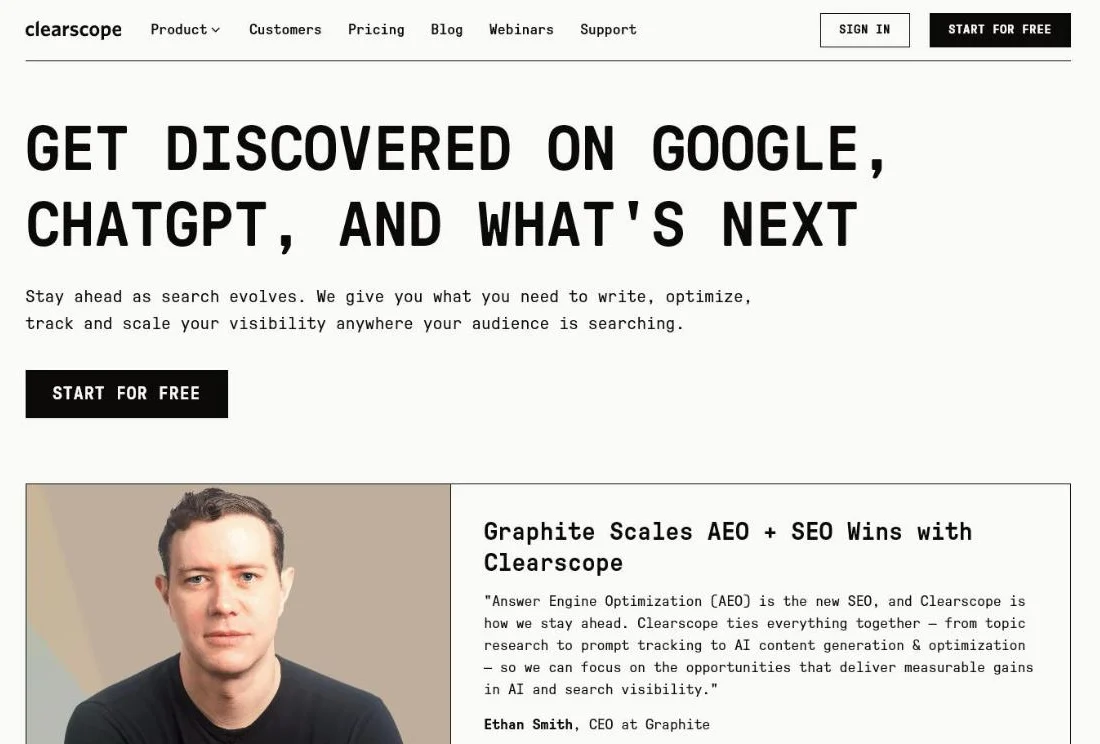 Clearscope added prompt tracking and AI content generation to its content reports.
Clearscope is known for clean, editor-friendly reports that writers actually use. It sits in the higher price segment, but teams that produce a lot of content often find it the easiest optimisation tool to adopt, and it now covers prompt tracking for AI answers as well.
| Pros | Cons |
|---|---|
| Very easy for writers | Higher price than Surfer |
| Clear grading per draft | No free plan, only a trial |
| Covers AI prompts now | Less useful for technical SEO |
Alternative: Surfer, for a lower entry price and more on-page data.
Which tool is best for rank tracking?
11. AccuRanker (fast, accurate rank tracking)
Best for: agencies and teams where positions are a core KPI. Price: Professional from $224/mo for 2,000 keywords (pricing page). Biggest strength: fast, frequent, accurate rank updates.
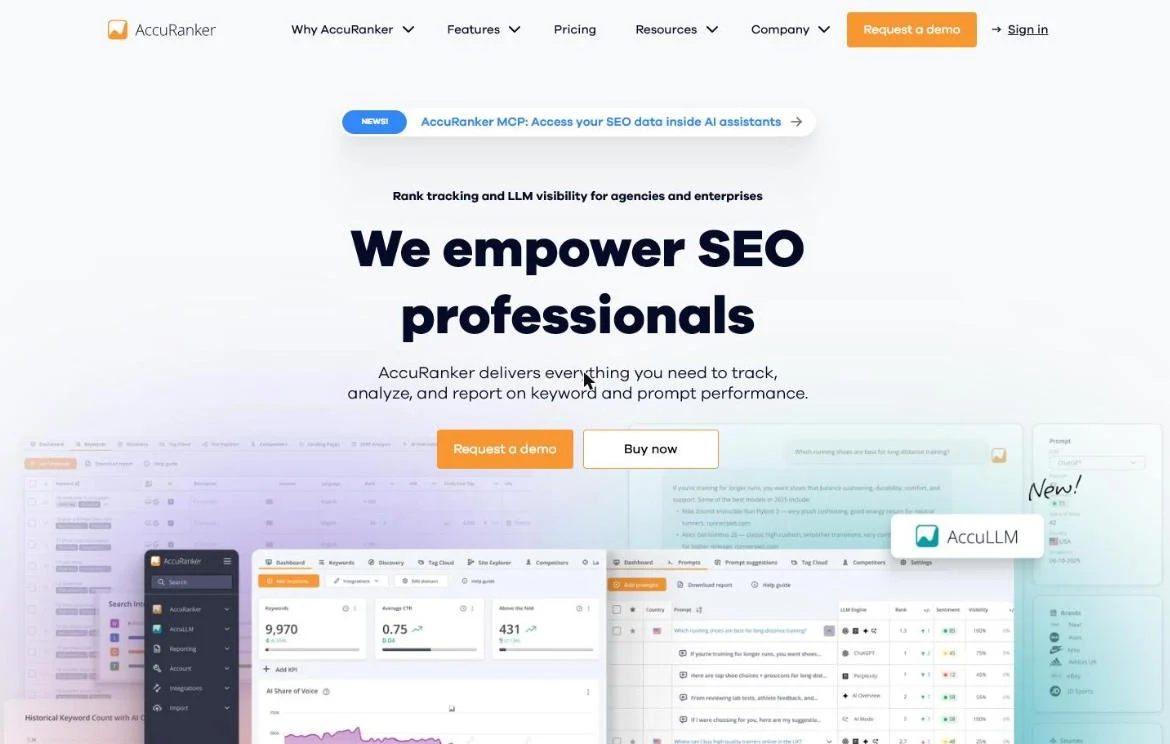 AccuRanker added AccuLLM to track prompts and AI share of voice next to classic rankings.
Rank tracking measures how your positions for your most important search terms evolve, per country and per device. The big all-in-ones (Ahrefs, Semrush) have this built in, but specialists like AccuRanker update faster and deeper. AccuRanker now tracks prompts in AI assistants too, with an AI share of voice view. Worth it when you track thousands of keywords or report rankings to clients.
| Pros | Cons |
|---|---|
| Fast, frequent, accurate updates | Pricey for small keyword sets |
| AI prompt tracking (AccuLLM) | No free plan listed |
| Strong segmentation and reporting | Only rank tracking, no research suite |
Which SEO tools do you really need?
For most B2B teams a simple stack is enough: Google Search Console and Bing Webmaster Tools as the free foundation, an all-in-one (Ahrefs or Semrush) for keyword and competitor research, and a crawler (Screaming Frog or Sitebulb) for the technical side. If you publish a lot of content, Surfer or Clearscope join the mix. More tools does not mean more growth. A tool delivers numbers, not customers. What you measure you have to translate into leads and revenue, otherwise you build an expensive stack that yields nothing.
| Your situation | Stack |
|---|---|
| Starting out, no budget | Search Console + Bing Webmaster Tools + Keyword Planner + Screaming Frog free |
| Small B2B team | The free base + Moz Pro or Semrush SEO plan |
| Serious SEO programme | The free base + Ahrefs or Semrush + Screaming Frog licence |
| Content-heavy team | The above + Surfer or Clearscope |
| Agency or many keywords | The above + AccuRanker |
What does this mean for your visibility in AI?
All these tools were built to rank in Google. But increasingly, an AI answers your customer’s question directly, in ChatGPT, Perplexity or Google’s AI Overviews, without a click to a classic search results page. The screenshots above show the market reacting: Search Console, Bing, Ahrefs, Semrush, Moz, Surfer, Clearscope and AccuRanker all report on AI visibility now. That new discipline has a name: GEO, or generative engine optimization. Want to understand how it works? Read our guide to GEO and, specifically for your market, GEO for B2B.
Start with the free first-party data: the generative AI features report in Search Console and the AI Performance report in Bing Webmaster Tools. For prompt-level tracking, our GEO tools comparison lines up Profound, Otterly.AI and Peec AI side by side, and our piece on free AI visibility tools shows where you can start without a budget. Building a report for management? Use our AI visibility report template.
Frequently asked questions
What is the best free SEO tool?
Google Search Console. It is the only tool with your real Google clicks, impressions, positions and indexing data, and it now also reports AI feature impressions. Add Bing Webmaster Tools for Bing data and Copilot citations, and Screaming Frog’s free version for crawls up to 500 URLs.
Is Ahrefs or Semrush better?
Ahrefs is stronger on backlinks and link-driven research, Semrush is broader for marketing teams that also research ads and content. Both cover keywords, audits and rank tracking, and both now measure AI visibility. Pick on your main task, then trial both on your own domain.
How much should a small business spend on SEO tools?
Often nothing at first: the free base above covers most needs. Once you do structural keyword and competitor research, one all-in-one at roughly €100 to €150 per month is usually enough. Add specialist tools only when a task really demands it.
Do SEO tools measure AI search visibility?
Increasingly, yes. Search Console has a generative AI features report, Bing Webmaster Tools reports Copilot citations, and Ahrefs, Semrush, Moz, Surfer, Clearscope and AccuRanker all track AI answers or prompts. Dedicated GEO tools go deeper at the prompt level.
Ready to make your stack deliver?
The right tools are a means, not an end. Do you want your SEO and your AI findability to generate leads together instead of just reports? Contact us and we will tell you honestly where your biggest opportunities lie, and which tools you really need for them.
Free website scan
Enter your website and get an automatic scan within minutes, with concrete technical and SEO improvements. No sales pitch.
We only use your details for your scan. No spam, unsubscribe anytime.