Customer Impact
← All services

SEO migration and recovery

A new website without losing your Google traffic.

A new website is one of the fastest ways to lose your Google traffic. We guide your migration so your rankings move with you: a complete redirect plan, checks before and after launch and monitoring until traffic is stable. If traffic has already dropped, we find the cause and recover what can still be saved.

Redirect plan per URL, not per template Checks before and after launch Recovery after a failed migration
TDK Tanguy De Keyzer Tanguy De Keyzer Founder & digital strategist

Last updated: 6 October 2026

Trusted by growing brands

  • Atlas Copco
  • Europ Assistance
  • WDP
  • Creditsafe
  • Facilicom Solutions
  • Gom
  • Trigion
  • Food&i
  • Sipwell
  • Aikido Security
  • Fabrique Fantastique
  • Suivo
  • iBood
  • Get Driven
  • TinRate
  • Adventure Valley
  • Werkr
  • Kaizo

Sound familiar?

“

Since the new website our organic traffic is down by a third.

“

Old pages that used to bring leads now return a 404.

“

Everything redirects to the homepage and nobody knows which URL used to be what.

“

We want to switch CMS or domain, but we are afraid of losing everything.

“

The web agency says SEO was not part of the job.

How we help

We treat a migration as a move with an inventory: every URL that brings traffic, links or leads gets a new destination, every redirect is tested and we compare traffic before and after. So at every moment you know whether the move is working.

Why Customer Impact

Why our approach is different.

01

We start from what brings traffic today

From Search Console, your analytics and your backlinks we pull the URLs that really count. That list is the basis of the redirect plan, not the sitemap of the new site.

02

One redirect per old URL

Every old page goes to the most equivalent new page, with a permanent 301 redirect. No mass redirects to the homepage and no redirect chains.

03

Testing before the switch

On the staging site we check redirects, canonicals, robots rules, metadata and internal links. What is wrong there will be wrong live too.

04

Monitoring until traffic is stable

After launch we compare clicks, impressions and indexing with the period before and step in where a page drops.

Customer Impact

About Customer Impact

The missing piece of your growth puzzle.

Customer Impact is a digital marketing agency founded by Tanguy De Keyzer. For more than 10 years we have been building the growth engine of startups, scale-ups and established companies.

At Customer Impact, SEO, websites and measurement are one team. We see migrations from both sides: as builders of new sites and as the team that has to win back the traffic afterwards. We use that experience to make your move safe.

What we stand for:

  • Efficiency over volume: the right levers, not more noise
  • Every euro measurable, from lead to revenue
  • Marketing and sales aligned around the same goals
  • Strategy and execution, under one roof

What we do

A new website without losing your Google traffic.

01

Baseline

A snapshot of your traffic, rankings and backlinks, so you can compare objectively afterwards.

02

Redirect plan

A complete mapping from old to new URLs, with 301 redirects and no chains.

03

Checks on the staging site

Status codes, canonicals, robots, metadata and internal links checked before the site goes live.

04

Domain and CMS change

Guidance for a new domain, a new CMS or a move to https, including the Change of Address in Search Console.

05

Monitoring after launch

Before and after comparison per page, follow-up of 404 errors and indexing.

06

Recovery after a migration

If traffic has already dropped, we look for the cause in redirects, content and technical setup and recover what can still be saved.

Our process

From inventory to stable traffic in 5 steps.

1

Baseline and inventory

We record today's traffic, rankings and backlinks and list every URL that matters.

2

Redirect plan

Every old URL gets a new destination, agreed with your web developer in a single file.

3

Checks on the staging site

Redirects, canonicals, robots, metadata, structured data and internal links are tested before launch.

4

Launch

We check the redirects live, submit the sitemap and use the Change of Address tool for a domain change.

5

Monitoring and recovery

We compare traffic before and after and fix pages or redirects that fall short.

Always all-in

What we do for you.

Before the migration

  • ✓ Baseline of traffic, rankings and backlinks
  • ✓ Inventory of every URL with value
  • ✓ Redirect plan per URL
  • ✓ SEO requirements for the new template

On the staging site

  • ✓ Testing redirects and status codes
  • ✓ Canonicals, robots rules and noindex
  • ✓ Titles, metadata and structured data
  • ✓ Internal links and navigation

At launch

  • ✓ Live check of every redirect
  • ✓ Submitting the sitemap in Search Console
  • ✓ Change of Address for a new domain
  • ✓ Updating Google Business Profile and listings

After the migration

  • ✓ Before and after comparison per page
  • ✓ Monitoring of indexing and 404 errors
  • ✓ Recovery plan if traffic drops

Website migration SEO: why a new website costs traffic

With a new website, a new CMS or a new domain, hundreds of URLs often change at once. Google has spent years getting to know your old pages. If they disappear without a clear new destination, Google almost starts over. We see the result at many companies: a beautiful new site and a traffic curve that bends downwards on launch day.

An SEO migration prevents that. We take an inventory of what your old site is worth, set a new destination for every URL and check everything before and after launch. You can read the full approach in our guide on website migration without losing rankings.

The redirect plan

For a site move Google recommends mapping old URLs to new ones and using permanent redirects, and keeping those redirects for at least a year. What a 301 redirect does exactly, and why a redirect to the homepage is no solution, we explain in the 301 redirect plan and redirect chains.

If your domain name changes too, we use the Change of Address tool in Search Console. See also migrating a domain without downtime and our CMS migration guide.

Want to see first how your old URLs are doing today? With our free redirect checker, you see the status code and final destination per URL.

Recovery after a failed migration

If your site is already live and traffic has dropped, the work starts with the cause. We compare the period before and after per page in Search Console, find which old URLs lost traffic and check redirects, content and technical setup. How to start that analysis yourself, read in analysing a website traffic drop. And do not forget your local listings: your Google Business Profile when a new website goes live.

Who is this for?

For companies planning a new website, a new CMS or a new domain, and for anyone who lost traffic after a relaunch. If we build your new site ourselves through website development, the migration is included as standard. If you work with another web agency, we work alongside them. After the migration you can move on to our SEO service.

Contact us and within 24 hours you hear how we would approach your migration.

“
In almost every failed migration we see, the new site was beautiful and fast, but nobody had a list of what the old site did. The redirects did not exist or all went to the homepage. Whoever takes inventory first moves their rankings with them.
TDK Tanguy De Keyzer Tanguy De Keyzer Founder of Customer Impact and digital strategist
5,023reviews on Google

What clients say about us

No empty promises. This is what clients say about working with Customer Impact.

  • “I have been working with Customer Impact for a while now and it has been a breath of fresh air from the very start. The team complements itself perfectly, so you always have someone with very extensive knowledge of specific aspects of marketing, ranging from ads to web design and strategy. The hands-on approach means you can always get started right away, and the feedback is always clear and honest. No nonsense, just facts.”

    A

    Axel D.S.

    Verified review via Google

  • “Customer Impact built a strong new website for us and set up a lead generation approach that truly delivers results.”

    J

    Janitor Waterschoot

    Verified review via Google

  • “They do not just execute, they also think along strategically. Real B2B specialists. Recommended!”

    J

    Jack Daly

    Verified review via Google

  • “Sharp and fast analysis of the problem, processes and possibilities. No complicated sales talk, fast, and a first setup that works well. A bit more attention to the fine tuning. Pleasant collaboration.”

    T

    Tandarts.nl

    Verified review via Google

  • “Smooth communication, proactive thinking and everything neatly followed up.”

    C

    Claire Farrell

    Verified review via Google

  • “Super professional and extremely creative! They managed to adjust and respond to all of our needs numerous times. Highly recommend ❤️”

    J

    Jovana Vakic

    Verified review via Google

Compare your options

Guiding a migration: SEO partner, web developer or yourself?

Customer Impact Web developer Freelancer Do it yourself
Starting point Pages that bring traffic and leads today The new design Variable What you know yourself
Redirect plan Per URL, tested before and after launch Often limited or per template Variable Depends on time and knowledge
Measuring before and after Per-page comparison in Search Console Rarely Sometimes Rarely
Recovery Finding and fixing the cause Not included Variable Hard without data

These are typical traits per type of partner, not statements about specific agencies.

What to expect

When do you see what?

  1. Week 1

    Baseline and inventory

    We record what ranks today and which URLs bring in links and leads.

  2. Week 2 to 3

    Redirect plan and requirements

    The plan and the SEO requirements go to your web developer, so they are in the new template.

  3. Before launch

    Checks on the staging site

    We test everything that can break at launch and hand over a list of what still needs doing.

  4. Launch and week 1

    Live check

    Redirects, sitemap, indexing and any change of address, checked on the day itself.

  5. Month 1 to 3

    Monitoring

    Fluctuations are normal; we follow up per page until traffic has stabilised.

Case studies

01

Case: a B2B website rebuilt for Google and AI

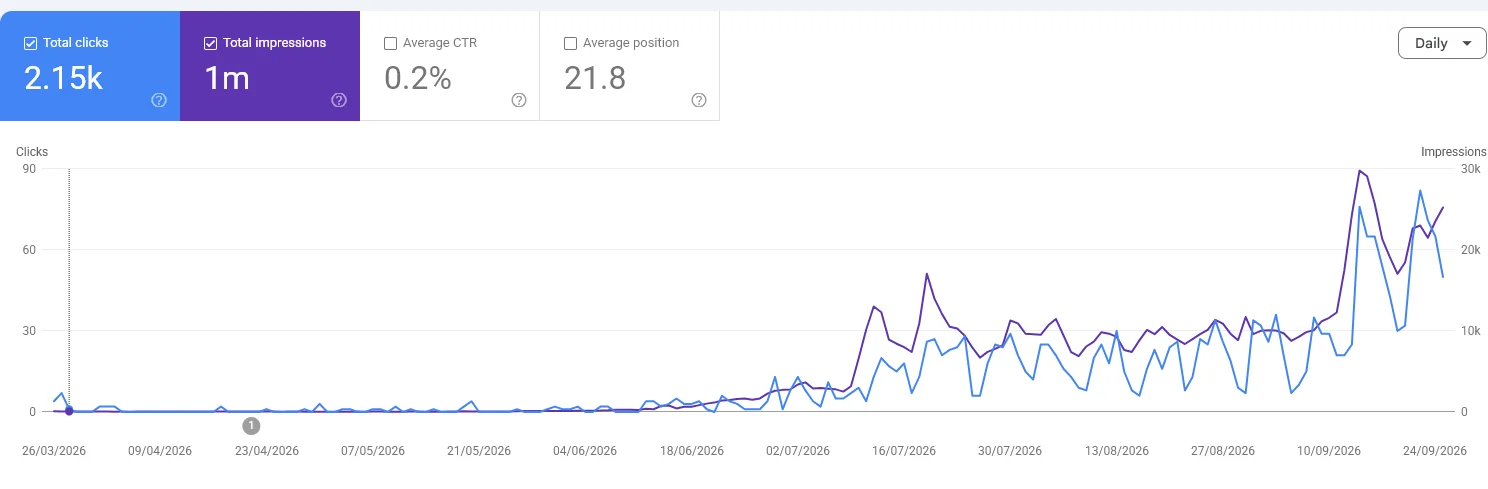
We rebuilt the website of a Belgian B2B service company in Astro: fast, light and readable for Google and AI agents, with the SEO foundation in the template from day one. After the rebuild, clicks and impressions in Google grew month after month.

Read the case

In all honesty

Who is this not for?

Contact us

Tell us where you stand.

Briefly tell us what it is about. You get a personal reply from Tanguy or someone from the team, not a call centre.

Your answer to the check question was not correct, so your message was not sent. Please try again below.
We could not verify your email address: the domain does not exist or does not accept mail. Please check the address and try again.

Answer with a digit or a word.

By sending this message you agree to our privacy statement.

Frequently asked questions

What does an SEO migration cost? +

We work on request, because every migration is different. What drives the effort: the number of URLs with traffic or backlinks, whether the domain or the CMS also changes, whether the URL structure changes, the number of languages and whether the migration has already happened and needs recovery. After a short intake you get a proposal with a clear scope.

How long should redirects stay in place? +

As long as possible. Google recommends keeping redirects for at least a year, and for visitors and old links it is better never to remove them.

Is it normal for traffic to dip after a migration? +

A temporary fluctuation is normal; Google itself says visibility can fluctuate during a move and settles afterwards. A drop that persists after a few weeks almost always points to missing or wrong redirects, lost content or technical blocks.

Our traffic already dropped after the new site. Can it still be recovered? +

Often yes, especially if the old URLs can still be traced from Search Console, an old sitemap or the Web Archive. We find which pages lost traffic, add the missing redirects after all and restore content that disappeared in the rebuild.

Should we redirect everything to the homepage? +

No. Google usually treats redirecting an old page to the homepage as a page that has gone. Every old URL should go to the most equivalent new page.

What if we also change our domain name? +

Then extra steps come in: domain-level redirects, the Change of Address tool in Search Console and updating your Google Business Profile, listings and ads. We include them in the plan.

How do I see whether my current redirects are right? +

Test your old URLs with our free redirect checker. You see the status code per URL, the final destination and whether there is a redirect chain.

Ready to win your market?

Contact our digital strategist Tanguy.