
SEO
Redirect chains: how to find them and flatten them into a single 301

Copy for AI
A redirect chain is two or more redirects in a row before a page loads.
Instead of going from URL A straight to C, a visitor or Googlebot travels from A to B to C.
The verdict: a redirect chain rarely sinks your rankings, but it’s free speed and crawl budget you’re leaving on the table. Flatten every chain into a single 301.
The fix is simple in principle: trace the chain and point every old URL straight at the final destination.
Here’s how to find each redirect chain, fix it and keep it from coming back.
What is a redirect chain exactly?
It’s a stack of redirects that a request has to pass through, one after the other, before it reaches a real page.
Redirects themselves are normal
A redirect is a server instruction that says: “this page lives somewhere else, go there.”
That’s normal.
It’s useful too, for example after a website migration or when you replace an old blog post.
The common types are:
- 301: moved permanently, the default for a move
- 302: found, meant for a temporary move
- 308: permanent, like a 301
Google’s redirects documentation treats a permanent redirect as a signal that the target should be the canonical URL. Our guide to HTTP status codes covers the rest of the family.
How a chain grows on its own
A redirect chain appears when those redirects get stacked, as Ahrefs describes it: “a series of redirects between the initial URL and the destination URL.”
URL A points to B, B points to C, and only then does C point to the real page. Every step costs an extra server request.
It usually happens unnoticed.
You move a page. A year later you move it again, and nobody updates the old redirect.
For example, say one service page moved twice:
- 2024:
/services/seo-auditmoved to/seo-audit - 2026:
/seo-auditmoved to/services/seo/audit
The oldest URL now takes two hops.
Here’s what that does to the number of requests before the page loads:
A chain isn’t a loop
Don’t confuse it with a redirect loop. That’s when two redirects point back at each other (A to B, B back to A) and the visitor gets stuck.
A loop breaks your page completely. A chain only makes it slow and messy.
Both belong in a technical SEO check.
Why is a redirect chain bad for your site?
It costs you in three ways, and none of them is a vanity number.
1. Slower load time
Every redirect is one extra round trip to the server.
A chain of three or four hops adds visible delay, especially on mobile with a slow connection.
Speed isn’t a detail: it helps decide whether a visitor stays. You can read more about that under Core Web Vitals and in our piece on page speed, SEO and conversion.
The redirect time shows up before anything else on the page. Here’s our own field data on mobile:
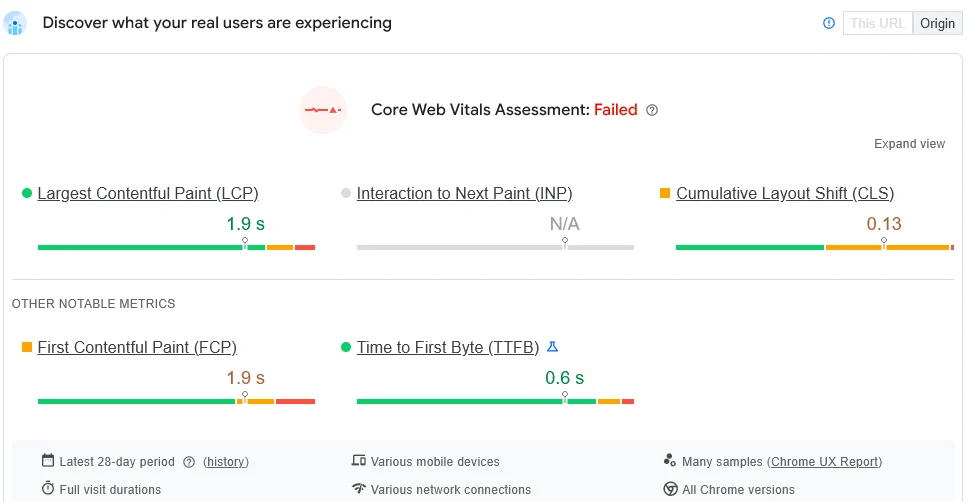 PageSpeed Insights field data for customerimpact.be on mobile, October 2026. Redirect time counts toward the load before LCP even starts.
Run the same check on an old URL that still redirects. Then compare it with the final URL.
2. Wasted crawl budget
Crawling isn’t unlimited.
Google gives your site a limited number of crawl actions. That’s your crawl budget.
Googlebot also follows only a limited number of redirects per attempt. Google’s crawler docs say its crawlers “follow up to 10 redirect hops” by default.
Watch out: if the bot hasn’t reached the real page after too many steps, it can abandon the attempt and the page doesn’t get indexed.
Google’s Page indexing report then lists the URL under “Redirect error”. The causes it names include:
- a redirect chain that was too long
- a redirect loop
- a bad or empty URL in the redirect chain
Every hop the bot follows is work that doesn’t go to your other pages. On a large B2B site, that adds up fast.
You can see how often Googlebot hits redirects in Search Console:
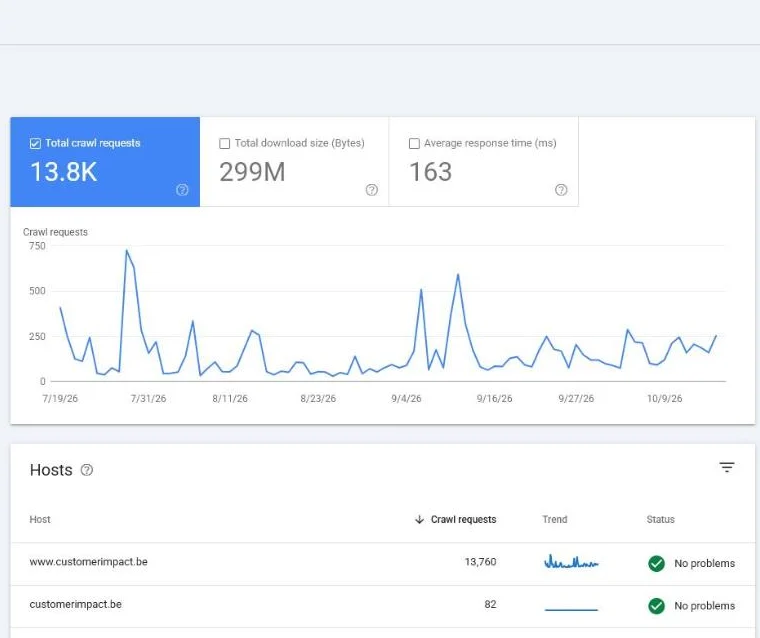 Crawl Stats in our own Search Console for customerimpact.be, October 2026. The breakdown by response shows how many requests hit a 301.
Our guide to crawl stats in Search Console explains how to read that breakdown.
3. Passing link equity more efficiently
According to the Google documentation on 301 redirects, a correct permanent redirect tells Google the new URL should be canonical.
So a single redirect costs you no link equity in principle.
Long chains change that.
Each stopover makes it less certain and less direct. Semrush’s guide even says chains “lead to losses in link equity.”
Point your old URLs straight at the final destination and you keep things simple. The value then flows as cleanly as possible to the page that matters.
Is it urgent?
No, not usually.
A redirect chain is rarely the cause of a ranking disaster.
But it’s free cleanup work that makes your site faster and frees up crawl budget. With a small team we handle this during an SEO audit, not as a standalone panic job.
Rule of thumb: we steer on customers and revenue, not on a perfectly green dashboard.
Cleaning up a chain is worth it if it makes your important sales pages faster and easier to find. Not because a tool complains about it in red.
How do you find a redirect chain?
Use a crawler.
Checking by hand only works for a handful of pages.
Pick a tool
The standard is Screaming Frog SEO Spider, free up to 500 URLs. It flags redirect chains and loops in one crawl:
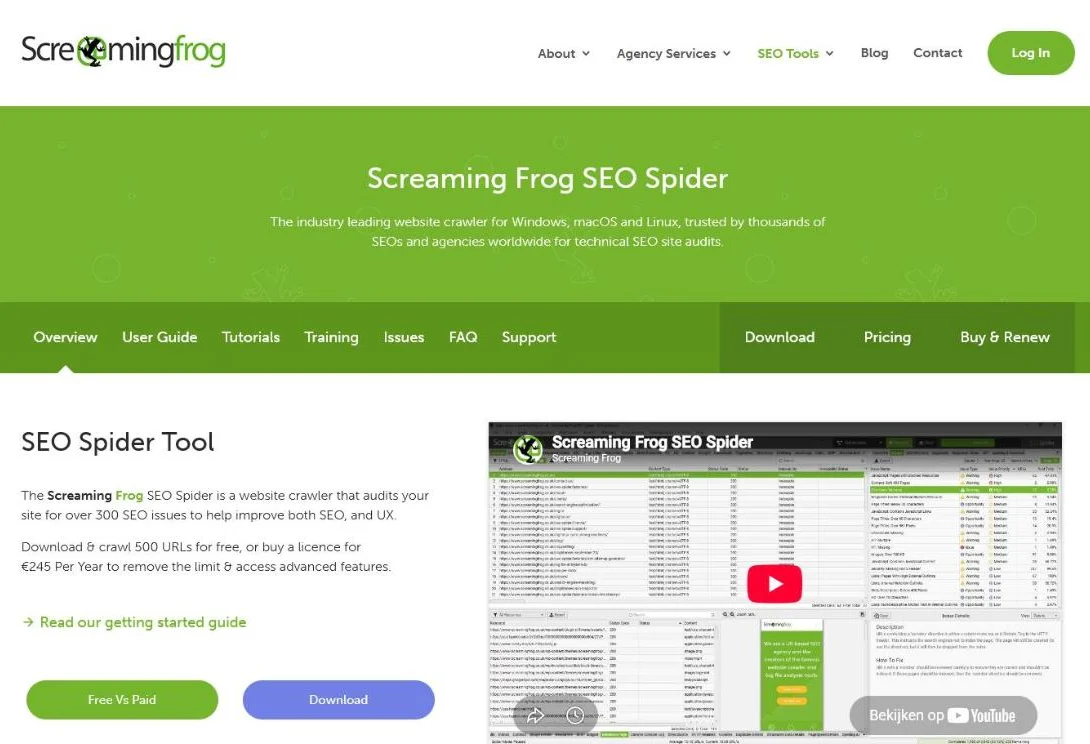 Screaming Frog’s product page, October 2026. Free up to 500 URLs; a licence lifts the limit.
Tools like the Ahrefs SEO Toolbar or httpstatus.io work just as well for a quick check. Our Screaming Frog guide covers the setup.
For a single URL, our free redirect checker shows every hop and its status code.
Run the crawl in four steps
With Screaming Frog you work like this:
- Crawl your site. Enter your domain and start the crawl. After a few minutes you have every URL and its status code.
- Filter on redirects. In “Response Codes”, pick “Redirection 3XX”. The “Redirect URL” column shows each destination.
- Pull the chain report. Under “Reports”, the redirects report shows which URLs pass through multiple hops and where loops sit.
- Find the source. The “Inlinks” tab shows which pages link to the old URL. You’ll update those too.
The goal is a simple list. Start URL, steps, final destination.
Check your backlinks too
Some chains start outside your site: an old URL that other sites still link to.
Fix those first. They carry link equity:
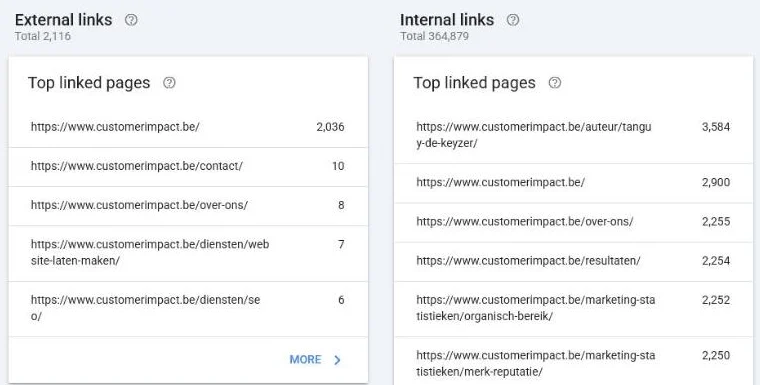 The Links report in our own Search Console for customerimpact.be, October 2026. Pages with external links go to the top of the fix list.
How do you fix a redirect chain?
Point every old URL at the final page in one go. No stopovers.
That lines up with what Semrush advises about redirects: “redirect the original URL directly to the final URL.”
Step 1: Replace the chain with a single 301
If you have A to B to C, adjust the redirect on A so it goes straight to C.
Keep B to C in place. Some visitors still arrive on B.
How: on WordPress you do this with a plugin like Yoast SEO or Redirection. On your own server you adjust the .htaccess file or the server config.
That last one takes expertise. A mistake in .htaccess can cause new errors.
For example, the flattened rules for the URL from earlier look like this:
# Before: /services/seo-audit -> /seo-audit -> /services/seo/audit
Redirect 301 /services/seo-audit /services/seo/audit
Redirect 301 /seo-audit /services/seo/audit
Both old URLs now land on the final page in one hop.
Step 2: Update your internal links
Is a button still pointing at old URL A? Change it to C.
That way nobody has to follow the redirect any more and you keep your internal links clean.
This is the step many people skip. It’s exactly where a lot of the gain sits.
Step 3: Test the outcome
Use a redirect checker to confirm every old URL now lands on the right page in a single step, without a loop.
A quick spot check of your most important pages is usually enough. Then recrawl to confirm the chain report is empty.
How much work is it?
Not much.
For most B2B sites this isn’t weeks of work.
It’s a targeted cleanup that fits best inside a broader technical SEO checklist, so you do it right in one go alongside other quick wins.
If you want this handled end to end, it belongs in our SEO service.
How do you keep redirect chains from coming back?
Chains grow back every time a page moves twice. Three habits prevent that:
- One redirect map: keep a single list of every redirect, old to final
- Update, don’t stack: when a target moves, edit the old rules too
- Recrawl after launches: check the chain report after every relaunch
A proper 301 redirect plan does this from day one. It matters most during a WordPress migration or any change of URL structure.
Frequently asked questions about redirect chains
How many redirects should a page have?
Ideally zero or one. Google says its crawlers follow up to 10 redirect hops, but every step costs time and crawl budget. The rule of thumb: the visitor always reaches the final destination in a single 301.
Is a redirect chain really bad for my rankings?
Rarely dramatic, but it does creep up on you. The delay and the wasted crawl budget work against you, and page speed is a confirmed Google ranking factor. It’s cheap cleanup work with a clear return.
What is the difference between a chain and a loop?
A chain eventually does lead to a real page, via several steps (A to B to C). A loop runs in circles (A to B to A) and never lets the page load. You fix a loop by removing one of the two redirects.
Should I use a 301 or a 302?
For a permanent move you almost always choose 301. It passes the signals and link equity along to the new URL. A 302 is only meant for something temporary.
Can I do this myself or do I need a specialist?
With a plugin like Redirection you can do it yourself. If you work directly in .htaccess or the server config, caution is required: a mistake breaks your site. If in doubt, have it reviewed.
Have your redirect chains reviewed
Redirect chains are usually not a disaster.
But they’re free speed and cleaner indexing, lying right there.
We find them during an audit, flatten them into single 301s and aim the freed-up link equity at the pages that bring you customers and revenue.
Want a list of your chains first? Contact us and we’ll run the crawl for you.
Free website scan
Enter your website and get an automatic scan within minutes, with concrete technical and SEO improvements. No sales pitch.
We only use your details for your scan. No spam, unsubscribe anytime.