
SEO
Broken link building: turning dead links into backlinks

Copy for AI
Broken link building swaps a dead link on someone else’s site for your content.
You find a 404, offer a page covering the same ground and send one short email.
The verdict: it works, but it’s labour-intensive and the hit rate is low. For a B2B company, it’s a niche tactic, not a growth engine.
Build your business case: calculate your SEO ROI with our free organic traffic calculator.
What is broken link building?
It’s replacing someone else’s dead link with a link to your content.
Links break all the time. Pages get deleted, sites change their URL structure, someone mistypes an address, or a whole domain disappears.
Every broken link is a poor experience for the visitor and lost link value for the site pointing at it. Google’s documentation on HTTP status codes explains why: an indexed URL that returns a 404 is removed from the index.
That’s where your opportunity sits.
With broken link building, you track down a dead link and check what the original page was about. Then you offer your own article as the replacement.
You help the owner solve a problem, and you earn a backlink for it. That makes it one of the fairer link building tactics: you aren’t asking for something for nothing.
It’s part of off-page SEO and fits into a broader approach to building backlinks. If you want to see how it fits your full SEO strategy, keep this in mind:
Broken link building is an addition to your SEO strategy, never the whole plan.
What is the main goal of broken link building?
The main goal is to earn a relevant backlink by replacing a dead link with a working page.
That link passes authority to your page. A good one also sends referral visitors who were already reading about your topic.
The site owner wins too: a fixed link and a better page for their readers.
Rule of thumb: if a link won’t send a single relevant visitor, it isn’t worth the email.
What is the broken link building method, step by step?
The method has 5 steps. Each one filters out candidates, so you only write emails that can land.
Step 1: Find dead links in your niche
Use one of the 4 methods in the next section: competitor 404s, resource pages, expired domains or Wikipedia.
Your output is a list of dead URLs plus the pages that link to them.
For example, say a CRM vendor deleted its “sales pipeline stages” guide. Every blog still linking to it is a candidate.
Step 2: Qualify the linking page
Check the referring page for relevance, authority and real traffic.
Drop weak or spammy domains here, before you invest any writing time.
A referring domains report shows the link profile at a glance. Here’s that view for our own site:
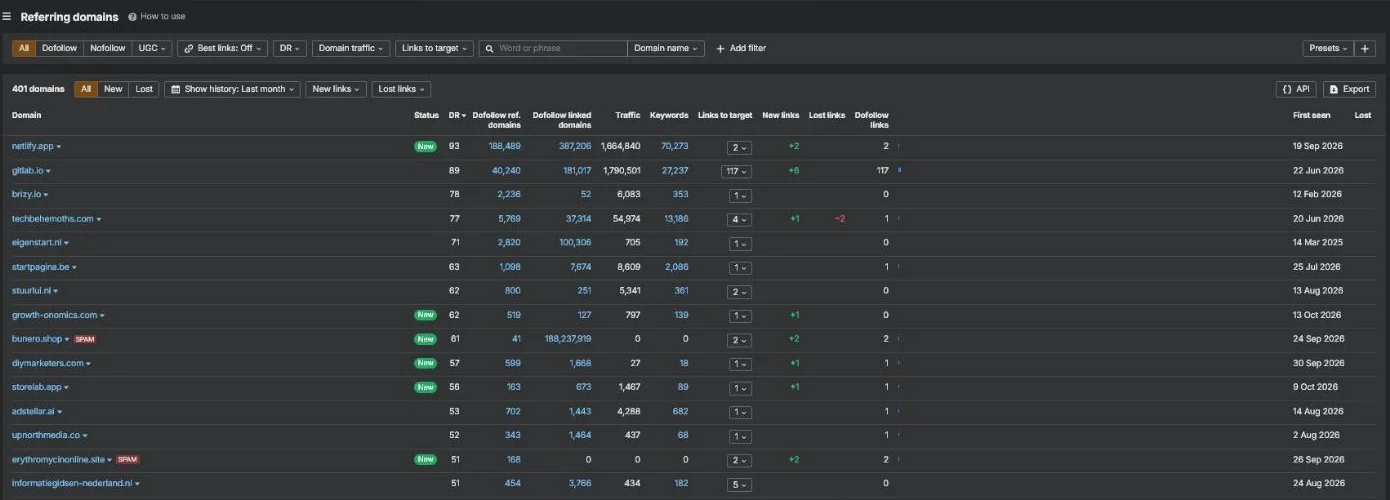 Referring domains for customerimpact.be in our own Ahrefs account, October 2026. Run the same report on a target site before you email it.
Look for steady growth and few spam tags. A profile full of junk domains is a skip.
Step 3: Study the dead page
Open the original in the Wayback Machine and note why it earned links: data, a guide or a tool.
Step 4: Match or beat the content
Point to an existing page that covers the same need, or create one that does it better.
Step 5: Send one email and one follow-up
Write a short, personal note to the editor. One reminder after a few days, then stop.
Rule of thumb: steps 2 and 3 decide the result. Skip them and you write emails that can’t land.
How do you find broken links to replace?
Look in two places: broken links on your own site, and broken links elsewhere that you can take over.
Start with yourself. Tools like Ahrefs, Semrush or Screaming Frog scan your site for 404 errors. They find both inbound links to deleted pages and outbound links to dead URLs.
That isn’t broken link building in the strict sense.
But it’s hygiene you want in order anyway. Our Screaming Frog guide shows the crawl.
The free version is enough for a first check on a small site:
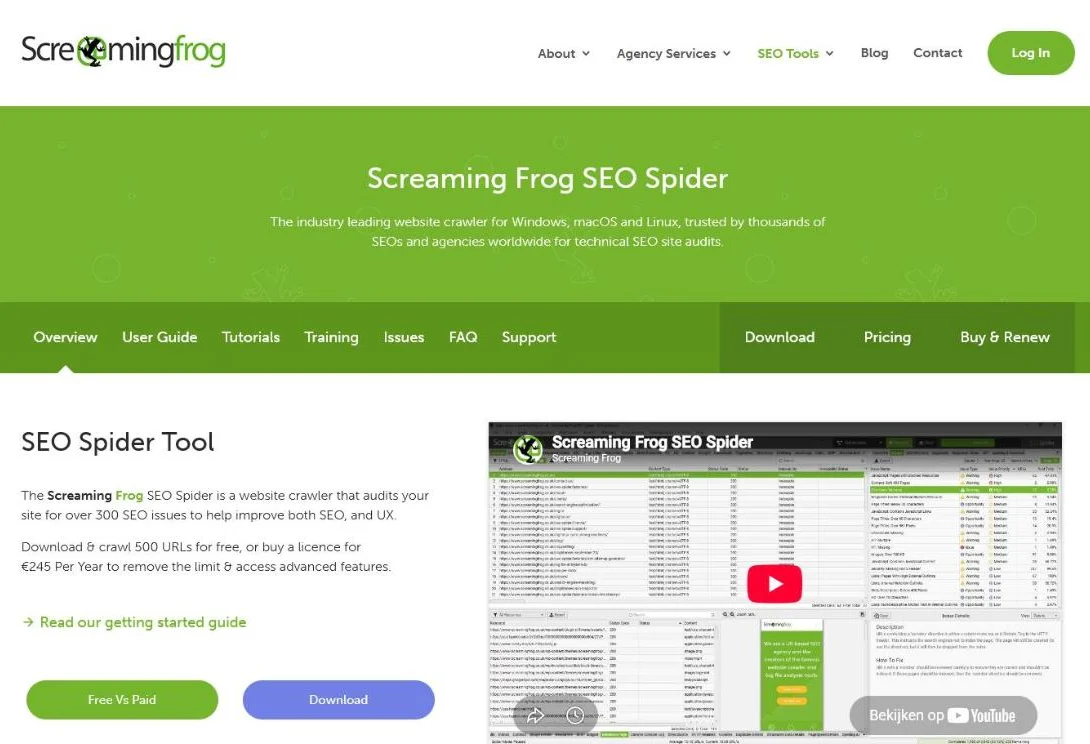 Screaming Frog’s product page, October 2026. Free up to 500 URLs; a licence lifts the limit.
So a site under 500 URLs can find its own broken links at no cost.
The real work starts with other people’s links. Four methods do most of the work:
| Method | Where to look | Tool | Watch out for |
|---|---|---|---|
| Competitor analysis | Competitor pages returning 404 that still attract backlinks | Ahrefs Broken Link Checker | Only worth it if you have or can create matching content |
| Resource pages | Link round-ups, tool and statistics lists | Manual check or crawler | Older pages break more; skip weak domains |
| Expired domains | Sites still linking to a dead domain | ExpiredDomains.net | Filter on a strong link profile |
| Wikipedia citations | site:wikipedia.org [topic] "dead link" | Google search | Nofollow; the value is visibility; quality standards apply |
- Analyse competitors. Drop a competitor’s URL into a tool like the Ahrefs Broken Link Checker and filter on “404 not found”. You’ll see which dead pages still attract backlinks. If you have relevant content (or can create it quickly), you offer it.
- Comb through resource pages. Blog posts, link round-ups and directories full of tools, guides or statistics often contain plenty of outbound links. The older the page, the higher the odds that one of them is broken.
- Track down expired domains. When a domain expires, the links pointing to it don’t disappear: they break. With a tool like ExpiredDomains.net you search on keywords and filter on a strong link profile. Sites still pointing at that dead domain are your target list.
- Wikipedia citations. Wikipedia has its own page on link rot: external links that go dead, which editors tag with a “dead link” template. Search via
site:wikipedia.org [your topic] "dead link". Wikipedia links are nofollow and pass no direct authority. The value lies in visibility, and only if your replacement genuinely meets their quality standards.
Not every broken link is worth your time. A dead link on a weak or spammy domain isn’t worth an email.
Two related tactics use the same research: resource page link building and the skyscraper technique.
How do you check whether a link is worth it?
Assess the referring page before you write a single email. Most link building advice skips this step.
Is this an authoritative, relevant domain that still attracts traffic in your niche?
Does your content fit there logically? If not, move on.
For example, say a dead link sits on a logistics trade magazine and you sell fleet software. That’s a fit. The same link on a coupon blog isn’t.
Use a tool to check the page’s authority and link profile.
Then work out why the original content earned the link.
Did it have a strong statistic, a unique guide or original data?
Once you know that, you can create something that fills the same need or beats it. That makes your replacement logical, and it gives the editor a real reason to change the link.
Our rule of thumb: quality over volume. It’s the same principle we apply to outsourcing link building: measure on relevant referral traffic and customers, not on a counter going up.
Five links from strong B2B sites beat fifty from random blogs.
What if you don’t have replacement content yet?
Study the dead page first.
Open it via the Wayback Machine (web.archive.org) and ask what made it valuable. Was it original data, a complete guide, or a clear explanation?
Next, beat the original: more current, deeper or more readable. Don’t copy it, beat it.
Guest content is a variation that often works better for B2B. Instead of pointing the link to your own blog, you write an article on a respected third-party site covering the same topic.
That feels less promotional to the editor, so it’s more credible.
Read about the overlap with digital PR and link building if you want to go that way.
Be realistic about the time. Creating replacement content is work.
Save replacement content for dead pages with the most referring links.
How do you write a broken link outreach email?
Keep it short, personal and specific.
Outreach is where most broken link building attempts fall apart. Your research can be perfect, but if your email reads like spam, you’ve lost them.
A few principles that make the difference:
- Find the right person. Not a general info address, but the editor, webmaster or content manager. LinkedIn and the “About us” page help.
- Short and concrete. No dressed-up sales pitch. Mention that you read the article, noticed a broken link, and think your content would be a good replacement.
- Tone, not pitch. Be helpful and clear about what you’re offering. Name the value of the original and explain why your piece fits at least as well.
- One polite follow-up. No response? Wait a few days and send a short reminder. After that, let it go.
The goal isn’t one backlink, but a relationship that can pay off again later.
Keep it human.
A short outreach email example
Here’s the shape we’d use. Names and URLs are placeholders:
Subject: Broken link on your [topic] guide

Hi [first name],

I was reading your guide to [topic] and noticed the link to
[dead URL] in the section on [subtopic] returns a 404.

We published a guide that covers the same ground:
[your URL]

Happy if it's useful as a replacement. Either way, thanks for the guide.

[Name]
It names the exact spot, offers one URL and asks for nothing else. For more variations, see our link building outreach templates.
Even a good email often gets no reply. That comes with the tactic.
Is broken link building worth it for B2B?
Sometimes, as a niche tactic.
It’s a fair, white-hat approach, but it’s no silver bullet.
Google’s spam policies name buying links, excessive link exchanges and automated link creation as link spam. Broken link building does none of that: you offer a working page, and the editor decides.
For a B2B company with a small team, the question isn’t “can we collect backlinks?” It’s “do those links deliver relevant traffic and customers?”
Often your time is better spent on content that converts.
Should you hire a broken link building service?
Only if the service shows you the dead links, the linking pages and the emails it sends.
A real service does the same 5 steps you would. It just saves you the hours.
For example, say you run a B2B software company with 10 solid guides. A service can map them to dead links you’d never find alone.
But some “broken link building services” are link selling with a different label. Google’s spam policies treat bought links as link spam, whatever the sales page calls them.
DIY, service or broader link building?
Here’s how we’d decide:
| Situation | Best option | Why |
|---|---|---|
| You have strong guides and a few hours a week | Do it yourself | You know which pages fit and can judge relevance |
| Strong content, no time | A transparent service | Saves hours, if you approve every target |
| No content worth linking to yet | Fix content first | No replacement page means no links |
| You need links across many tactics | Broader outsourced link building | Broken links alone rarely move a B2B site |
Red flags in a service offer
Walk away when you see one of these:
- A fixed number of links promised before any research.
- No list of targets you can check yourself.
- Payment per link placed on sites you never approved.
- Unrelated domains with no traffic in your niche.
Before you sign, compare what you’d pay with our guide to link building costs.
Frequently asked questions
Does broken link building still work in 2026?
Yes, but as a niche tactic. The mechanism (replacing a dead link with working content) still makes sense for search engines and editors. Just don’t expect volume: it’s manual work with a low hit rate.
Is broken link building white hat?
Yes. You replace a dead link with working content the editor can check, which is a fair trade, not a paid or swapped link.
How many backlinks does broken link building deliver?
Few per hour of work. Many emails go unanswered. That’s why you aim for a handful of strong, relevant domains instead of mass, which is what counts in B2B anyway.
What is a broken link building service?
It’s an agency or freelancer that finds dead links in your niche, matches them to your content and handles the outreach. Pick one that shows you every target and email, and avoid any that guarantee a number of links.
Which tools do I need?
A backlink tool to find 404s at competitors (Ahrefs or Semrush), Screaming Frog for your own site, the Wayback Machine to view dead pages, and possibly ExpiredDomains.net for expired domains.
Is this better than other link building tactics?
Not better, different: cheap in budget, expensive in time. Combine it with a broader SEO strategy.
Which link approach pays off in your market?
We steer on revenue, not on vanity numbers. We’ll tell you when a tactic is too much work for too little result.
Send us your market and top three services; we’ll show which link approach pays off.
Free website scan
Enter your website and get an automatic scan within minutes, with concrete technical and SEO improvements. No sales pitch.
We only use your details for your scan. No spam, unsubscribe anytime.