
Advertising
Meta ad formats: which format fits your B2B goal?

Copy for AI
Pick the Meta ad format that serves your goal, not the one that looks prettiest.
For B2B marketers, choosing between the Meta ad formats is simpler than it looks. Want brand awareness? Video and carousel do the job. Want leads? Then you run a lead ad or a traffic ad to a landing page.
The verdict: your goal decides the format, never the other way round. The prettiest creative is worthless if it doesn’t match what you want to achieve.
Below we walk through every format and every goal, with the honest caveats most guides leave out.
TL;DR: Meta (Facebook and Instagram) offers a handful of core formats: image, video, carousel, collection and lead ads. In Ads Manager you pick a goal per campaign, then the format that fits it.
Awareness? Video or carousel. Leads? Lead ads (cheap but variable quality) or traffic to your own landing page (pricier, often better quality).
Work it out yourself: calculate your ROAS and your break-even point with our free ROAS calculator.
What are the main Meta ad formats?
Meta works on two levels: the creative format and the campaign objective.
The format is what the ad looks like.
The objective is what you want to achieve with it.
In practice, these are the Facebook ad formats that matter:
| Format | What it is | Strongest for |
|---|---|---|
| Image | One static visual with text and a button | A single, sharp message |
| Video | Moving image, short or longer clip | Explanation, demo, awareness |
| Carousel | Multiple cards you scroll through | Showing several features or steps |
| Collection | Visual “shop window” that opens into a fullscreen experience | Product catalogue, more of a webshop format |
| Lead ad | A form that opens inside Meta itself | Collecting direct enquiries |
You can reach the same goal with different formats.
There’s no one-size-fits-all.
That’s good news: you’re never locked into one type, and you can test what works for your audience.
Six objectives come first
Meta’s campaign objectives now come in six outcome-based types: awareness, traffic, engagement, leads, app promotion and sales.
Meta’s own Marketing API reference lists exactly those six and says they replace the older objectives.
For a B2B company, three of them do most of the work: awareness, traffic and leads. Our walkthrough of Facebook Ads Manager shows where you set them.
Image ads
An image ad is one static visual, a short text and a button.
Best for: one sharp message, or a retargeting ad to people who already know you.
Spec: for the Facebook feed, Meta’s ads guide recommends a 4:5 ratio at 1440 x 1800 pixels, 50 to 150 characters of primary text and a 27-character headline (checked 20 October 2026).
Video ads
A video ad tells more in less space.
A few seconds can name a problem and show your approach.
Best for: awareness, explanation and demos. Our guide to video ads covers hooks, length and captions.
Spec: Meta’s video specs for the Facebook feed allow 1 second to 241 minutes, in MP4, MOV or GIF, with a 4:5 ratio recommended (checked 20 October 2026).
Watch out: on the awareness objective, Meta’s guide notes the headline, description and button aren’t shown in the mobile Facebook feed. So your message has to live inside the video itself.
Carousel ads
A carousel shows several cards that people swipe through, each with its own visual and link.
Best for: a process, several services, or one story told in steps.
Spec: a carousel holds 2 to 10 cards, with a 1:1 ratio and JPG or PNG images, according to Meta’s carousel specs (checked 20 October 2026).
Collection ads
A collection shows a cover image or video with three product images under it. A tap opens a fullscreen Instant Experience. Fill those product slots from a catalogue and you’re in dynamic product ads territory.
Best for: catalogues and webshops. For most B2B companies it’s overkill.
Spec: Meta’s guide lists 125 characters of primary text, a 40-character headline and a minimum of 1080 x 1080 pixels.
Lead ads
A lead ad opens a form inside Facebook or Instagram.
The visitor never has to leave Meta.
Best for: direct enquiries, provided you qualify them properly. More on that in the lead ad section below.
Here are the specs from this section side by side:
| Format | Ratio Meta recommends | Text limits | Notes |
|---|---|---|---|
| Image (feed) | 4:5, 1440 x 1800 px | 50 to 150 characters, headline 27 | One message |
| Video (feed) | 4:5 | 50 to 150 characters | 1 second to 241 minutes |
| Carousel | 1:1 | per card | 2 to 10 cards |
| Collection | 1.91:1 to 1:1 | 125 characters, headline 40 | Instant Experience required |
Want to dig deeper into the strategy behind paid social? Read our guide on social media advertising, or see how we deploy social ads for B2B growth.
How do you choose a format based on your goal?
Always start with your goal, then let the funnel stage pick the format.
The biggest mistake we see is the reverse. A company picks a nice format first and only then works out what it wants from it.
That’s back to front.
We think in three funnel stages:
Awareness: video and carousel
You want the right people to know you.
Video and carousel score best here.
Video lets you explain what you do in a few seconds. Carousel shows several benefits or steps without it getting busy.
Awareness isn’t waste. It’s the top of your funnel that makes your later leads cheaper, and you can measure brand awareness instead of guessing.
Consideration: traffic to your site
Your audience knows you, and you want them to visit your site, read an article or watch a demo.
Traffic ads (clicks to your site) are your workhorse here.
Watch out: send people to a page that matches the ad. Someone who clicks an ad about a whitepaper wants that whitepaper, not your general homepage. Our guide to paid traffic to a landing page shows how to line the two up.
Conversion: leads and revenue
You want a concrete action: an enquiry, a download, a completed form.
This is where lead ads and traffic to a landing page with a form come in. It’s what you steer on as a B2B company, because this is where customers and revenue are born.
Where you set it up
You set all of this up in Ads Manager. There you define the format, but also the objective, the call to action, the targeting and the placements.
That last one is no detail. Most of your audience scrolls on a phone, so your creative has to work there first.
In the ad setup, the format choice sits right under the ad’s identity settings:
You’ll find more on the mechanics of paid advertising in our PPC wiki.
What is the difference between a lead ad and traffic to your landing page?
A lead ad keeps the form inside Meta.
A traffic ad sends people to a form on your own site.
This is the choice most budgets get stuck on, so let’s be honest here.
How a lead ad works
A lead ad opens a form inside Facebook or Instagram itself. Fields are often pre-filled with the user’s Meta details.
Meta’s lead ads documentation describes the form as mobile-friendly and built on information people already shared, so they don’t retype it.
The result: little friction, so plenty of sign-ups at a low cost per lead.
The honest side of lead ads
Sounds perfect. But precisely because it’s so easy, quality is often lower.
People fill in their details on reflex, without being genuinely interested. Your sales team burns time on contacts that go nowhere.
The cost per lead looks great. The cost per customer doesn’t.
Traffic to your own landing page
Traffic to your own landing page costs more per lead. The user has to click through, read your page and fill in a form.
That extra step is friction. And friction filters. Whoever makes the effort is usually more serious.
Here are the two routes next to each other:
Our rule for choosing
Use lead ads if you want volume and you’re prepared to filter strictly. Then build qualifying questions into the form: company size, job title, budget, need.
Our tips on lead form optimization show which questions filter without killing your response.
Would you rather have fewer but better leads? Send them to a landing page.
| Your situation | Choose | Judge it on |
|---|---|---|
| You need volume and sales can filter fast | Lead ad with qualifying questions | Cost per qualified lead |
| Sales time is scarce | Traffic to a landing page | Cost per qualified lead |
| You can’t follow up within a day | Landing page with a clear offer | Lead to deal rate |
A worked example
For example, say a lead ad brings in 40 leads at 20 euros each, and 4 of them turn out to be qualified leads. That’s 800 euros for 4 good contacts, or 200 euros each.
Now say a landing page brings in 10 leads at 50 euros each, and 5 qualify. That’s 500 euros for 5, or 100 euros each.
The “cheap” route turns out twice as expensive. That’s why you compare on cost per qualified lead, and ultimately on ROAS and cost per opportunity, not on cost per raw lead.
Rule of thumb: wire your lead ads straight into your CRM. Our guide on how to connect lead ads to your CRM shows how, so no lead sits in a download file for days.
Why should you not simply steer on “page likes” or followers?
Because likes feel like a win but rarely bring a customer.
The classic example is advertising for page likes or followers. It’s easy to watch your follower count rise fast, and that feels good.
But not all followers are equal. Cheap likes usually come from the least qualified people.
Your engagement and conversions don’t keep pace, or even drop.
Why it matters double for B2B
You aren’t selling to a crowd.
You’re selling to a handful of companies that fit you.
Five good contacts are worth more than a hundred empty followers.
So steer on business outcomes (enquiries, conversations, deals), not on applause metrics.
Which formats work best for B2B specifically?
Video and carousel for awareness, lead ads and landing pages for enquiries.
B2B isn’t a webshop, and that changes the ranking of formats:
- Video: your strongest awareness and explanation format.
- Carousel: a process or several services without the mess.
- Image: one sharp message, or retargeting.
- Lead ad: direct enquiries, if you qualify properly.
- Collection: e-commerce territory, overkill for most B2B.
A short video clip that names a problem and shows your approach does more than a static banner. A carousel works well for a sequence, for example “here is how our approach works in 4 steps”.
Images shine in retargeting
A static image is cheap to make and quick to test. It works best on people who already know you, such as recent site visitors.
Our guide to B2B retargeting on social ads shows which audiences to build first. You’ll need the Meta pixel on your site for that.
Creative still matters
B2B ads don’t have to be boring.
A business message is allowed to stand out.
We wrote about that in B2B social ads that are creative and not boring.
Meta next to LinkedIn and Google
If you run Meta alongside LinkedIn, read how the two reinforce each other in Facebook ads for B2B alongside LinkedIn.
Weighing Meta against search? Our comparison of Google Ads vs Meta Ads sets out where each channel wins. For Instagram specifically, see Instagram ads for B2B.
See which formats others run
The public Meta Ad Library shows which formats companies in your niche actually use.
No login is needed.
Open the filters and look at the Media type field: it splits ads by images, videos and more.
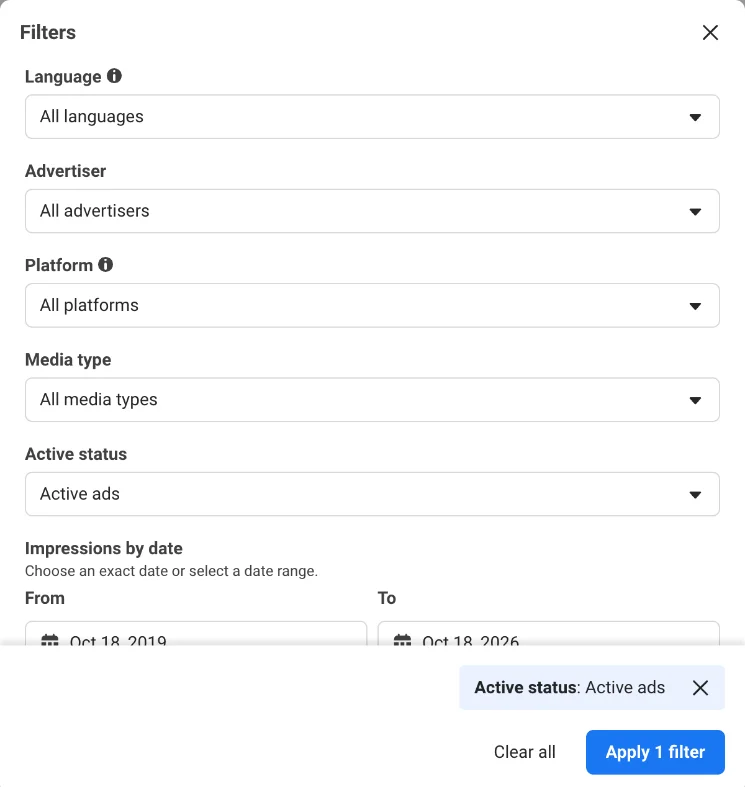 The Meta Ad Library filters, United States settings, checked 18 October 2026. Media type is the field that shows formats.
Filter on a competitor, set media type to video, and you’ll see whether video is their main format.
Each ad card also shows when it started running:
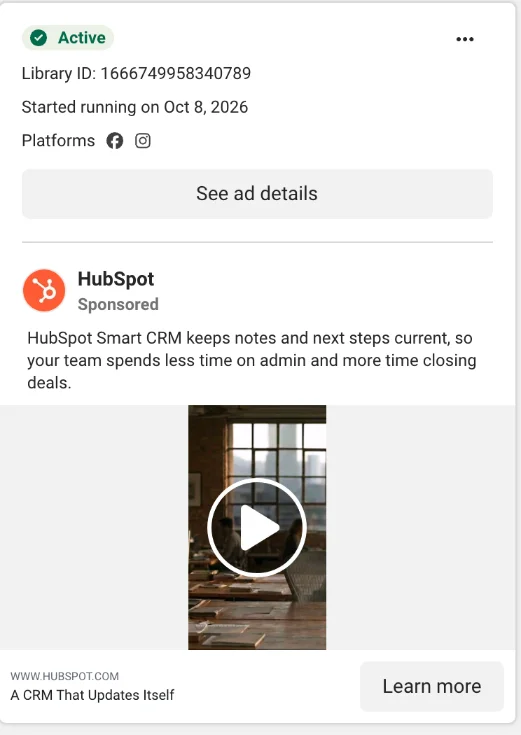 One ad card in the Meta Ad Library, October 2026. An ad that has run for months is one worth studying.
Our walkthrough of the Meta Ads Library shows how to read those cards in detail.
Test small, then refresh
Run two or three formats against each other and keep the comparison clean. Our guide to A/B testing covers how long to run a test before you decide.
Watch out: a winning format wears out too. When frequency climbs and clicks drop, it’s ad fatigue, not a broken format.
How do you set up a Meta ad format, step by step?
Pick the objective, then the audience, then the format and the action you want.
Step 1: Choose the objective
In Ads Manager, create a campaign and pick one of the six objectives. For enquiries that’s leads; for site visits it’s traffic.
Step 2: Define audience and placements
At ad set level you set who sees the ad and where: Facebook, Instagram or both.
Check your creative works on a phone, since that’s where most people see it.
Step 3: Pick the format
At ad level you choose single image or video, carousel or collection. Then upload the creative in the ratio Meta recommends for your main placement.
Step 4: Set the call to action
Choose the button that matches the next step, such as “Learn more” or “Sign up”. Our wiki on the call to action explains why one clear action beats three.
For a lead ad, this is where you build the form and add your qualifying questions.
Step 5: Track what happens after the click
Install the pixel and send your form and CRM events back to Meta. Without that, Meta optimizes on clicks, not on customers.
Then judge every format on cost per qualified lead, not on the cost per click in the report.
Frequently asked questions
What is the best Meta ad type for B2B leads?
There’s no universally best type. For volume at low cost, lead ads work, but qualify strictly.
Want better lead quality? Then send traffic to a landing page with a form. Always judge on cost per qualified lead.
Feel free to compare your results with the Google Ads benchmarks by industry to see where you stand.
Do video ads work better than images?
For awareness and explanation usually yes, because you can tell more.
For a single sharp message or retargeting, a static image can be just as effective and cheaper. Test both.
How many formats should I run at once?
Start small.
You can reach the same goal with several formats, so test two or three against each other and scale what performs.
For a small team, focus matters more than trying to do everything at once.
What is the difference between format and campaign objective on Meta?
The format is what your ad looks like (video, image, carousel). The campaign objective is what you want to achieve, which you set in Ads Manager.
Think awareness, traffic, engagement, leads or sales. You choose the goal first and the format that fits it second.
Are lead ads cheaper than other formats?
Often yes, per lead. The user doesn’t have to visit your site. But cheaper per lead doesn’t mean cheaper per customer.
Lower friction also attracts less serious enquiries, so run the numbers through to cost per customer.
Ready to point your Meta budget at customers?
Choosing the right format is one thing.
Tying it to a goal that delivers revenue is what really counts.
We help Belgian B2B companies build their Meta advertising around customers and revenue, not vanity numbers.
Send us your current campaign setup and we’ll tell you which format to test first. Contact us
Free website scan
Enter your website and get an automatic scan within minutes, with concrete technical and SEO improvements. No sales pitch.
We only use your details for your scan. No spam, unsubscribe anytime.