
Advertising
Meta Ads Library: smart competitor research made simple

Copy for AI
The Meta Ads Library shows every active ad on Meta’s platforms, free and public.
That covers Facebook, Instagram, Messenger, Threads and Audience Network. You don’t need an account.
The verdict: the Meta Ads Library (also called the Facebook Ads Library) is the fastest free way to see your competitors’ copy, creative and landing pages. Use it to understand your market, never as a copy machine.
You open it at facebook.com/ads/library and type in a competitor’s name. Within seconds you see their visuals, copy, call-to-action and the landing page they send traffic to.
For a B2B company that’s worth its weight in gold: you stop guessing.
Then you turn those insights into better social ads without copying blindly.
What exactly is the Meta Ads Library?
A searchable collection of every ad running on Meta’s platforms.
According to Meta, the company launched it in the name of transparency: everyone should be able to see who’s advertising what.
That’s why it’s completely free and open to anyone, even without a Facebook account.
What’s in it
In March 2019, Meta expanded the library to “all active ads any Page is running”, not just political ads.
Today it holds:
- All active ads: on every Meta platform
- EU ads: every campaign that ran in the EU over the past year
- Social issues, elections and politics: going back seven years
The ads look the way they appear in the feed. You see the real copy, the creative, the CTA buttons and the linked landing pages.
You also see which platforms an ad runs on and since when.
Why EU ads stay visible for a year
That one-year window isn’t a Meta choice alone.
The EU’s Digital Services Act, Article 39, requires very large platforms to keep an ad repository “until one year after” an ad was last shown.
The same article lists what that repository must show, such as who the ad runs for, who paid and the period it ran.
Our explainer on beneficiary and payer covers those two fields.
A legal look inside the kitchen
Think of it as a perfectly legal look inside your competitors’ kitchen. Not to imitate, but to understand what’s going on in your market.
Want the basics of paid advertising first? Read our explainer on PPC.
How do you open and search the ad library?
You have two routes: the library itself, or a brand’s Facebook page.
Route 1: facebook.com/ads/library
The fastest route.
Pick a country and type an advertiser’s name or a keyword from your niche into the search bar.
No login needed, so you can start right away.
Here’s the start page:
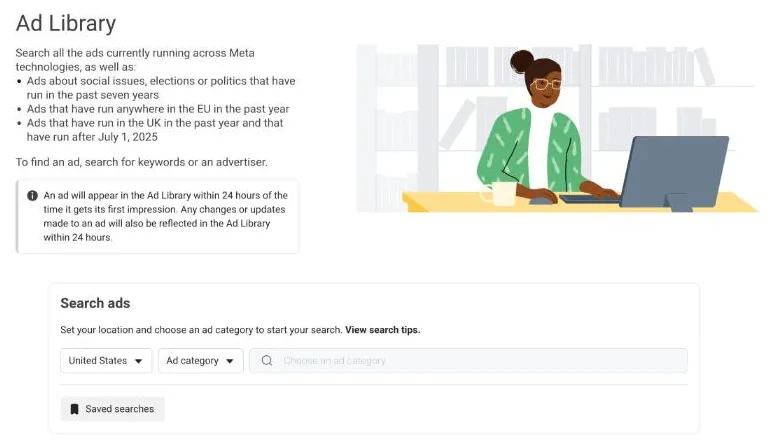 The public Meta Ad Library search page, United States settings, checked 18 October 2026. No login needed.
Set the ad category to all ads, then search.
Route 2: via a Facebook page
Open a brand’s page, go to the About tab and look for the page transparency section.
From there you click through to that specific company’s ads in the library and see everything it’s running.
Use the filters
Once you’re in, the filters steer your research.
You can refine by:
- Country: so you only see Belgian or Dutch ads
- Platform, media type and language: for example video only
- Active status: active ads, or active and inactive together
- Impressions by date: a date range for when ads were shown
Here’s the filter panel:
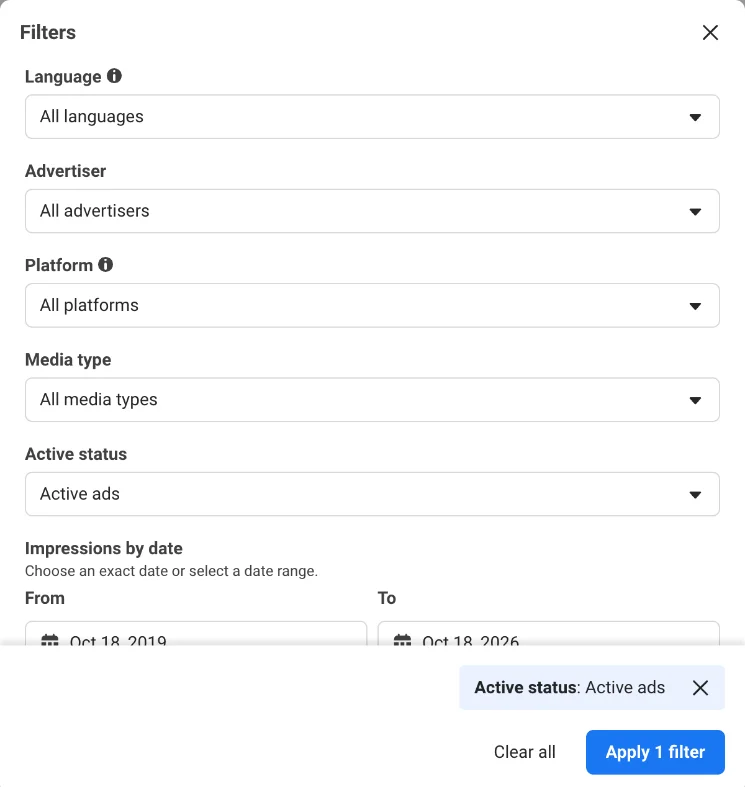 The Filters panel in the Meta Ad Library, checked 18 October 2026. Active status is set to active ads by default.
Tip: for competitor research, set the filters to all ads. That way you miss nothing, regardless of the category.
Want to work faster? A browser extension for the Ad Library shows extra insights right next to the ads.
What can you learn from your competitors’ ads?
Five things you can research in a targeted way.
This is where the real value sits for a B2B marketer.
Creative and style
Scroll through recent ads from the biggest players in your market.
Which visual style do they use, which colours, how much text sits over the images? You quickly see what the norm is and where there’s room to stand out.
Format
Filter by video or image.
If your competitors mainly run static visuals, a strong video might be your chance to break through.
Our overview of Facebook ad formats shows what each format is good at.
Looking for creative that isn’t boring? Read why B2B meta ads don’t have to be boring.
Copy and CTA
Compare how different brands build their headlines and body text. Short and sharp, or long with a story?
Tip: type a typical CTA like “book a demo” into the search bar. You’ll see how others phrase it.
Funnel structure
Walk through one competitor’s ads and sort them into awareness, consideration and conversion ads.
That shows how they guide prospects step by step towards an enquiry.
Our guide to the B2B social ads funnel helps you translate that into your own approach.
Timing and run time
The start date is listed on every ad card:
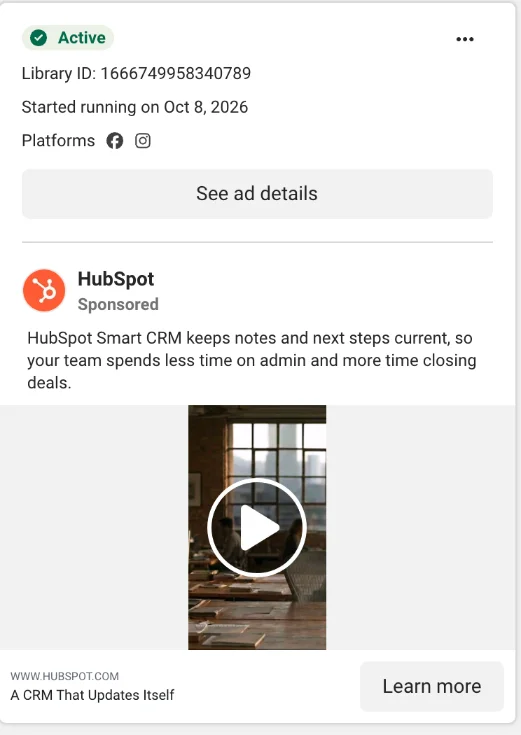 One ad card in the Meta Ad Library, October 2026. The “Started running” date is your best clue to what works.
Has an ad been running non-stop for months? That’s often a sign it pays off.
Nobody lets money leak away for long on something that doesn’t work.
On your own account, the same date is a refresh reminder. See ad fatigue.
What do you not see, and why does that matter?
You see all the creative, but never the results.
This is the part honest marketers remember.
Here’s what the library does and doesn’t give you:
No performance data
You don’t see the click-through rate, the conversion rate or the ROAS of an ad.
So you never know for sure whether a good-looking ad actually makes money.
Limited targeting data
According to Meta, ads with impressions in the EU show some extra context on reach, age, gender and location, in the name of transparency.
Outside the EU you usually don’t see that. And even in the EU, it’s context, not a campaign setup you can copy.
What that means for you
Treat the library as a source of inspiration, not as a proven recipe. An ad can look slick and still run at a loss.
Rule of thumb: the only reliable signal is run time. The longer an ad stays active, the more likely it works.
In B2B, the same handful of decision-makers sees your ads over and over. You lose precisely by looking like everyone else.
Use what you see to understand where the norm sits.
Then deliberately choose an angle of your own, starting from your value proposition.
How do you turn these insights into better campaigns?
By making your own ads sharper.
Competitor research only has value if it changes what you run.
A four-step routine for a small B2B team
A workable approach:
- Select three to five direct competitors and a few brands outside your market you admire.
- Note each brand’s style, format, copy tone and funnel steps. Look for patterns, not single ads.
- Decide where you can be different: a sharper promise, another format, a more honest story.
- Test your own variant and steer on qualified enquiries and cost per lead.
Watch out: likes and impressions don’t pay the bills. Our benchmarks on cost per lead in B2B show what to compare against.
Keep a simple research sheet
For example, say you sell HR software.
Your sheet could have one row per competitor:
| Competitor | Main format | CTA | Oldest active ad | Angle |
|---|---|---|---|---|
| Competitor A | Video | Book a demo | 5 months | Saves time |
| Competitor B | Static image | Download guide | 3 weeks | Compliance |
| Competitor C | Carousel | Learn more | 2 months | Price |
The oldest active ad tells you what each one keeps paying for. The angle column shows the gap you can claim.
If carousels dominate, our guide to carousel ads helps you do them better.
Then build and measure
Set up your campaigns in Facebook Ads Manager and make sure the Meta pixel measures real enquiries.
Then work out what a good return looks like with our ROAS calculator.
That way you use a free tool to start in a more targeted way, instead of burning budget on guesswork.
Frequently asked questions
Is the Meta Ads Library free?
Yes. The ad library is completely free and public. You don’t need a Facebook account to use it.
Can I really see all of my competitors’ ads?
You see all of their active ads on Meta’s platforms, including the visual, the copy, the CTA and the landing page. You just don’t see the performance, such as click-through rate or conversions.
Am I allowed to copy a successful ad from a competitor?
You’re allowed to, but it isn’t a smart idea. You don’t know whether their ad is profitable, and by copying you don’t stand out. Use it as inspiration and differentiate.
How do I know whether an ad works if I can’t see the numbers?
Look at the run time. An ad that has been running non-stop for months is a strong signal that it delivers results.
How long do ads stay in the library?
Active ads are always there. In the EU, ads stay searchable for a year after they last ran, and ads about social issues, elections or politics are kept for seven years.
Ready to sharpen your social ads?
The Meta Ads Library gives you a free head start: you see what’s going on in your market before you spend a single euro.
Turning those insights into ads that produce enquiries is a craft of its own. We help B2B companies steer on customers and revenue, not on impressions.
Want a second pair of eyes on your competitors’ ads and your own? Contact us and we’ll tell you where your angle is.
Free website scan
Enter your website and get an automatic scan within minutes, with concrete technical and SEO improvements. No sales pitch.
We only use your details for your scan. No spam, unsubscribe anytime.