
Advertising
Free Google Ads Tools for B2B: More Return Without Extra Budget

Copy for AI
Five free Google Ads tools cover what most B2B campaigns need.
They’re Keyword Planner, Google Trends, the Ads Transparency Center, Microsoft Clarity and Google Analytics. Google and Microsoft offer all five themselves.
The verdict: you don’t need an expensive software suite. For a B2B company on a tight budget, the gain sits in better choices with free data, not in more data.
Below, each free Google Ads tool is tied to one concrete gain: more qualified leads or a lower cost per lead.
Tip: calculate your cost per lead with our free budget calculator.
Why are free tools enough for B2B?
Because the leverage in a small B2B campaign is in your choices, not in extra data.
Many B2B companies think they can only advertise seriously with paid tooling such as Semrush or Ahrefs. That’s not true for most small and mid-sized campaigns.
Three things decide your return
Free tools give you insight into the three things that matter:
- Keywords: which terms people with buying intent use
- Competitors: what the other advertisers are doing
- Conversion: why visitors do or don’t convert after the click
That last one is where a Google Ads specialist earns their fee.
Whoever has those three sharp beats a competitor who blindly throws in more budget.
Google Keyword Planner: the basis of every search campaign
Keyword Planner is the free keyword tool inside your Google Ads account.
It’s the starting point of every decent search campaign.
Best for: choosing which keywords get your budget.
Biggest strength: volume, cost and competition in one table.
Price: free inside Google Ads, but you need a set-up account.
Watch out: without an active campaign, volumes often show as ranges.
The three numbers it gives you
Google’s Keyword Planner help describes monthly search estimates and the average cost for your ad to show. You can also filter ideas by competition.
Per keyword, that comes down to three numbers you can use straight away:
- Search volume: how often a term is searched per month, on average
- Estimated CPC: what a click is likely to cost
- Competition level: how many advertisers bid on the keyword
Here’s what that looks like for an expensive B2B term:
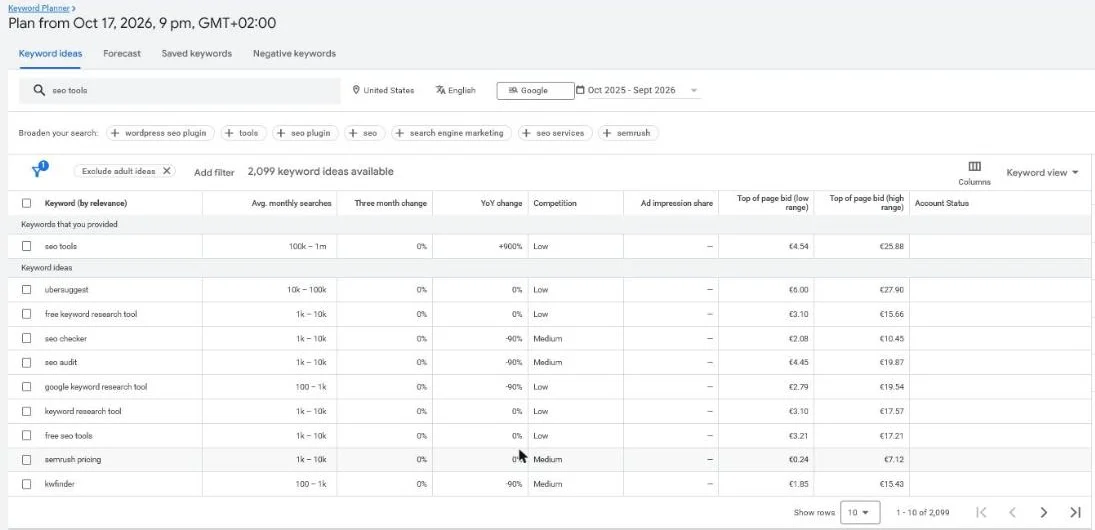 Keyword Planner for “seo tools”, United States, plan from 17 October 2026. Top-of-page bid: 4.54 euros (low range) to 25.88 euros (high range).
A click of up to 25.88 euros is why you check intent before you bid. Our wiki entry on CPC explains what drives that price.
Why competition matters most for B2B
The most expensive, most competitive terms are often generic keywords without buying intent.
Good keyword research with free Google Ads tools shows the gain usually sits in specific, long-tail keywords. Those have lower volume and a lower cost per click, but much higher intent.
For example, someone searching for “accounting software for SMEs with payroll” is closer to a request than someone typing “accounting”.
More on that pattern in our guide to long-tail keywords for B2B.
The gain
You spread your budget towards keywords with genuine buying intent, not expensive terms that bring clicks but no leads.
Combine this with a solid list of negative keywords to filter out wasted budget.
Google Trends: judging timing and relevance
Google Trends is free and shows how search demand for a term moves over time and per region.
Keyword Planner gives you an average. Trends shows you the trajectory.
Best for: timing your budget and choosing between two terms.
Biggest strength: trends per region and over years.
Price: free.
Watch out: it shows relative interest, not search counts.
How to read the 0 to 100 scale
Trends doesn’t show how many people searched.
Per Google’s Trends help, data is divided by the total searches of its region and time range, then scaled from 0 to 100. So two regions with the same score can have very different volumes.
Use Keyword Planner for the size. Use Trends for the shape.
Two questions Trends answers
For B2B you mainly use Trends for two questions:
- Is interest in my service rising, stable or declining?
- Are there peak moments to concentrate my budget around?
A lot of B2B demand is seasonal or tied to budget cycles, such as quarter-end or annual budgets.
With Trends you spot those patterns before they show up in your own data. Our piece on seasonal Google Ads shows how to act on them.
Comparing two terms looks like this:
Pick the term for your headline
You can also compare two terms to decide which one goes front and centre in your ads and on your landing page.
That seems small. But the right term in your headline raises your relevance, and with it your quality score.
Google Ads Transparency Center: free view of your competitors
The Ads Transparency Center is an underrated free tool.
According to Google, it shows every ad an advertiser has actively running at that moment, filterable by region and by format.
Best for: competitor research before you write ad copy.
Biggest strength: live ads per advertiser, by region and format.
Price: free.
Watch out: it shows ads, not their results or budgets.
What you see in black and white
For a B2B company, three insights are worth gold:
- the ad copy competitors use and the messages they push
- whether they’re active in your region, and with which formats
- how long certain ads have run, a hint at what works for them
Here’s the search view for one advertiser:
Find gaps, don’t copy
Use this to find gaps, not to copy competitors blindly.
Which angle is nobody addressing? Which segment are they leaving untouched? That’s where your opportunity sits.
To tackle this in a structured way, read our guide on Google Ads competitor analysis.
Microsoft Clarity: seeing why visitors drop off
Clarity shows you, for free, where visitors click, scroll and give up on your landing page.
This is where the biggest hidden gain sits for many B2B companies. You can run perfect ads, but if your landing page doesn’t convince, you pay for clicks that never become a lead.
Best for: finding why paid clicks don’t turn into enquiries.
Biggest strength: heatmaps and session recordings at no cost.
Price: free, with no paid plan.
Watch out: in the EU, recordings need valid visitor consent.
What Clarity shows you
According to Microsoft, Clarity offers free heatmaps and session recordings of your landing pages.
The homepage shows the demo dashboard:
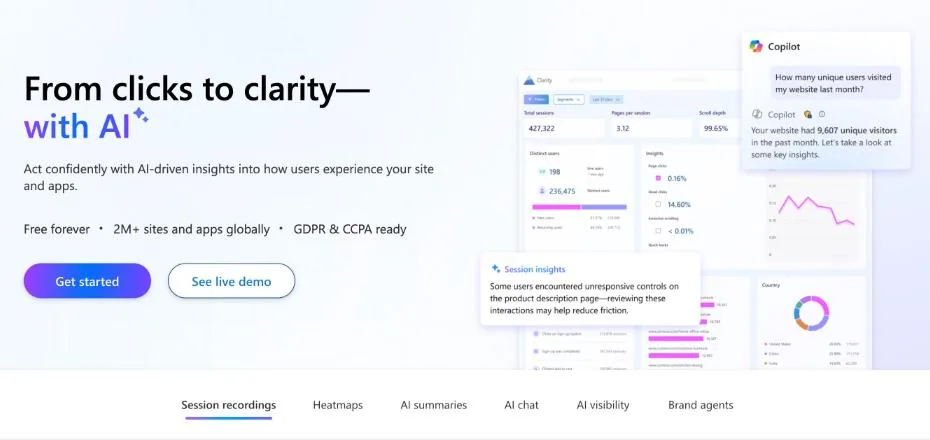 Microsoft Clarity’s homepage, October 2026. The demo dashboard shows scroll depth, the number that tells you how many visitors leave the first screen.
Two views do most of the work:
- Heatmaps: where visitors click, how far they scroll, where attention goes
- Session recordings: real visitors, where they hesitate, drop off or get stuck in your form
The limits worth knowing
Microsoft’s Clarity FAQ calls it “a free service forever”, with no traffic limits.
Three practical limits still apply:
- Heatmaps: up to 100,000 page views per heatmap
- Recordings: kept for 30 days, except favourites and a sample
- Consent: in consent-required regions, full recordings need valid consent
So export or favourite the sessions you want to keep.
The gain
You optimise your conversion rate without a euro of extra ad budget.
For example, say you see that visitors never scroll down to your contact form, or that they abandon a form that’s too long.
A small fix can bring your cost per lead down sharply. Every click you already pay for then turns into a request more often.
Our guide on how to optimise a landing page for conversion lists the fixes that usually come first.
Google Analytics: from click to lead to customer
A free Google Analytics account (GA4) shows what happens after the click.
Google Ads tells you how many people click. Analytics tells you what those people do next.
Best for: following the route from ad to request.
Biggest strength: behaviour across your whole site, not only the ad.
Price: free.
Watch out: it only helps once your conversions are set up properly.
Follow the whole route
For B2B lead generation you follow the route from ad to landing page to request.
That way you see which campaigns and keywords deliver real requests, not just traffic. Only then can you shift budget from campaigns that buy clicks to campaigns that deliver leads.
Here’s a traffic acquisition report in our own property, filtered on one source:
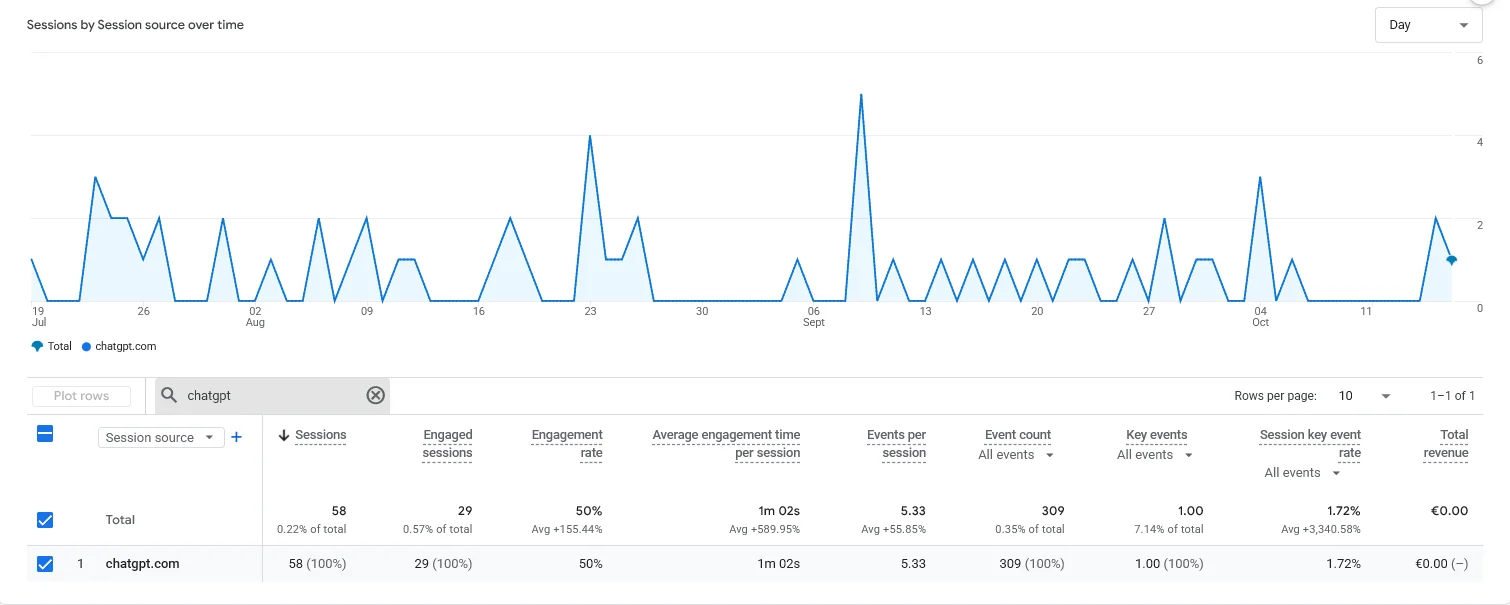 GA4 Traffic acquisition in our own property, last 90 days, October 2026: 58 sessions from chatgpt.com.
The same report, filtered on google / cpc, shows what your paid clicks do on the site.
Connect it to Google Ads
That link is exactly why solid conversion tracking is the basis of every profitable campaign.
Two steps make it work: link GA4 to Google Ads and set up GA4 conversions for your real enquiries.
In our own Google Ads account, one action counts as primary:
 All conversions in our own Google Ads account, 1 to 16 October 2026. One primary action: the contact form.
Without this link you’re steering blind. With it, you know which euro works and which one is better spent elsewhere.
The cycle in one picture
Together, the five tools form one loop: research, advertise, measure, adjust.
Rule of thumb: every round should lower your cost per lead on the same spend.
Which free tool do you use for what?
Each tool answers one question. Here’s the overview:
| Tool | Provider | What for | Gain |
|---|---|---|---|
| Keyword Planner | Keywords, volume, CPC, competition | Budget to terms with buying intent | |
| Google Trends | Timing and relevance | Budget on peak moments, right term front and centre | |
| Ads Transparency Center | Competitors’ ads | Finding gaps and underused segments | |
| Microsoft Clarity | Microsoft | Heatmaps and session recordings | Higher conversion rate, lower cost per lead |
| Google Analytics | Route from click to lead | Shifting budget to what delivers leads |
Want the wider list, paid tools included? See our overview of Google Ads tools.
When do you actually need paid tools?
Only when you hit the limits of the free ones.
Free tools cover most of what a B2B company needs, but not everything.
When paid tools earn their fee
Paid tools such as Semrush or Ahrefs become worthwhile in three cases:
- you want to monitor many competitors structurally
- you hunt down in-depth keyword gaps
- you manage several markets at once
Our comparison of keyword research tools covers the paid options.
When they’re overkill
For one campaign in one market with a limited budget, that’s overkill.
Start with the free tools, get everything out of them, and only invest in paid software once you hit their limits.
When no tool helps
Be clear about the channel itself too.
If your market is too small, or your audience doesn’t search with buying intent at all, no tool will solve that. In that case Google Ads simply isn’t the right channel, and we’d rather say so upfront.
Next step: check what a lead may cost before you scale, with our guide to cost per lead in Google Ads.
Frequently asked questions about free Google Ads tools
Are free Google Ads tools enough to manage a campaign?
For most B2B companies with one market and a limited budget: yes. Keyword Planner, Trends, the Transparency Center, Clarity and Analytics cover keyword research, competitor insight, conversion optimisation and measurement.
Paid tools only add value for larger or international campaigns.
Do I need an active Google Ads account to use Keyword Planner?
You need a Google Ads account, but you don’t have to run ads with it to open Keyword Planner. Google does ask you to complete account setup, billing details included.
Do note: without an active campaign, Google often shows rougher search volumes (in ranges) instead of exact numbers.
Is Microsoft Clarity really completely free?
Yes. Microsoft Clarity is a completely free tool for heatmaps and session recordings, without paid plans or traffic limits that a normal B2B site would hit.
It works on any website, not only on pages you promote through Microsoft Ads.
What is the difference between Google Analytics and Google Ads reporting?
Google Ads reporting shows what happens inside your ads (clicks, costs, conversions you measure in Ads). Google Analytics shows the broader behaviour on your site after the click.
Together they give a complete picture of the route from click to lead.
Ready to get more out of the same budget?
Free tools give you the numbers. The gain sits in what you do with them.
As a small team that moves fast, we help Belgian B2B companies get more qualified leads out of their Google Ads budget, without expensive software or vanity numbers.
Want to know where the biggest gain sits in your campaign? Contact us and we’ll point to the first fix.
Free website scan
Enter your website and get an automatic scan within minutes, with concrete technical and SEO improvements. No sales pitch.
We only use your details for your scan. No spam, unsubscribe anytime.