
E-mailmarketing
Brevo vs Mailchimp (2026): pricing, automation and GDPR

Copy for AI
Some links in this article are affiliate links. If you choose a tool through one of them, we may earn a commission. It costs you nothing extra and does not change our assessment.
Brevo is cheaper if you rarely email a big list. Mailchimp wins if you work with several colleagues, need lots of integrations or email a small list very often.
The verdict: for most B2B teams in Belgium, Brevo is the better value pick. At 50,000 contacts, you pay a fraction on Brevo of what Mailchimp charges. But Mailchimp isn’t a bad choice: it’s more mature on team seats, integrations and A/B tests on its cheapest plan.
Below, we compare both tools factor by factor.
How we checked: we read both vendors’ pricing pages, comparison tables and help articles on 21 October 2026. Prices are in the currency the page showed, excluding taxes. We didn’t test paid accounts or run a deliverability test. We use a partner link for Brevo; Mailchimp isn’t a partner.
Brevo vs Mailchimp: what are the differences at a glance?
Here’s the short version:
| Brevo | Mailchimp | Edge | |
|---|---|---|---|
| Pricing model | Email volume per month | Contacts per month | Brevo for big lists |
| Free plan | 300 emails a day, 100,000 contacts | 250 contacts, 500 sends a month | Brevo |
| Entry price | €7 a month (Starter) | $13 a month (Essentials) | Brevo |
| Automation | Unlimited from Standard (€15) | Full workflows from Standard ($20) | Tie |
| CRM | Free sales CRM, 50 open deals | Contact profiles, no sales CRM | Brevo |
| EU data | Servers in the EU | US company, Data Privacy Framework | Brevo |
| Users | 1 on Starter, up to 3 on Standard | 3 on Essentials, 5 on Standard | Mailchimp |
| Integrations | 150+ | 300+ | Mailchimp |
| A/B tests | From Standard | From Essentials | Mailchimp |
Everything checked on 21 October 2026 with the vendors themselves.
Which tool is cheaper for a B2B list?
Brevo is cheaper once your list is bigger than your sending rhythm justifies. That’s down to the pricing model.
How does Mailchimp charge?
Mailchimp charges per contact tier.
According to Mailchimp’s help article on its plans, subscribed, unsubscribed and non-subscribed contacts all count. Archived contacts don’t.
Your send limit is 10 times your contacts on Essentials, 12 times on Standard and 15 times on Premium.
For example: with 5,000 contacts on Standard, you can send 60,000 emails a month for the same price.
How does Brevo charge?
Brevo charges on emails per month. Starter costs €7 and Standard €15 for 5,000 emails.
But the first three tiers cap you at 500, 1,500 and 2,500 contacts. From 20,000 emails a month, you can store 500,000 contacts.
This diagram shows the difference:
What does that mean in euros and dollars?
Three examples with published prices, billed monthly, excluding taxes:
| Situation | Brevo (worked out) | Mailchimp (published) |
|---|---|---|
| 500 contacts | €7 (Starter, 5,000 emails) | $13 (Essentials) |
| 50,000 contacts, 2 emails a month | €70 (Starter, 100,000 emails) | $385 (Essentials) |
| 100,000 contacts, 1 email a month | €129 (Standard, 100,000 emails) | $800 (Standard) |
The Mailchimp amounts for 50,000 and 100,000 contacts are on Mailchimp’s compare plans page. We worked out the Brevo amounts with the euro prices on Brevo’s pricing page.
Mailchimp bills in dollars.
It calls the euro prices it shows estimates based on the exchange rate.
This is Mailchimp’s pricing page with US settings:
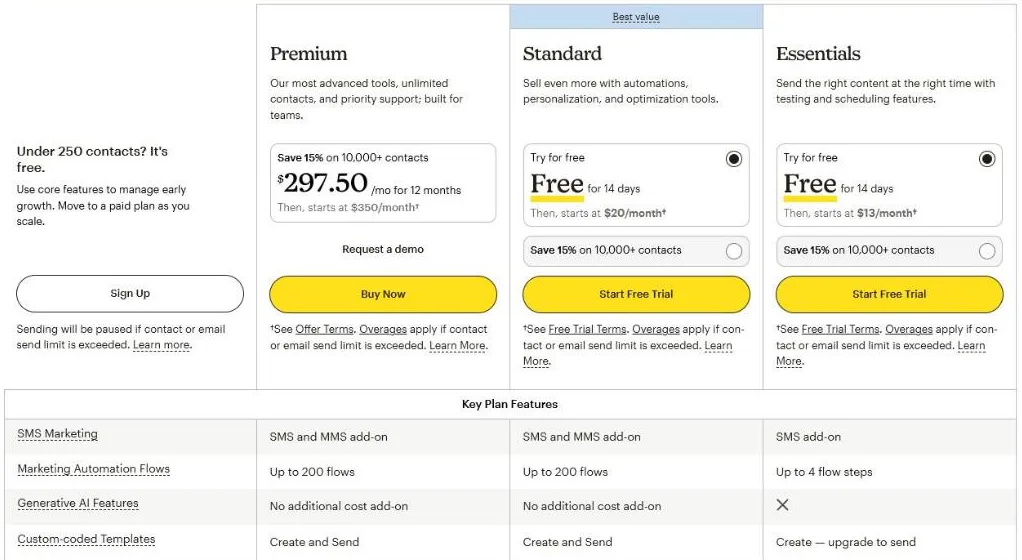 Mailchimp’s pricing page, US settings, 0 to 500 contacts, 18 October 2026.
Want to work out your own list? Our guide to Brevo pricing has three B2B scenarios with the full sums.
Rule of thumb: the bigger your list and the less often you email it, the bigger Brevo’s edge.
Which free plan is better?
Brevo’s free plan is roomier.
Brevo allows 300 emails a day and stores 100,000 contacts.
Mailchimp stops at 250 contacts and 500 sends a month, with 250 a day at most.
But Brevo has limits too:
- Logo: “Sent with Brevo” sits under every email
- Daily cap: a campaign to 900 people takes three days
- Automation: 2,000 contacts at most in your workflows
That’s in Brevo’s own FAQ on the free plan.
On Mailchimp, sending is paused as soon as you go over 250 contacts.
Winner: Brevo, for any list above 250 contacts.
Which tool has the better automation?
Brevo wins on the cheapest plans; from Standard, they’re on a par.
Mailchimp: workflows from Standard
Mailchimp Essentials allows workflows of up to four steps.
Standard and Premium give you up to 200 flows, with multiple starting points and branching.
So for a real B2B nurturing sequence, you need Standard.
Brevo: unlimited from Standard
Free and Starter let 2,000 contacts into your workflows.
Standard gives you automation for unlimited contacts.
An example: a whitepaper download starts a five-email sequence. Anyone who visits the pricing page gets a different branch.
You can build that in both tools. Our guide to lead nurturing email flows shows how to set one up.
Winner: tie on Standard. Looking for deeper scoring and branching? Check out the best marketing automation tools too.
Which tool has a CRM for sales?
Brevo, by a distance.
Every Brevo plan includes free sales features: 50 open deals, one pipeline, a connected calendar and inbox.
Sales Essentials (€29 a month) makes deals and pipelines unlimited.
Mailchimp has contact profiles and audience management, but no sales pipeline.
Think of an account manager who wants to see which lead opened your pricing email yesterday. In Brevo, that sits next to the deal.
Does your sales team already work in a CRM? Then this point matters less.
Compare the best B2B CRM options before you decide.
Winner: Brevo, for SMEs without a CRM.
Where’s your data, and what does GDPR say?
Brevo keeps your data in the EU. Mailchimp processes it in the United States.
Brevo’s security page says its servers are in the EU and that it’s ISO 27001:2022 certified.
Mailchimp is a US company.
Its GDPR page says it’s certified under the EU-US Data Privacy Framework, with Standard Contractual Clauses in its Data Processing Addendum.
So both can be used under GDPR.
But if your legal team wants data kept in the EU, Mailchimp’s out.
Winner: Brevo, if EU data is a must.
Which tool has better templates and integrations?
Mailchimp has more integrations. Brevo gives you more on the free plan.
Integrations: Mailchimp lists 300+ integrations on every plan. Brevo lists 150+, such as Shopify, WordPress, Stripe and Zapier.
Templates: both have a drag-and-drop editor and ready-made templates. On Mailchimp’s free plan, templates are limited; sending custom-coded templates starts on Standard.
Users: Mailchimp gives you 3 seats on Essentials and 5 on Standard. Brevo Starter has one; Standard allows up to 3, at €9 per extra seat.
Winner: Mailchimp, if you connect lots of tools or work as a team.
Which tool does more for your deliverability?
On the lower plans, we see no clear difference on paper.
The real gains are in your own setup: SPF, DKIM and DMARC, a clean list and a gentle warm-up after a switch.
On the top plans, they do differ:
- Brevo Professional: three hours a year with a deliverability specialist, dedicated IP as an add-on
- Mailchimp Premium: phone and priority support
We didn’t check dedicated IPs at Mailchimp.
Want to improve inbox placement, whatever the tool? Read how to improve email deliverability.
Winner: tie until you reach enterprise level.
Where do both tools fall short?
Both are strong at newsletters. For heavy B2B work, they’re missing something.
- Lead scoring: Brevo only includes contact scoring on Professional (€499). Mailchimp has no sales-focused scoring.
- Dutch-language tool: want a Dutch interface and servers in the Netherlands? Look at Laposta.
- Marketing and sales on one platform: HubSpot is a third option, though the price is much higher.
Mainly after deep nurturing with lead scoring? ActiveCampaign is often a better pick than either.
Every option by reason for leaving is in our overview of Mailchimp alternatives.
How do you switch from Mailchimp to Brevo, or the other way round?
Switching mostly costs time, not money.
Four things always need to move:
- Contacts and tags: export unsubscribes and bounces too
- Proof of consent: date, source and form per contact
- Sending domain: set your DNS records up again
- Workflows: you rebuild them, they don’t migrate
Use the switch to segment your email list straight away. Then start with your welcome email series.
Should you choose Brevo or Mailchimp?
Put your situation next to this table:
| If you… | Choose | Why |
|---|---|---|
| have a big list you email 1 to 3 times a month | Brevo | You pay for emails, not contacts |
| must keep data in the EU | Brevo | Servers in the EU |
| want marketing and a light CRM in one tool | Brevo | Free sales features, Sales Essentials from €29 |
| email a small list very often | Mailchimp | Sending 10 to 15 times your contacts is included |
| work with 3 to 5 colleagues on the cheapest plan | Mailchimp | 3 seats on Essentials, 5 on Standard |
| connect lots of US tools | Mailchimp | 300+ integrations |
Still unsure? Run your list of a year from now through both tools.
Frequently asked questions
Is Brevo better than Mailchimp?
For most B2B teams in Belgium, yes: it’s cheaper for big lists, keeps servers in the EU and includes a free CRM. Mailchimp is better if you email a small list very often, work with several colleagues or need lots of integrations.
Is Brevo cheaper than Mailchimp?
For big lists, clearly. For 50,000 contacts, Mailchimp Essentials asks $385 a month. 100,000 emails on Brevo Starter cost €70 (both checked October 2026). At 500 contacts the gap is small: €7 against $13.
Does Mailchimp count unsubscribed contacts?
Yes. According to Mailchimp, subscribed, unsubscribed and non-subscribed contacts all count towards your contact total. Archived, cleaned and deleted contacts don’t. So archive your unsubscribes regularly.
Is Mailchimp GDPR compliant?
Mailchimp says it’s certified under the EU-US Data Privacy Framework and includes Standard Contractual Clauses in its Data Processing Addendum. Your data is still processed in the US. Brevo says its servers are in the EU.
Can I move my workflows from Mailchimp to Brevo?
No. You can export contacts, tags and unsubscribes, but you’ll rebuild the workflows. Plan time to test each workflow before you switch it on.
What’s your next step?
Choose on your list and your sending rhythm, not the longest feature list.
Want help with the choice or the switch, from export to new workflows? See how we handle marketing automation, or read first whether you should be outsourcing email marketing.
Book a call and you’ll hear within 24 hours which tool fits your list.
Free website scan
Enter your website and get an automatic scan within minutes, with concrete technical and SEO improvements. No sales pitch.
We only use your details for your scan. No spam, unsubscribe anytime.