
SEO
Google Search Operators: Free SEO Research with site:, intitle: and inurl:

Copy for AI
Google search operators are free commands that refine what Google shows you.
You type them into the normal search bar: think site:, intitle:, inurl: and quotation marks.
The verdict: for SEO they’re worth their weight in gold. You check indexing, find content opportunities and pick apart a competitor’s site in seconds, without a paid tool.
Below you’ll find which operators exist and how to use them for SEO.
The focus is B2B (software, SaaS, professional services), not webshops.
What are Google search operators?
They’re symbols or words you add to your query to steer Google.
Google documents the basics itself, in its help page on refining your searches. Instead of pages full of scattered results, you get exactly what you’re looking for.
Where they come from
The basis comes from logic and programming: the so-called Boolean operators AND, OR and NOT.
But for SEO it’s mainly the search-focused commands that are useful, such as site: and intitle:.
Why SEO teams use them
The big advantage: they cost nothing.
They work straight away. You need no account, no subscription and no plug-in.
For a small team that wants to work sharply without buying the entire toolkit, that’s exactly right.
One rule: don’t put a space between the operator and your term. Google’s help page spells it out: site:youtube.com, not site: youtube.com.
You’ll find more on the broader context in our SEO wiki.
Which Google search operators exist?
Below are the operators you’ll use most often in practice.
Most of them can be combined, and that’s where their power lies.
| Operator | What it does | Example |
|---|---|---|
" " | Exact search term or phrase | "account based marketing" |
- | Excludes a word | crm software -webshop |
OR or | | Results with X or Y | saas OR software |
AND | Results with X and Y | lead generation AND b2b |
* | Wildcard, fills in a word itself | best * for b2b |
( ) | Groups terms or operators | (saas OR software) crm |
site: | Only results from one domain | site:customerimpact.be |
intitle: | Term in the page title | intitle:quote |
allintitle: | All terms in the title | allintitle:b2b lead generation |
intext: | Term in the page text | intext:integration |
inurl: | Term in the URL | inurl:blog |
allinurl: | All terms in the URL | allinurl:case study b2b |
filetype: or ext: | Specific file type | filetype:pdf whitepaper |
before: / after: | Results before or after a date | seo after:2025-01-01 |
define: | Definition of a word | define:schema |
Advanced Google search operators are combinations
It often comes down to the combination. site: plus quotation marks, or intitle: plus a minus sign: that’s where the real insights come from.
Here’s how the most useful pairs map to SEO jobs:
The sections below go through each job.
How do you use site: to check whether Google indexes your pages?
Type site:yourdomain.be into Google and you’ll see roughly which pages Google knows about.
It’s by far the most-used operator for SEO. No results where you expected them? Then there may be an indexing problem.
Here’s what that check looks like for our own domain:
Zoom in with a keyword
Add a keyword to see whether a specific page is included. For example: site:yourdomain.be quote.
Watch out: site:https://www.example.com and site:https://example.com/ return different results. Check which version of your domain you’re testing.
Check documents with filetype:
Combine site: with filetype:pdf and you check whether certain PDFs or documents are indexed.
Google matches the file type on the content-type header or the file extension, as its search operator overview for site owners explains.
It’s handy if you’ve just published a whitepaper.
Or if you specifically want to keep something out of the index.
Why site: isn’t a full index count
Google says plainly that the operator “doesn’t necessarily return all the URLs that are indexed” under your domain.
Without a keyword, results aren’t ranked either.
The shortest URL usually comes first, and the rest is “relatively random”, in Google’s words.
Rule of thumb: a missing URL in site: is a reason to check, not proof of a problem. Confirm it with the URL Inspection tool in Google Search Console.
How to read that report is in our guide to the Search Console indexing report.
What to do with what you find
Do you find pages that don’t belong there? Or are important landing pages missing?
That’s a signal for a more thorough investigation.
Our pieces on the SEO audit and technical SEO go deeper.
The operator tells you that something is wrong, not what you should do about it.
Two common causes:
- Missing pages: see why a website isn’t showing on Google.
- Too many pages: thin filter or tag pages point to index bloat.
How do you find content opportunities and internal links?
Operators are ideal for finding gaps in your content.
Combine intitle: and inurl: with keywords from your niche.
You immediately see what already ranks and where there’s still room.
Find the missing angle
Search for intitle:"account based marketing" b2b, for instance.
You see which titles already exist and which angle is still missing.
That’s a quick, manual content gap analysis.
Our guide to keyword research shows how to turn it into a list.
Find internal link candidates
For internal links, the combination of site: and quotation marks is your best friend.
Want to link internally to a new page on a topic? Search with site:yourdomain.be "the core term" for existing pages where that word already appears.
Every result is a candidate for an internal link to your new content.
Our guide to internal links explains how to pick the anchor.
Spot duplicate and copied content
The same approach finds duplicate content.
Paste a unique sentence from one of your pages between quotation marks and put site:yourdomain.be in front of it.
Multiple results?
Then that same text appears in more than one place. That confuses your rankings, as our page on duplicate content explains.
Now leave out site:.
You’ll see whether someone copied your text without permission.
How do you analyse your competitors with operators?
This is where operators get really fun.
Already know a competitor? Then pick apart their site with site:competitor.be. Add a topic to see how deeply they cover a theme.
Find players you didn’t know
Want to find new players you didn’t have on your radar yet? Combine intitle: or intext: with a core theme from your market.
For example, intitle:"account based marketing" b2b shows which companies publish on the same subject.
Note: the old related: operator for showing similar sites no longer works. Google switched it off in 2023.
Estimate their publishing rhythm
Want to know how often a competitor publishes? Combine site: with before: and after: to estimate their rhythm.
Google’s help describes both as filters on pages “last updated” before or after a date, such as after:2026/03/10.
That way you see whether someone rolls out new content weekly or has been idle for a year.
Turn observations into a strategy
The insights you gather this way (topics, titles, structure) then become a real strategy.
Operators deliver the raw observations. Weighing search volume, difficulty and buying intent is something you do in a tool such as the Google Keyword Planner:
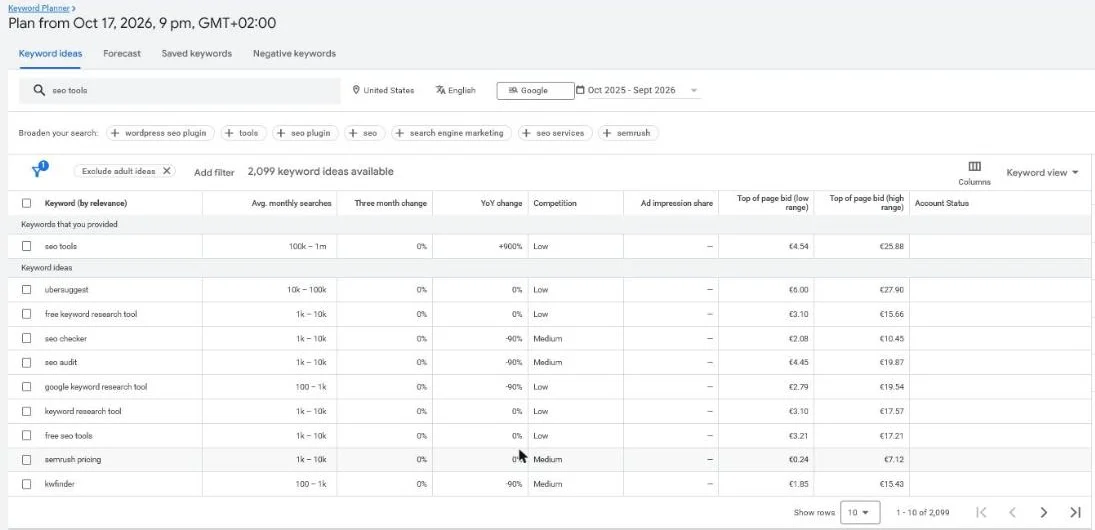 Google Keyword Planner, United States, English, plan from 17 October 2026. Operators show what exists; this shows what people search.
How to go about that, you can read in our pieces on SEO competitor analysis and SEO tools.
How do you use operators for link building?
Link building is about finding the right pages. Operators are fast at that. A few concrete applications:
- Guest blogging:
intitle:"write for us"orinurl:guest-blogplus a niche term. - Resource and link pages:
inurl:linksorintitle:resourcescombined with your theme. - Comparisons and listicles:
intitle:"best"plus your category, minus your own brand name. - Contact details:
site:linkedin.com OR site:x.com "company name"for your outreach.
Guest posts and resource pages
The first query shows sites that accept guest contributions.
Our guide to guest blogging covers how to pitch them.
The second finds curated lists you might fit into.
That’s the core of resource page link building.
Here’s what a guest post search looks like in practice:
Round-ups you’re not in yet
intitle:"best" plus your category, with a minus sign for your brand, shows round-ups you’re not part of yet.
Add after:2025-01-01 to see only recent opportunities.
Check who already links to you
Before you reach out, check who already links to you. Search Console lists them under Links:
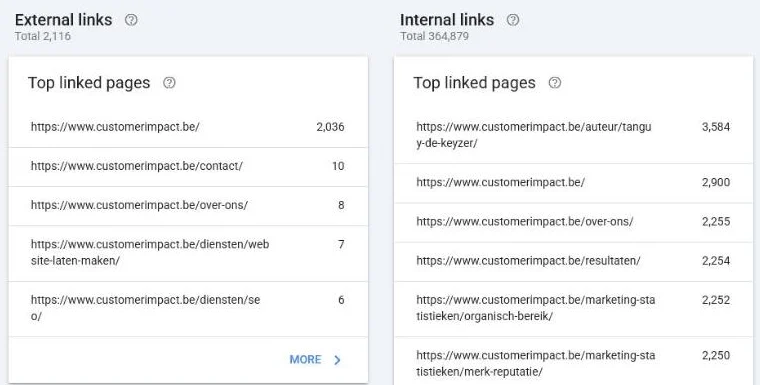 The Links report in our own Search Console for customerimpact.be, October 2026. Scroll to Top linking sites to see every referring domain.
That stops you from pitching a site that already features you.
Quality over a long list
An important nuance: a long list of potential link pages isn’t a success.
One relevant link from a site your target audience actually reads is worth more than twenty random mentions.
So steer on quality and relevance, not on numbers.
Our guide to link building explains how to judge a prospect, and the outreach templates help you write the first email.
Frequently asked questions about Google search operators
Do Google search operators cost anything?
No. All search operators work for free in the ordinary Google search bar. You need no account and no tool. It is one of the few genuine free lunches in SEO.
What are Boolean operators?
Boolean operators are the logical commands AND, OR and NOT (often shown as the minus sign). They broaden or narrow your search results: AND requires both terms, OR accepts either of the two, and NOT or - excludes a term.
Are search operators reliable for indexing checks?
They give a quick indication, but not exact data. With site:, Google shows an approximation of what has been indexed. For hard figures and specific notices, use Google Search Console.
Why does site: show fewer pages than Search Console?
Because site: isn’t built to count. Google says it doesn’t necessarily return every indexed URL and that results for bigger sites aren’t exhaustive. Search Console’s indexing report and URL Inspection tool give the real status per page.
Do operators replace an SEO tool?
No, they complement each other. Operators are perfect for exploring quickly and checking hypotheses. For search volume, keyword difficulty and rank tracking you still need a tool.
Which operator do I use most often for SEO?
site: is by far the most useful. You use it for indexing checks, internal link opportunities, spotting duplicate content and analysing competitors, each time by pairing it with a second operator.
Get started, but with a purpose
Google search operators are a fast, free way to sharpen your SEO research.
They save time and give insight that otherwise sits behind a paywall.
But a handful of clever queries is a starting point, not a strategy.
Pick one operator from this page and run it on your own domain today.
We’re a small team that steers on results, not on vanity metrics.
Want us to review your site and turn the opportunities into actions that generate leads? Contact us and we’ll start from your own Search Console data.
Free website scan
Enter your website and get an automatic scan within minutes, with concrete technical and SEO improvements. No sales pitch.
We only use your details for your scan. No spam, unsubscribe anytime.