
Marketing Automation
Email marketing best practices: writing B2B emails that get opened and convert

Copy for AI
Some links in this article are affiliate links. If you choose a tool through one of them, we may earn a commission. It costs you nothing extra and does not change our assessment.
The best email marketing best practices are about relevance, not pretty templates.
The right person, the right moment, a message that moves them forward. In B2B one email rarely sells, so each one brings the next step closer.
The verdict: one goal per email, sharp segments and a clean list beat any design trick. Judge each email on what happens after the click.
Below are the email marketing tips that consistently separate ignored emails from emails that get replies.
What are the eight email marketing best practices at a glance?
Every tip below follows the same structure: why it works, and the mistake we see most often in practice.
This is the short version. After the table we go deeper on each point.
| Tip | Why it works | Common mistake |
|---|---|---|
| One goal, one email | Focus drives the whole email | Three messages in a single send |
| Write the subject line last | By then you know the real promise | Clickbait the email does not deliver |
| Segment sharply | Relevance lifts response | One generic email to the entire list |
| Timing that fits the segment | Reaches people at a readable moment | Sending whenever it suits you |
| Design mobile-first | Most B2B emails are opened on mobile | Wide tables and tiny buttons |
| One clear call-to-action | One choice lowers the threshold | Multiple links and buttons side by side |
| Guard deliverability | No inbox, no result | Keeping on emailing dead addresses |
| Measure after the click | Steers on revenue, not on vanity numbers | Only looking at the open rate |
Tip 1: Why start with your goal, not with your copy?
Because the goal decides everything else.
Before you type a word, ask what this email should concretely deliver:
- a demo request
- a download
- a reply
One email, one goal. Emails that try to do three things at once usually do nothing.
Let the goal shape the email
That goal determines the subject line, the length and the call-to-action.
Steer on that one action and measure whether it happens.
Not on opens or clicks alone. What counts is what comes after: conversations, requests, customers.
Watch out: a high open rate that leads nowhere is a vanity number.
Tip 2: Why should you write the subject line last?
Because only a finished email tells you what the real promise is.
The subject line decides whether your email gets opened at all. So it deserves the last word, not the first.
Four rules for B2B subject lines
These four rules cover most of it:
- Keep it short and concrete. Many B2B inboxes show 40 to 50 characters, mobile even fewer.
- Promise one clear benefit. “3 ways to halve your no-shows” works better than “Our June newsletter”.
- Avoid clickbait. If the email doesn’t deliver, you pay it back in your next open rate.
- Test it. Two subject lines side by side teach you more in a week than five opinions.
Salesforce’s email best practices underline how strongly the subject line determines the open rate. They note that most marketers aim for roughly 50 characters.
How to test two subject lines
Split a segment in two. Send each half one version, then compare replies or clicks, not only opens.
Our guide to A/B testing emails covers the setup. Check whether a difference is real with our A/B test calculator.
Want to go further? We collected our approach in subject lines for B2B emails.
Tip 3: How do you write for one reader with one message?
You segment sharply, then write as if you’re emailing one person.
Generic emails to your entire list rarely perform. Segment on what matters:
- industry
- role
- stage in the marketing funnel
A prospect who just visited your site wants to hear something different from a customer of three years.
Write like it’s one email to one person
Use phrases such as “your team”, “in your industry” and “the problem you probably recognise”.
That tone feels personal, even though the email goes out to hundreds of people.
The sharper your segment, the more relevant your B2B email marketing becomes.
Don’t drown in mini-lists
The practical side, how to split your list without getting lost in dozens of mini-lists, is in segmenting your email list.
Common mistake: building so many segments that no single segment is worth a decent email any more.
Tip 4: When is the right moment to send?
When your segment actually reads, not when it suits you.
The content can be perfect, but an email that lands at 10pm on a Friday sits under fifty others by Monday.
Timing depends on the segment
In practice we see that the best moment depends on your segment, not on a universal golden hour.
For example, an operational role reads early. A director often reads outside office hours.
Let your data decide
The mistake is sending whenever it suits you and then blaming the open rate. A better routine:
- Pick a send moment per segment.
- Test two times against each other.
- Keep the winner and test again next quarter.
More guidance is in the best time to send emails.
Tip 5: How do you make an email mobile-first?
You design for a thumb on a small screen first.
Most B2B emails are opened on a phone, even if the click happens later on desktop. An email that isn’t readable on mobile loses your reader before you say anything.
Three layout rules
Keep these three in every template:
- One column: no wide tables side by side.
- Readable font size: nobody zooms in on an email.
- A big button: big enough to hit with a thumb.
Always check it on your own phone
The classic mistake is designing an email on a wide screen and never viewing it on a phone.
Send every email to yourself first and open it on mobile. If the subject line cuts off or the button drops below the fold, you’ll know straight away.
How do you make the first two sentences irresistible?
You get to the point in the first line.
Nobody reads a wall of text. Your first two sentences have to show why this email is worth the time.
Skip: the long run-up and “I hope you’re doing well”.
Write for scanning
After that, keep it light:
- short paragraphs
- white space
- one thought per block
People scan emails. They don’t read them word for word.
Make your message readable in five seconds of scanning.
For example, say you invite people to a webinar. Lead with the one problem it solves, then the date, then the button.
Tip 6: Why does one clear call-to-action work best?
Because one choice lowers the threshold, and several choices freeze the reader.
Many emails get bogged down in choice stress: three links, two buttons, a PS with yet another offer. The result: the reader chooses nothing.
Keep it to one action
Give one clear next step. Repeat it if you must, but keep it to one action.
What a strong call-to-action looks like is in our wiki.
Make the step small
Make that action small, too.
“Book a 20-minute call” feels lighter than “Request a quote”.
The lower the threshold, the higher your conversion rate. Track it per email with our conversion rate calculator.
Rule of thumb: a good email doesn’t ask for the whole decision at once, only the next small step.
Tip 7: How do you make sure your email reaches the inbox?
You protect your sender reputation, because that’s what inbox providers judge.
All the tips above are pointless if your email lands in the spam folder. Deliverability is about trust.
Three basics of deliverability
Get these right before anything else:
- send from a verified domain
- only email people who are allowed to receive you
- clean up inactive addresses
Every email to a dead or unhappy contact drags down your reputation. With it goes the delivery of your next email to everyone.
What Gmail asks of bulk senders
Gmail spells out the rules. Senders of more than 5,000 messages a day must set up SPF, DKIM and DMARC (Google’s email sender guidelines).
Their marketing messages must also support one-click unsubscribe. And spam complaints have a hard ceiling:
Don’t keep mailing a dead list
The common mistake is to keep emailing an old list because “more addresses feels better”.
It’s the opposite.
A targeted checklist is in improving email deliverability. Quiet contacts first get a re-engagement campaign, then a goodbye.
Rule of thumb: better 500 addresses that open you than 5,000 of which half no longer want you.
How do you automate what is repeatable?
You build the emails you’d otherwise write again and again as flows, once.
The emails that work hardest are often the emails you write only once. Three flows earn their keep in almost every B2B setup:
- Welcome: a welcome email series for new subscribers.
- Follow-up: an email after a download.
- Reactivation: an email for quiet contacts.
Zapier collects useful email marketing best practices on this. Set them up properly once and they keep delivering.
Where marketing automation comes in
That’s where marketing automation comes in: the right email at the right moment, based on behaviour.
Most email platforms now build this in. Brevo, for example, presents itself as one platform for email, SMS and WhatsApp:
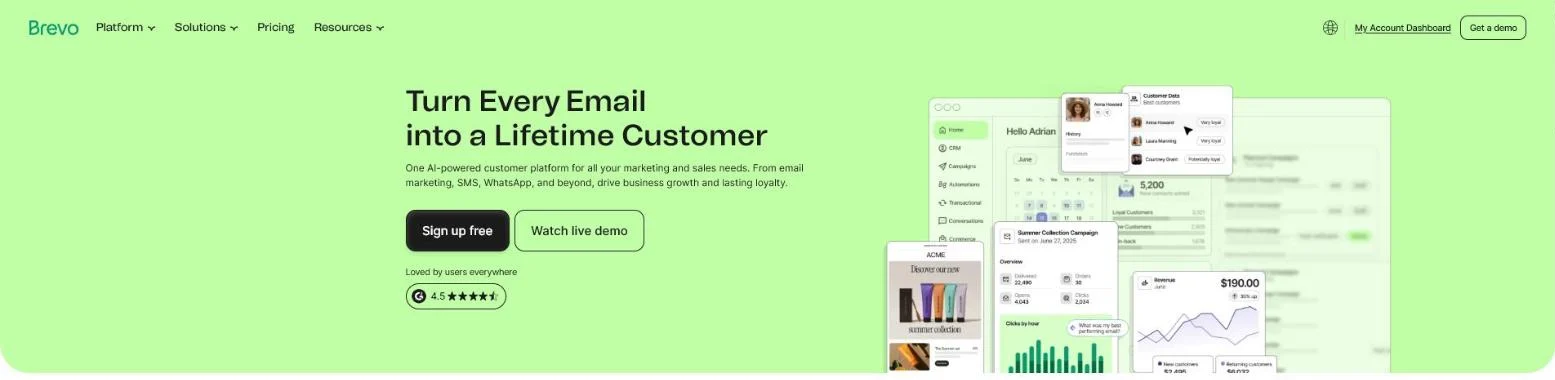 Brevo’s homepage, October 2026: “One AI-powered customer platform for all your marketing and sales needs.”
Which platform fits your volume is in our comparison of email marketing software.
Our experience: we’ve built flows in HubSpot, ActiveCampaign, Brevo, Make and Zapier. Think contact to user to newsletter, active versus inactive contacts, lead scoring and drip campaigns.
Start with one flow
Want to go deeper? Also read marketing automation for B2B and which tools are worth it.
How to chain several emails into one journey is in building an email nurture flow.
Start small: one good flow is worth more than ten one-off emails.
Tip 8: How do you measure, learn and dare to cut?
You measure what happens after the click and throw away what doesn’t work.
Email marketing gets better by measuring and adjusting, not by guessing. How to look beyond opens and clicks, all the way to revenue, is in measuring the ROI of email marketing.
Measure the whole chain
That chain is quicker written down than lived.
From open to customer, people drop off at every step.
It’s precisely the bottom steps that decide whether an email delivers anything. So measure the whole series, not just the open at the top:
Track the bottom of the chain in your CRM
The bottom steps live in your CRM, not in your email tool. HubSpot’s lifecycle stages show the idea, from lead to customer:
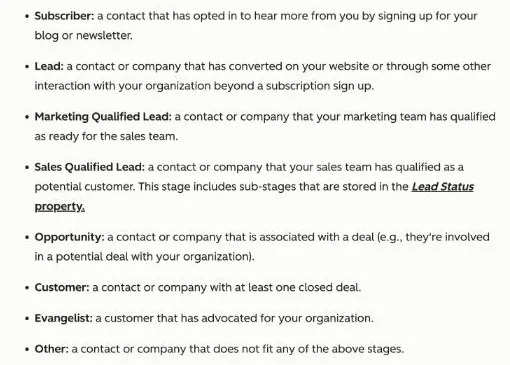 HubSpot’s lifecycle stage definitions, checked 18 October 2026. Tag each stage with the email that moved the contact.
When a contact moves a stage after an email, you know that email worked.
Four habits that keep you sharp
Build these into every send:
- Follow the whole chain. From open to customer, not just the open.
- Test one thing at a time. Otherwise you won’t know what made the difference.
- Clean your list. A smaller, engaged list performs better than a big, dead one.
- Be realistic about frequency. Emailing too often costs you more unsubscribes than it delivers.
What that looked like for Get Driven
Our approach for Get Driven delivered a fourfold conversion rate, from 1.8% to 7.3%.
That came from optimising across the whole chain instead of getting stuck on pretty numbers at the top:
 Case visual from our Get Driven website and branding project, Belgium: conversion rate from 1.8% to 7.3%.
Frequently asked questions
How often may I email my B2B list?
There’s no fixed number.
In practice we see that relevance matters more than frequency.
A list that gets something useful every week tolerates more than a list that only hears from you when there’s an offer.
Look at your unsubscribes and your response per email. If unsubscribes rise without response growing along, you’re emailing too often or not to the point enough.
Which numbers should I really follow?
Look beyond the open rate, which has become less reliable anyway after privacy changes.
Follow the whole chain: click, response, conversation, customer. One email with a lower open rate that generates more conversations beats an email everyone opens and nobody answers.
Should I do email marketing myself or outsource it?
That depends on your volume and your time.
A single newsletter you can keep up yourself.
As soon as you want behaviour-driven flows and segmentation, marketing automation for B2B becomes a craft of its own. Start small, measure, and bring in help when the complexity starts costing you speed.
Need help with your email marketing?
Tell us your goal and your situation. We’ll tell you honestly whether email is the right channel, or whether your time is better spent elsewhere.
We’re a small team, so we move fast and build flows that genuinely deliver customers.
Contact us and you’ll hear within 24 hours where your opportunities lie.
Free website scan
Enter your website and get an automatic scan within minutes, with concrete technical and SEO improvements. No sales pitch.
We only use your details for your scan. No spam, unsubscribe anytime.