
Marketing Automation
Automating re-engagement: winning back dormant B2B leads

Copy for AI
Some links in this article are affiliate links. If you choose a tool through one of them, we may earn a commission. It costs you nothing extra and does not change our assessment.
A re-engagement email wins back B2B leads who stopped opening your messages.
Part of your list hasn’t opened anything in months.
The reflex is to ignore or delete those contacts, but that wastes lead capital you’ve already paid for.
The verdict: automate a short re-engagement flow before you write anyone off. Try a fresh angle first, then say goodbye cleanly to whoever stays silent.
Below: what such a flow looks like, which triggers work, and when it’s better to let people go.
Back up your budget: calculate your value per lead with our free calculator.
What exactly is a re-engagement campaign?
A re-engagement campaign is an automated series of emails aimed at contacts who haven’t opened or clicked for a while.
Mailchimp defines it as a campaign “designed to reactivate subscribers who have become inactive or disengaged”.
The goal is the relationship
The goal isn’t “sending yet another email”.
It’s reactivating the relationship: getting the lead reading, clicking and eventually enquiring again.
Why it matters more in B2B
Sales cycles are long.
Someone who doesn’t respond today may suddenly be in the market three months from now.
A large share of your qualified leads is simply not ready to buy at any given moment.
So writing off dormant contacts straight away means losing exactly the people who convert later.
A lead nurturing approach keeps them warm until that moment arrives.
Reactivating costs less than buying
You’ve already invested to get these contacts onto your list.
Buying a new lead costs money every single time.
Reactivating an existing lead is far cheaper.
That’s precisely why a re-engagement flow so often pays off.
Re-engagement or win-back?
The terms overlap. A re-engagement email targets contacts who stopped reading, while a win-back campaign usually targets former customers.
Which triggers start a re-engagement flow automatically?
The beauty of re-engagement is that you can fully automate it through your marketing automation.
You define once when someone counts as “inactive”, and the flow starts by itself.
Four common triggers
Commonly used triggers:
- No opens within X weeks or months: for example, 90 days without opening a single email.
- Opens but never clicks: passive reading, a sign your content no longer lands.
- Went quiet after earlier activity: a whitepaper download or demo, then nothing.
- No more website visits: possible when your email is connected to your CRM.
Behaviour on your site makes a sharper trigger than email alone.
Our guide to behavioral email marketing shows how to set those up.
How long is “inactive”?
Important: don’t set the threshold too short.
In B2B, two weeks of silence is normal, not an alarm.
Pick a window that fits your sales cycle and your send frequency.
Mailchimp’s guidance gives a useful starting point:
| You send | Start re-engagement after | Source |
|---|---|---|
| Weekly newsletters | 3 to 6 months of inactivity | Mailchimp |
| Daily updates | 1 to 2 months of inactivity | Mailchimp |
| B2B, long sales cycle | 60 to 90 days without opens or clicks | Our rule of thumb |
Watch out: a 60-day lapse and a six-month lapse need different messages. Mailchimp makes the same point, so segment by how long someone’s been quiet.
Where the trigger lives
In most tools, the trigger is a workflow with an enrolment rule such as “last email open more than 90 days ago”.
Our experience: we’ve built active/inactive flows, lead scoring and drip campaigns in HubSpot, ActiveCampaign and Brevo. Make and Zapier closed the gaps between automations.
How do you build a re-engagement flow that works?
Start with the quickest win and build the real series after that.
Here’s the whole flow in one picture:
Step 1: Resend the same email with a new subject line
The simplest step with a measurable effect.
MailiGen gained 8.6% extra openers with this tactic.
It resent exactly the same email to everyone who hadn’t opened it, only with an adjusted subject line.
It costs you nothing but a new title.
Our list of email subject lines gives you starting points, and A/B testing your emails tells you which one won.
Step 2: Change the angle, not the frequency
Don’t send five reminders.
Send an email that touches on a different problem, or offers a concrete piece of value.
For example: a case study, a checklist or a fresh insight.
Step 3: Build a content-driven series
This is where the real reactivation happens.
Dave Huffman (Deaconess Health System) reactivated cold leads with a six-week series of content-focused emails.
He achieved open rates of 15 to 20% with it.
From the handful of sign-ups that followed came some 100,000 dollars in revenue.
It’s a pattern that recurs in examples of effective re-engagement emails.
The point isn’t the exact figure.
It’s that a few reactivated B2B leads can mean a substantial contract.
How to time a series like that is in our guides to setting up a drip campaign and lead nurturing email flows.
How many emails? Mailchimp suggests a sequence of about 2 to 3, with at least a week between the first and the follow-up.
Step 4: Add another channel for those who stay silent
Anyone still not responding after the series can sometimes be reached differently.
According to Tatango, SMS is read within three minutes in nine out of ten cases.
That makes it a strong follow-up channel for stubborn non-openers.
In B2B, a LinkedIn message or a sales call can also break through.
The common thread
Every step has to offer the lead something new, not push harder.
Whoever feels pushed clicks unsubscribe.
Whoever gets value comes back.
Which tool do you build it in?
Any serious automation platform can run this flow.
ActiveCampaign, for example, pitches its AI as spotting a CTR drop and drafting the next campaign:
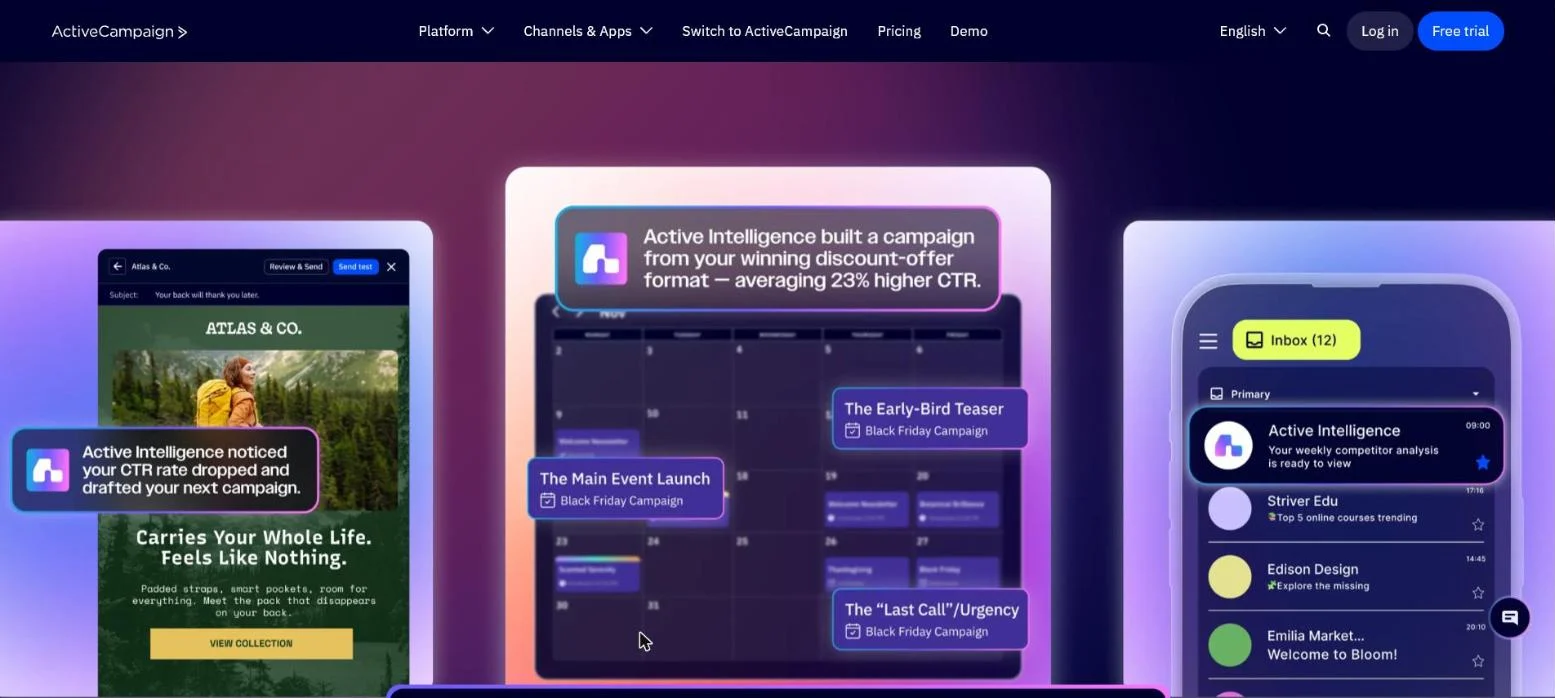 ActiveCampaign’s public homepage, October 2026. Its pitch: the tool spots a drop in engagement and drafts a follow-up campaign.
Pick one with our best marketing automation tools comparison.
When does re-engagement not pay off and should you write people off?
Not every inactive contact is worth it, and that advice is part of the deal.
A re-engagement flow has a final phase that’s often skipped: saying goodbye.
When do you pull the plug?
Three signs it’s time to let go
Watch for these:
- No response after the full series: a final “do you still want to stay?” email gives them the choice.
- Your list is too small anyway: work on list growth and a sharp offer first.
- They were never really leads: bought or poorly collected addresses only hurt your reputation.
With a handful of contacts, segmenting your list into active and inactive makes little sense.
Writing people off is hygiene
Writing people off isn’t a loss.
A list full of dead contacts drags down your deliverability, so even your active leads receive your emails less reliably.
Cleaning up therefore protects the people who do respond.
Gmail is strict about this.
Its email sender guidelines say to keep spam rates in Postmaster Tools “below 0.10% and avoid ever reaching a spam rate of 0.30% or higher”.
Watch out: if you send more than 5,000 messages a day to Gmail accounts, marketing messages must support one-click unsubscribe. A clean exit is a requirement, not a courtesy.
More fixes: our guide to improving email deliverability.
What should you steer on in a re-engagement campaign?
Not on opens as a goal in themselves.
A reactivated open that leads nowhere is interesting noise, not a result.
Measure what happens after the open
Steer on what happens afterwards:
- clicks to your site
- an enquiry or a scheduled demo
- a conversation with sales
Those are the signals that a dormant lead is genuinely moving again.
Feed them into your lead scoring, so sales sees who woke up.
Once someone is active again, they move back to a stage in your funnel.
HubSpot’s lifecycle stages show where that is:
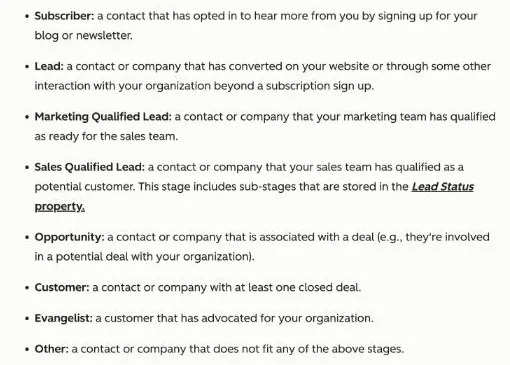 HubSpot’s lifecycle stage definitions, checked 18 October 2026. A reactivated contact re-enters as a lead, not straight as an SQL.
Set it against the cost of a new lead
So measure, per flow, how many inactive contacts you bring back to a concrete action.
Then set that against the cost of a new lead.
For example, say a new lead costs you 200 euros and your flow brings back 10 contacts to a demo request.
That’s 2,000 euros of acquisition you didn’t have to buy again.
Because reactivating an existing contact is almost always cheaper than acquisition, you only need to win back a small percentage to repay the effort.
Re-engagement is one stage of a longer journey.
Our guide to lifecycle email marketing maps the rest.
Sharpen the whole structure with our tips on email marketing in B2B.
Frequently asked questions about automating re-engagement
When is a B2B lead “inactive” enough to start a flow?
That depends on your sales cycle. Two weeks of silence is normal in B2B. A window of 60 to 90 days without opens or clicks is usually a better starting signal, so you don’t needlessly approach your active leads.
What is the quickest re-engagement tactic?
Resending the same email to non-openers with a different subject line. It only costs a new title and immediately delivers extra openers. It’s a good first step before you build a full series.
How many emails may a re-engagement series contain?
Better a handful of valuable emails over a few weeks than a barrage. Every email has to offer a fresh angle or a concrete piece of value, otherwise you push people towards the unsubscribe button.
Does re-engagement harm my sending reputation?
Only if you keep emailing contacts who never respond. That’s why writing people off is part of the flow: whoever stays silent after the whole series comes off the list. That protects deliverability for your active leads.
Does re-engagement work outside email too?
Yes. For stubborn non-openers, another channel sometimes works better, such as SMS (read almost instantly), a LinkedIn message or a targeted call from sales. Multichannel follow-up increases your chances of winning a dormant lead back.
Ready to win back your inactive B2B leads?
Dormant contacts aren’t dead weight. They’re lead capital you already paid for.
An automated re-engagement flow wins part of it back at a fraction of the cost of new leads, and cleanly writes off whoever is truly gone.
We’re a small team that moves fast. We treat email as a channel that has to deliver customers, not pretty open rates. Want to know which part of your list is still worth reactivating? Contact us and we’ll look at your inactive segment with you.
Free website scan
Enter your website and get an automatic scan within minutes, with concrete technical and SEO improvements. No sales pitch.
We only use your details for your scan. No spam, unsubscribe anytime.