
SEO
Disavow Links in Google: When and How to Use the Google Disavow Tool

Copy for AI
Disavowing links tells Google to ignore specific backlinks pointing to your site.
When do you need it? Almost never: hardly any site does.
The verdict: the Google disavow tool is a last resort for a manual action or a link scheme you can prove. It isn’t a maintenance task you run every quarter.
Google says as much itself: “In most cases, Google can assess which links to trust without additional guidance” (Google’s disavow help page).
New to backlinks and authority? Start with what SEO is and how it works.
What does disavowing a link actually do?
It asks Google not to count certain links when it assesses your site, and nothing more.
A backlink is a link from another website to yours. Google treats it as one signal of how trustworthy and relevant your page is.
Our explainer on backlinks covers that signal in detail.
Disavowing isn’t removing
You upload a file with domains or URLs. That file tells Google: “don’t count these links, in any direction.”
The links stay online on the source site; Google just ignores them when it looks at yours.
Three things a disavow doesn’t do:
- remove the link from the other website
- fix a ranking drop on its own
- lift a manual action without a reconsideration request
So read it as: pretend these votes don’t exist.
Do you need to disavow links at all?
Usually not: if you’ve never bought or commissioned manipulative links, you probably have nothing to disavow.
Why the tool exists
Google announced the disavow tool in October 2012. Back then it punished messy link profiles harder, and old aggressive link building could really hurt you.
Since then, Google has got far better at spotting worthless links and ignoring them by itself.
What Google’s help page says today
Google’s disavow help page sets two conditions. You should only disavow if both are true:
- You have a considerable number of spammy, artificial or low-quality links.
- Those links have caused, or will likely cause, a manual action.
The odd references from scraper sites, spam directories and copied pages don’t meet that bar. As a rule, they simply don’t count.
”Toxic” is a tool score, not Google’s verdict
Audit tools label links with scores like “toxic” or “spam”. Those are the tool’s estimates, not a ruling from Google.
Here’s an example from our own Ahrefs account. Our site has 401 referring domains, and Ahrefs tags two of them as spam:
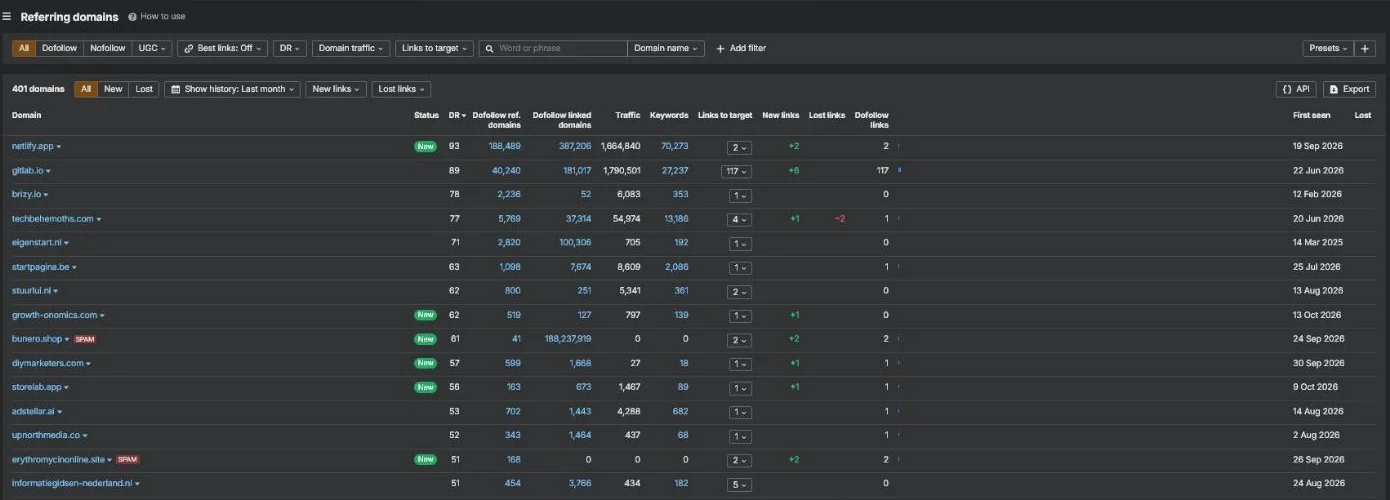 Referring domains for customerimpact.be in our own Ahrefs account, October 2026. The red SPAM tags are Ahrefs’ label, not a Google penalty.
That’s normal noise for any site that ranks. A spam tag is an invitation to look, not an order to disavow.
When does disavowing links make sense?
In two situations, and both involve links someone deliberately built to manipulate rankings.
Here’s the decision in one picture:
1. You have a manual action for unnatural links
A manual action is an explicit notice from a Google reviewer, not a suspicion.
It says Google found “a pattern of unnatural, artificial, deceptive, or manipulative links” to your site (Google’s manual actions help).
You’ll find it in Search Console under Security & Manual Actions, then Manual actions. A clean property shows “No issues detected”:
With a notice, you first get the worst links removed, then you disavow what’s left.
The action only goes away after a reconsideration request.
2. You can prove a pattern of self-made manipulative links
There’s no formal penalty, but you know the links are there. For example:
- a previous agency bought hundreds of links on irrelevant networks
- an old period of automated link building
Google’s spam policies name both as link spam. Our piece on buying backlinks explains that risk.
Disavowing is defensible here, but only if you can back up the pattern and aren’t guessing.
Intent and evidence decide
You act on links that you, or someone on your behalf, deliberately created to manipulate, not on random spam that showed up by itself.
Rule of thumb: when in doubt, doing nothing is almost always the safer choice.
How do you disavow links correctly?
In five steps, in this order: Google’s own help puts removal before disavowing, so the order matters.
Step 1: Inventory all your backlinks
You can’t judge links you haven’t listed.
Export them from Google Search Console and, optionally, from an external link tool.
Check the external total first:
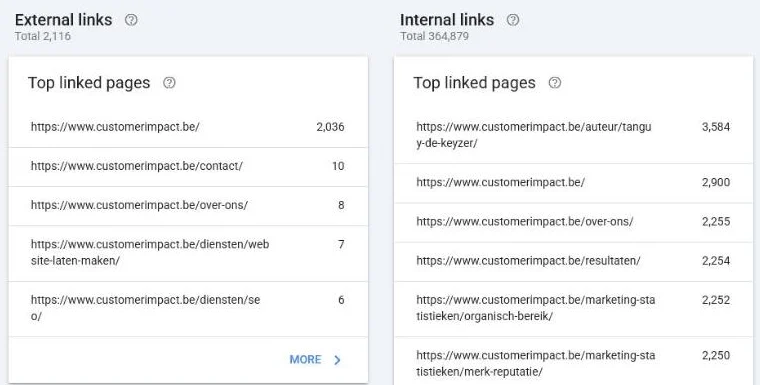 The Links report in our own Search Console for customerimpact.be. Scroll down to Top linking sites to see every referring domain.
That’s 2,116 external links for our site. Yet the Links report is only a sample, not every link Google knows.
Export limit: up to 100,000 rows of referring domains and links.
Our experience: Search Console was never built to monitor backlinks. Links come and go, and there’s a lot of spam in it.
That’s why we use Ahrefs to keep a closer eye on them.
Step 2: Judge each domain, not the tool score
Ask one question per suspicious domain: did I, or a supplier, place this link to manipulate rankings?
- Candidate: an irrelevant foreign-language site full of paid outgoing links
- Not a candidate: a news site that happened to cite you
- Not a candidate: a scraper copy of one of your articles
Work at domain level with the rule domain:example.com.
One line then covers every link from a junk domain.
Step 3: Try to get the links removed first
Google is clear on this: “First and foremost, we recommend that you remove as many spammy or low-quality links from the web as possible.”
So contact the source sites and ask them to take the link down or mark it nofollow.
Document every attempt.
In a reconsideration, Google wants proof that you really cleaned up.
Step 4: Build the disavow file
It’s a plain .txt file, encoded in UTF-8 or 7-bit ASCII. Put one domain or URL on each line.
Lines starting with # are comments for your own reference.
Here’s an example of the format, with made-up domains:
# Paid links from an old agency network, removal requested, no reply
domain:spam-network-example.com
domain:paid-links-example.net
https://old-directory-example.org/listing/123
Check three limits before you upload:
- Size: at most 100,000 lines and 2 MB
- Subpaths: you can’t disavow a subpath such as
example.com/en/ - Typos: one wrong domain name can block a good link
So double-check the list.
Step 5: Upload the file and wait
Upload the file in Google’s official disavow tool, one list per property.
The tool asks you to pick the property first:
The tool doesn’t support Domain properties.
Pick the URL-prefix property instead; http and https each need their own list.
Watch out: a new upload replaces the old list, so always upload the complete file.
There’s no button that says “done”. Google says it can take a few weeks to incorporate your list.
Got a manual action? Then click “Request Review” in the Manual actions report once you’ve cleaned up.
Explain what you removed and what you couldn’t.
Can you undo a disavow?
Yes: select the property in the tool and click “Cancel Disavowals” to remove the list.
But mistakes only take effect with a delay, so they’re hard to reverse quickly.
Treat the whole process with the caution of a database migration.
Frequently asked questions
Does Google still recommend the disavow tool?
Only for a narrow case: many spammy or artificial links that caused, or will likely cause, a manual action. For everything else, Google says it can work out which links to trust.
How long does a disavow take to work?
Google says it can take a few weeks to incorporate a new list. Rankings won’t change the day you upload.
Should I disavow the toxic links my SEO tool flags?
Not because of the score alone. Check whether you or a supplier built those links to manipulate rankings. If not, leave them.
Can I disavow links for a Domain property?
No. The disavow tool doesn’t support Domain properties, so you upload per URL-prefix property, with separate lists for http and https.
So should you disavow your links?
Probably not: disavowing is a sharp instrument for a rare problem.
When people ask us “shouldn’t we disavow these toxic links?”, the answer is usually no. Google already ignores them, and a careless disavow does more harm than good.
That energy pays off more in new, relevant links and strong content.
Our list of link building mistakes shows where effort usually leaks.
At Customer Impact, SEO isn’t a set of isolated tricks.
It’s the acquisition layer of one growth engine, built for pipeline rather than vanity rankings.
A healthy link profile is part of that, and you build it by earning authority, not by nervously cutting links away.
If an seo company adds value anywhere, it’s with this kind of call: judging calmly whether to act, and doing it right if so.
Not sure whether your profile has a real problem or a tool is just scaring you? Get in touch and we’ll go through your Search Console data with you first.
Free website scan
Enter your website and get an automatic scan within minutes, with concrete technical and SEO improvements. No sales pitch.
We only use your details for your scan. No spam, unsubscribe anytime.