
SEO
Log File Analysis Tools Compared: Screaming Frog, Oncrawl, JetOctopus

Copy for AI
The best log file analysis tool depends on your log volume and goal.
Need a one-off snapshot, or continuous monitoring? That question decides more than any feature list.
The verdict: start free with Crawl Stats and Screaming Frog. Only pay for Oncrawl or JetOctopus at millions of URLs.
How we tested: prices come from each vendor’s own pricing or product page, checked on 18 October 2026, in the currency the page showed. The Crawl Stats screenshot is from our own Search Console for customerimpact.be.
No vendor pays us to be listed.
Which log file analysis tool fits which site?
Here’s the side-by-side answer:
| Tool | Best for | Free option | Paid from |
|---|---|---|---|
| Google Search Console Crawl Stats | A free first look at Googlebot activity | Fully free | Free |
| Screaming Frog Log File Analyser | One-off deep dives on a desktop | Free up to 1,000 log events | $139 per year |
| Oncrawl | Segmented crawl, log and ranking data at scale | Demo on request | Not published |
| JetOctopus | Continuous log monitoring for millions of URLs | 7-day trial | Growth from $349/mo (billed annually) |
The price gap between the desktop tool and the cloud platforms is huge. Here it is per year:
The jump from a desktop licence to a cloud platform is about thirty times.
Make sure your site needs it.
Why log files beat crawl tools
Log files are the most honest SEO data you have.
A crawl tool shows how a search engine could read your site. A log file shows what Googlebot actually did: which URLs it requested, how often and which status code it got.
On a B2B site with hundreds of thousands of URLs, that’s the difference between guessing and steering.
New to the topic? Read what SEO is or the method in log file analysis for SEO.
Why does log file analysis become essential at scale?
Because Googlebot has a finite crawl budget per site, and big sites burn through it.
With a few hundred pages, everything gets crawled quickly and often.
Where big sites leak crawl budget
Large sites multiply URLs fast. For example:
- faceted navigation and filters
- paginated listings
- internal search results
- near-identical product variants
If the bot wastes time on those, your important pages get fewer visits and slower indexing.
Questions only log files answer
A log file analysis answers questions no crawl tool can:
- What share of crawls hits pages that sell?
- Are key category and solution pages crawled often enough?
- Which URLs keep returning 404s or 301 chains?
- How fast does Google pick up new pages?
That ties straight into crawl budget and crawl stats and your website architecture for SEO.
Log files are the evidence; the architecture is the lever.
AI agents now show up in the logs too
We run a lot of log file analysis, mostly for bigger companies.
They want to see how AI uses their site, both for training and for answering questions.
Our finding: the number of AI agents visiting websites grows significantly year over year.
Watch out: separating humans from agents is the hard part. Humans leave a navigation fingerprint, so we check whether a session’s path falls far outside the human range.
We also check origins: many Claude Code agents, for instance, are launched from Singapore.
Some agents even get tracked as users in GA4, so exclude them properly.
Our guide on whether to allow AI crawlers covers the robots.txt side.
Which log file analysis tools are worth it?
Four tools cover almost every situation, from free to enterprise.
1. Google Search Console Crawl Stats (the free first look)
Best for: checking whether Googlebot has a crawl problem before you touch raw logs.
Biggest strength: Googlebot activity per response code, file type, purpose and bot type, with zero setup.
Price: free.
Watch out: it covers Googlebot only, with example URLs instead of every hit.
Here’s the report for our own site. Look at the breakdown by response at the bottom:
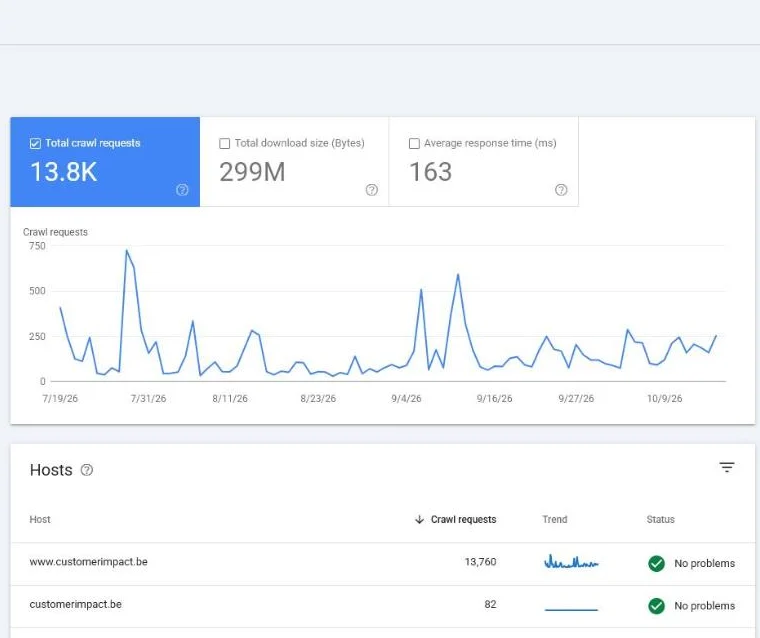 Crawl Stats in our own Search Console. It shows Googlebot’s requests per response code, but not per URL over time: for that you need the raw logs.
Crawl Stats sits under Settings in Search Console, not in the main menu.
Google’s own Crawl Stats help page calls it a report for advanced users, and adds that sites under a thousand pages typically don’t need it.
It shows total requests, download size and average response time, split by response, file type, crawl purpose and Googlebot type.
Tip: when indexing slows down, open this first. Within a minute you’ll see whether it’s server errors, redirects or too few crawl requests.
| Pros | Cons |
|---|---|
| Free and already there | Only Googlebot, no other bots |
| Breakdown by response, file type and purpose | Example URLs, not every hit |
| Host status flags availability problems | Only for root-level properties |
Alternative: Screaming Frog Log File Analyser, once you need every hit per URL.
2. Screaming Frog Log File Analyser (the desktop starter)
Best for: SEO teams that want to learn log analysis or run a one-off deep dive.
Biggest strength: price and privacy, because your logs stay on your own machine.
Price: free up to 1,000 log events. A licence costs $139 a year, as shown on the product page on 18 October 2026.
Watch out: large log files strain your working memory, and you import them by hand.
It’s the separate sibling of the well-known crawler. Here’s how its product page presents it:
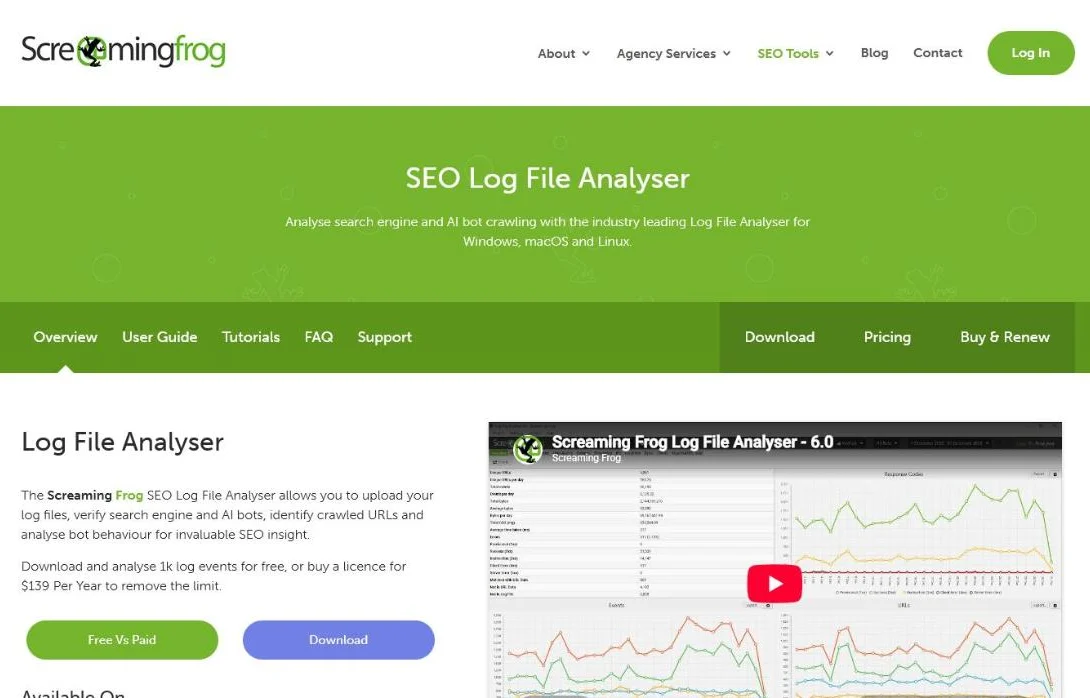 The Log File Analyser is a separate product from the SEO Spider. It verifies search engine bots and runs on Windows, macOS and Linux.
You import log files, and it summarizes hits per URL, bot and status code.
It verifies search engine bots and shows the most and least crawled URLs.
It also finds orphan URLs.
Pair it with an SEO Spider export to see crawl data next to real bot visits, the logical step after a technical SEO audit.
But it’s a desktop tool, and you notice that at scale.
An enterprise site’s logs quickly run into many gigabytes per month.
Fine for one deep analysis, too limited for permanent oversight of a large site.
| Pros | Cons |
|---|---|
| Cheap licence, free version to learn | Desktop memory limits on big logs |
| Logs stay local, no cloud setup | Manual log collection and import |
| Combines with SEO Spider crawl data | Built for snapshots, not monitoring |
Alternative: JetOctopus, when the logs outgrow your laptop.
3. Oncrawl (segmentation and data linking)
Best for: large sites with clear page templates that want crawl, log and ranking data per segment.
Biggest strength: grouping URLs into segments and comparing crawl frequency with organic performance.
Price: not published. Oncrawl works with a demo and a quote (log analyzer page, checked 18 October 2026).
Watch out: it needs budget, a log pipeline and someone who reads the data.
Oncrawl now pitches its log analyzer on AI bots as much as on Googlebot. Read the subheadline:
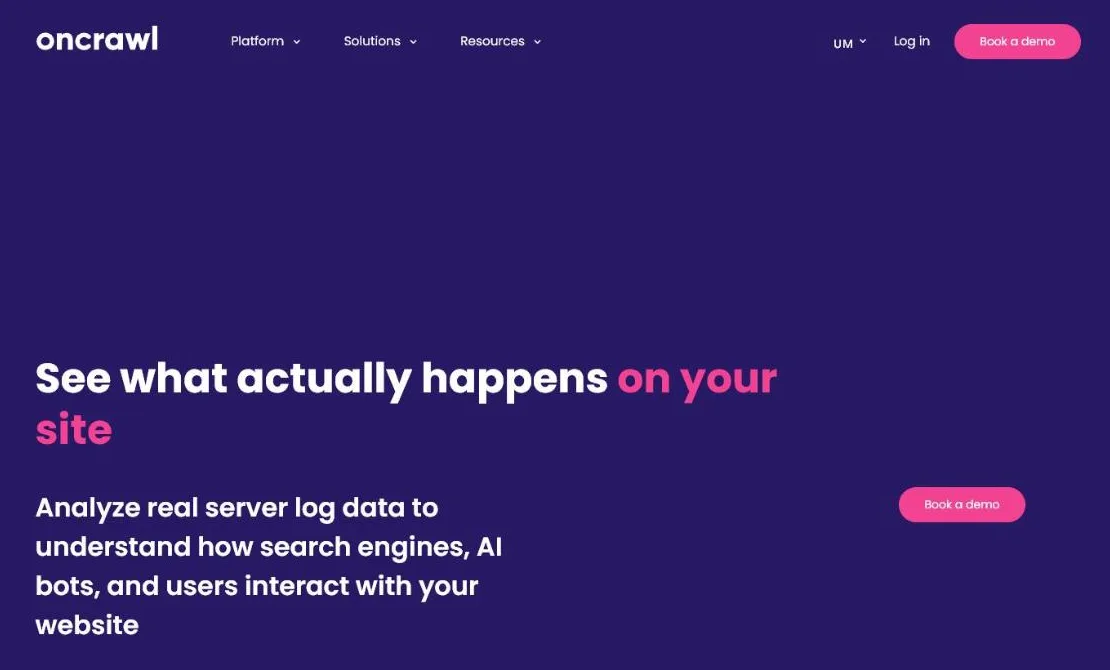 Oncrawl’s log analyzer page, 18 October 2026. Pricing only comes after you book a demo.
Oncrawl is a cloud SEO platform that combines crawl data, log files, rankings and Search Console data.
You group URLs on logic you choose, such as category, template, language or folder depth.
Then you see crawl frequency and rankings per segment.
Its AI bots dashboard tracks crawlers from OpenAI, Perplexity, Claude, Gemini and Mistral, and separates AI training bots from AI user bots.
The catch: you have to build log collection first, often via a continuous feed. This isn’t a tool you switch on in an afternoon.
| Pros | Cons |
|---|---|
| Strong segmentation by template or folder | Price only on request |
| Logs, crawl and rankings in one place | Needs a log pipeline to be set up |
| AI bot monitoring next to Googlebot | Learning curve for non-technical teams |
Alternative: JetOctopus, if you want published prices and a self-serve trial.
4. JetOctopus (continuous monitoring at scale)
Best for: very large sites that follow crawl patterns continuously instead of snapshot by snapshot.
Biggest strength: processing speed with millions of URLs and log lines.
Price: Growth from $349 a month billed annually ($459 otherwise), with 2 million log lines a month. Every plan includes the log analyzer, and there’s a 7-day trial (pricing page, checked 18 October 2026).
Watch out: the monthly cost adds up for mid-size sites, and plans cap log lines.
JetOctopus publishes its prices, which is rare in this category. Check the log lines per plan:
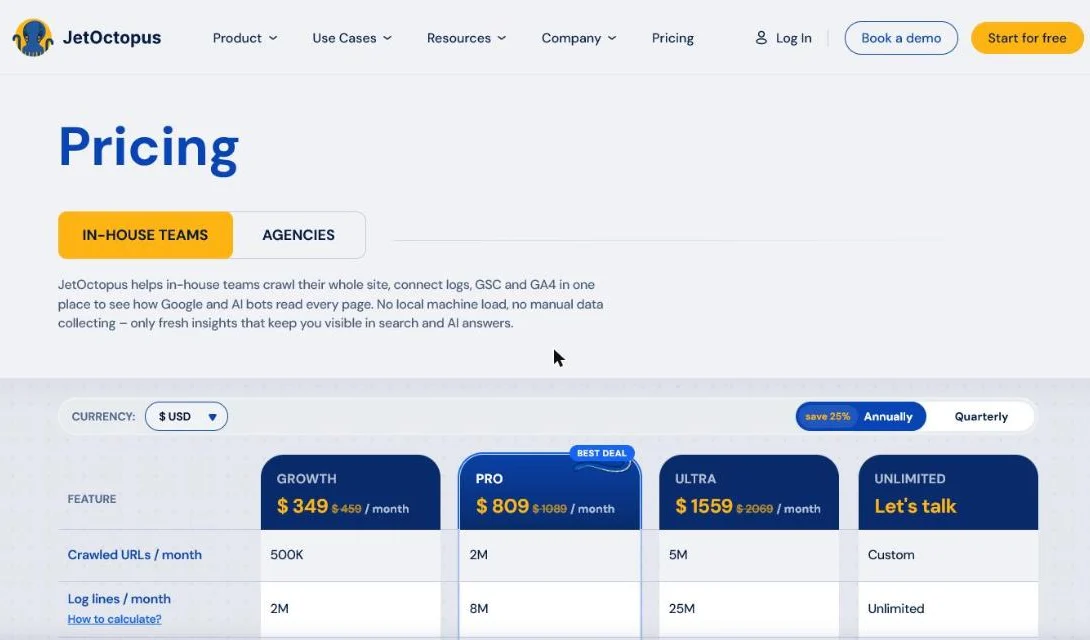 JetOctopus publishes its prices and includes the log analyzer in every plan. Log lines per month set the plan you need.
It plays in the same cloud category as Oncrawl: a crawler, log analysis and Search Console in one.
It’s built to keep log monitoring running continuously.
The interface links crawl frequency, indexation and positions without pivot tables.
But here too, value depends on the setup.
You need server log access and someone who keeps the feed running.
Without someone to prioritize, you’ll drown in dashboards.
| Pros | Cons |
|---|---|
| Published prices, log analyzer included | Monthly cost adds up for mid-size sites |
| Handles millions of log lines | Plan limits on log lines per month |
| Self-serve 7-day trial | Value depends on a reliable log feed |
What do log files typically expose on a large site?
The same four patterns show up, whichever tool you pick.
Knowing them tells you if a tool moves you forward or just draws graphs.
Crawl waste on parameter URLs
Filters, sort options and session IDs multiply your URL set.
In the logs, Googlebot spends hours on variants you never want to rank.
A good tool groups those URL families, so the leak’s size shows at once.
Orphan pages Google never visits
Pages deep in the structure with few internal links don’t show up in your logs.
No bot visit means slow indexation, or none. That’s an architecture problem, not a content problem.
Status codes that swallow budget
Chains of 301 redirects, 404s and the odd 5xx error mean the bot is hitting dead ends.
At scale, that adds up fast.
Skewed crawl per template
Do blog articles get ten times more bot visits than your solution pages? Then Google crawls the wrong half of your site most.
You’ll only see that in the logs.
Each pattern links to a fix: catching parameters, steering internal links, cleaning up redirects.
Our guide to optimizing crawl budget on a large site covers them.
The tool shows the pattern; solving it touches your whole technical SEO.
How do you choose between these tools?
Not by the longest feature list. Three plain questions decide it:
1. How much data do you really process?
If monthly logs run into tens of gigabytes and URLs into the millions, a desktop tool stalls. You’ll end up with Oncrawl or JetOctopus.
Well below that? Start with Crawl Stats, then Screaming Frog.
2. Snapshot or continuous oversight?
A one-off hunt for crawl waste works fine on a desktop tool.
Weekly monitoring of how Google reacts to changes needs a cloud platform with a fixed data pipeline.
3. Who reads the report, and acts on it?
This is the decisive question, because a tool only delivers the diagnosis.
Moving crawl budget to money pages, cleaning up parameters and strengthening internal links is human work. Without an owner, every licence is wasted.
| Your situation | Tool |
|---|---|
| Under a few thousand URLs | Crawl Stats in Search Console is usually enough |
| First log analysis, one-off audit | Screaming Frog Log File Analyser |
| Large site with clear templates, team to act on it | Oncrawl |
| Millions of URLs, continuous monitoring | JetOctopus |
Where most enterprise sites get stuck
The data is there and the platform runs.
But nobody turns the patterns into fixes that produce pipeline.
That’s the work of an SEO specialist: a priority list from your logs, steered on leads instead of green checkmarks.
For the wider toolset beyond logs, see the best SEO tools.
Frequently asked questions
What is the best free log file analysis tool?
Start with Crawl Stats in Google Search Console: it is free and shows Googlebot’s requests by response code, file type and purpose. For real log lines, Screaming Frog Log File Analyser has a free version for up to 1,000 log events.
Do small sites need log file analysis?
Rarely. Google’s own Crawl Stats documentation says sites with fewer than a thousand pages typically do not need that level of crawl detail. Log analysis pays off on large sites with faceted navigation, many templates or indexing problems.
Can log file analysis show AI bots?
Yes. Raw server logs record every crawler, including AI bots, and Oncrawl’s log analyzer has a dedicated AI bots dashboard. Search Console’s Crawl Stats only covers Googlebot.
What is the difference between a crawler and a log file analyser?
A crawler like the SEO Spider simulates how a bot could move through your site. A log file analyser reads what bots actually requested from your server. You need both to find pages that exist but never get crawled.
From log data to growth
Log analysis shows whether Google spends its attention on your key pages, or wastes it on noise.
Rule of thumb: Screaming Frog for the first deep dive, Oncrawl or JetOctopus for oversight at scale.
Want us to read your enterprise logs, Googlebot and AI agents alike? Get in touch and we’ll show where your crawl budget leaks today.
Free website scan
Enter your website and get an automatic scan within minutes, with concrete technical and SEO improvements. No sales pitch.
We only use your details for your scan. No spam, unsubscribe anytime.