
Data & Tracking
AI in Google Analytics 4: what the Analytics Advisor does and does not do for you

Copy for AI
AI in Google Analytics 4 is an assistant, not an autopilot.
It comes in two kinds. Diagnostic AI tells you what’s happening now and what stands out. Predictive AI tries to guess what a visitor will do next.
The verdict: use the diagnostic side, such as the Analytics Advisor, every week. Ignore the predictive side unless you have e-commerce volume.
That second part rules out most Belgian B2B sites. Below, we show where the line sits and what to do instead.
AI helps you see faster where to look. It doesn’t decide for you.
Which kinds of AI are inside Google Analytics 4?
Two, and they do completely different jobs.
Diagnostic AI looks back
Diagnostic AI searches your existing data and points out what stands out.
Think of the Analytics Advisor and the automated insights. They compare periods and report deviations.
Google files these under Analytics Intelligence, “a set of features that uses machine learning and conditions you configure” (Google’s help on insights).
Predictive AI looks ahead
Predictive AI (predictive metrics) assigns a probability to future behaviour.
For example, the chance that someone will buy within seven days, or drop off instead.
Google introduced these predictive capabilities in Google Analytics as an addition to the standard reports.
Why the difference matters
Diagnostic AI already works on your account today, whatever your size.
Predictive AI needs a minimum amount of training data before it kicks in at all.
Here’s the split at a glance:
| Diagnostic AI | Predictive AI | |
|---|---|---|
| Examples | Analytics Advisor, automated insights | Purchase probability, churn probability, predicted revenue |
| Looks at | The past and the present | The next 7 to 28 days |
| Data needed | Any working property | 1,000 positive and 1,000 negative returning users |
| Useful for B2B? | Yes, from day one | Rarely |
New to the measurement model behind all this? Read our piece on GA4 first.
Wondering whether to manage this yourself or outsource Google Analytics? We come back to that at the bottom.
What does the Analytics Advisor actually do?
It reads your property’s data and answers in plain language.
Google calls the Analytics Advisor “an agentic conversational experience in Google Analytics”, powered by Gemini models (Google’s Analytics Advisor help page). It’s still in beta.
What you can ask it
According to that help page, the Advisor can:
- surface high-level performance insights
- build visualizations for specific metrics and events
- diagnose the cause of a drop or a spike
- give step-by-step “how to” guidance
You open it with the Ask Advisor icon at the top right of your property.
Watch out: the property’s selected language must be English for now. Google says other languages are planned.
The automated insights
The older “Insights” feature runs alongside it. GA4 “detects unusual changes or emerging trends in your data and notifies you automatically”.
You’ll find them on the Home page and under “View all insights”.
You can also add up to 50 custom insights per property, with email alerts.
Set up one custom insight for leads
Automated insights watch everything. A custom insight watches the one number you care about.
Here’s a setup we’d start with:
- Open the Insights dashboard via “View all insights” (Editor or Administrator role).
- Create a custom insight on your lead key event, such as
generate_lead. - Pick the “Has anomaly” condition, so GA4 decides what counts as unusual.
- Add an email alert for the people who act on leads.
For example, say demo requests drop sharply on a Tuesday. You hear it that day, not at the end-of-month report.
Rule of thumb: one alert on leads beats ten alerts on pageviews.
What an insight looks like
A typical insight reads: “Pageviews from organic search +47% versus last week” (see how Google Analytics 4 uses AI to enhance your marketing data).
So you don’t just get a number. You get a comparison with context: what moved, on which channel, and by how much.
That’s useful for three reasons:
- you spot deviations faster than by leafing through reports
- it focuses your attention on what changed
- you can ask follow-up questions without building a report
Where it goes wrong
A rise in pageviews is a vanity metric on its own: nice to look at, only valuable once visitors do something that counts.
The Advisor shows you the way; you judge whether it holds up.
So tie every insight to your real goals and your conversion rate.
Do the predictive metrics in GA4 work for my company?
Usually not, and this is where many B2B companies hit a wall.
The four predictive metrics
Google Analytics 4 offers predictive statistics. Google’s predictive metrics help page lists four:
- Purchase probability: a key event within the next 7 days
- Churn probability: no activity in the next 7 days
- Predicted revenue: purchase revenue over the next 28 days
- In-app purchase probability: for apps only
The threshold
To train them, Google needs at least 1,000 returning users who showed the behaviour. It also needs at least 1,000 who didn’t.
Both counts must fall in a seven-day period within the last 28 days. And model quality must hold over time.
There’s a second catch. Purchase probability and predicted revenue need a purchase or in_app_purchase event, with value and currency set.
A B2B site that tracks a generate_lead event doesn’t fit that mould at all.
Do the maths
For example, say a Belgian B2B service provider gets 250 quality leads a month.
That’s far from 1,000 conversions in 28 days.
And you’d still need 1,000 negative examples on top.
The result: predictive metrics stay empty or never become available.
That isn’t a mistake in your setup.
It’s simply how the model works.
Who they’re built for
Predictive metrics fit sites with many, frequent and similar conversions. Think e-commerce with thousands of transactions.
They don’t fit a B2B funnel with long sales cycles and low volumes.
Our stance: don’t pretend. We sometimes see proposals for “AI-driven audiences” based on purchase probability, on accounts that never reach the threshold. That’s selling smoke.
What works instead
Build usable audiences on purchase intent rather than volume.
Our guide to remarketing with Google Analytics shows how to segment smartly.
For the rest, you need solid first-party data and clear events:
- Events: a clean event tracking plan for forms, calls and demos
- Key events: the GA4 conversions that mark a real lead
- Lead value: what a lead is worth, which our lead value calculator helps you estimate
Diagnostic AI plus your own conversion tracking gets you further than a prediction that never kicks in.
Need a score per lead? Then predictive lead scoring in your CRM is the better home for it.
You can ladder leads through clear stages, as HubSpot does:
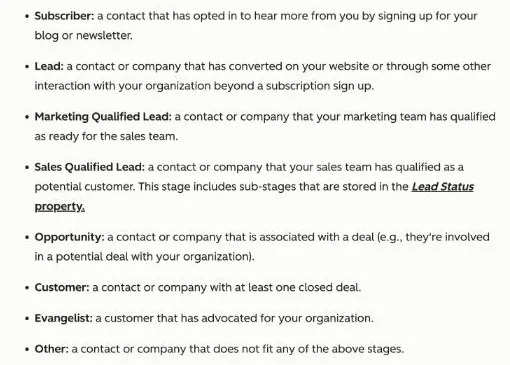 HubSpot’s lifecycle stage definitions, checked 18 October 2026. CRM stages tell you more about lead quality than a GA4 probability score.
How do you use AI in GA4 without fooling yourself?
Treat it as an accelerator, not a decision maker.
Four working rules
These principles keep the AI honest:
- Look faster, don’t think less. An insight is a question, not an answer.
- Skip empty features. No volume means no predictive metrics.
- Ask a customer question. Does this channel deliver real leads?
- Keep a human in the loop. AI sees patterns, not your context.
“Organic +47%” means: go investigate. It doesn’t mean: pop the champagne.
Spikes need context
A spike can be a successful campaign or a bot attack.
You make that distinction.
Here’s a small source in our own property. Look at the single-day peak in early September:
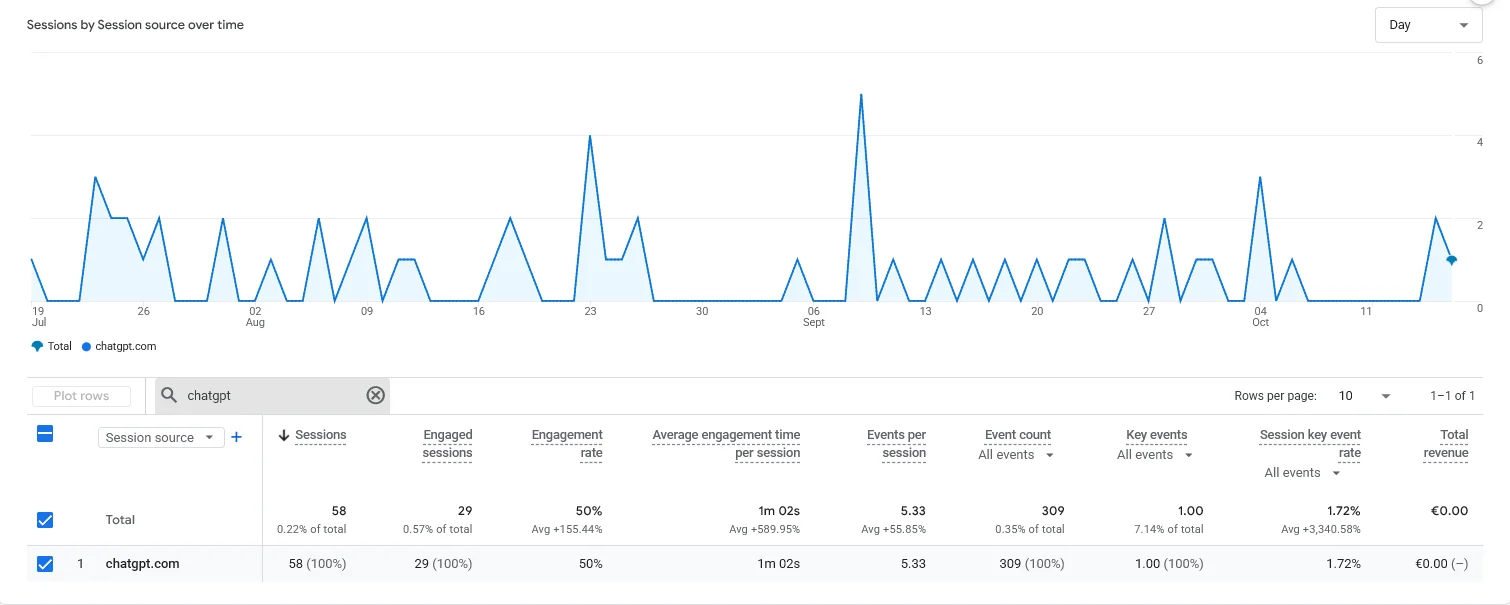 GA4 Traffic acquisition in our own property, last 90 days, October 2026: 58 sessions from chatgpt.com, with one day at 5.
An AI insight would flag that day.
Only a human can check what was published or shared that week.
Our guide to tracking ChatGPT traffic in GA4 shows how to set up that view.
Watch for polluted data
A polluting spike is often referral spam in Google Analytics. Learn to recognise and filter it.
Our experience: some AI agents get tracked as user traffic in GA4. Exclude them properly, or the AI will happily “explain” bot visits to you.
Where this fits
Data is only valuable if it leads to a better decision.
Starting from scratch? Follow our setup guide for Google Analytics 4 for B2B.
Want it set up and monitored for you? Look at our data & analytics service. We configure GA4 around your leads and revenue, not around features that happen to exist.
Not sure your current data is clean? A tracking audit checks it first.
Frequently asked questions about AI in Google Analytics 4
Is the AI in GA4 free?
Yes. The diagnostic functions such as the Analytics Advisor and automated insights are part of standard GA4 at no extra cost. Predictive metrics are free too, but only calculated if your account meets the data thresholds.
Why do I not see any predictive metrics in my account?
Usually because you don’t have enough conversions. GA4 needs at least 1,000 returning users who showed the behaviour and 1,000 who didn’t within 28 days. Many B2B sites never reach that.
Can I blindly trust the insights the AI shows?
No. Treat an insight as a pointer to where you should look, not as a conclusion. Google itself says the Advisor can make mistakes, and it doesn’t know your business context.
Does AI in GA4 replace a data analyst?
No. AI speeds up spotting patterns, but interpretation, choosing the right KPIs and linking them to revenue remain human work.
Can GA4 predict which customers will churn?
Only with consumer-scale volume. For B2B accounts, churn prediction built on CRM and usage data works far better than GA4’s churn probability.
Want to set up GA4 around customers instead of features?
AI in Google Analytics 4 saves work, as long as you use the features that fit your volume.
We set up GA4 so you measure leads, channels and revenue, not empty predictions.
Contact us and we’ll start with a look at what your property measures today.
Free website scan
Enter your website and get an automatic scan within minutes, with concrete technical and SEO improvements. No sales pitch.
We only use your details for your scan. No spam, unsubscribe anytime.