
SEO & GEO
ChatGPT in your Google Analytics: how to track ChatGPT traffic in GA4 and see the leads it really brings

Copy for AI
You open Google Analytics, filter on referrals and suddenly there it is: chatgpt.com as a source. Nice, you think, but then comes the real question: how many leads am I actually getting out of ChatGPT? And why so few, when your gut says customers are finding you through AI more and more often? That gut feeling is right, and your report is not lying, it simply shows only a fraction of the real picture.
In this article we show why AI traffic is so hard to measure, how to track ChatGPT traffic in GA4 by building a clean channel group for AI sources, and how to close the blind spots. Practical, no fluff.
Why you almost always underestimate your ChatGPT traffic
Most people look at the referring sources, see a handful of sessions from chatgpt.com and conclude: “AI isn’t bringing me anything yet.” That is a logical conclusion, but a wrong one.
Here’s our own GA4 for the last 90 days (19 July to 16 October 2026), Traffic acquisition filtered on session source “chatgpt”:
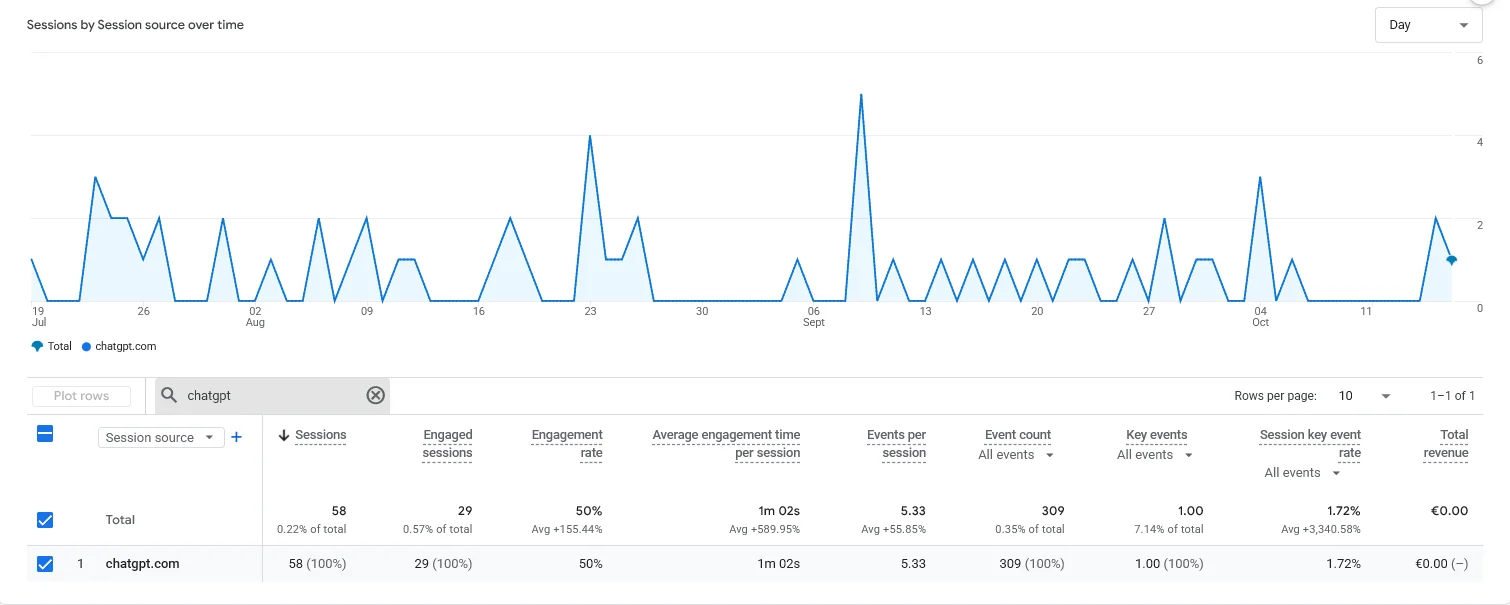 Our chatgpt.com referrals: 0.22% of sessions, yet 7.14% of all key events, with engagement far above the site average.
58 sessions looks like nothing. But those visitors stay a minute on average and produced one of our 14 key events in that period. Tiny volume, high intent. And that’s only the part that arrives with a referrer.
The problem lies in how traffic is passed along. When someone clicks your link in an AI answer, the browser ideally passes a referrer, the web address the click came from. GA4 uses that referrer to determine the source. But with AI tools, that often goes wrong:
- The free ChatGPT app in many cases sends no recognisable referrer.
- Clicks from a desktop app or a mobile app lose the referring source entirely.
- Some answers open links via an intermediate step, which wipes out the trail.
The result: a large share of your real AI traffic does not end up under Referral, but under Direct. And Direct is exactly the corner marketers never look at, because they assume it is “people typing in the address”.
In short: what you see in the referral report is the visible tip. The rest is hidden. A growing share of B2B buyers today orients themselves with an AI assistant first, before they ever type a company name, so that hidden layer becomes more important every quarter.
Why does traffic from ChatGPT show up as direct traffic?
This is the question marketers ask most often, so let’s answer it head on. Traffic from ChatGPT shows up as direct traffic because the referrer is missing at the moment the visitor enters your site.
GA4 applies a simple rule: no recognisable source, no campaign tag, then the session falls back to the Direct channel. That happens with, among others:
- the free version of ChatGPT, which cites privacy reasons for not leaking a referrer;
- clicks from the ChatGPT desktop app or the mobile app, where no classic browser referrer exists;
- visitors who copy and paste your link into a new tab.
The paid version and the web interface more often do pass chatgpt.com as a referrer, which is why you sometimes do see that source. But you only see the part that labels itself neatly. If you want the full picture, you have to measure actively instead of waiting.
How do I set up a channel group in GA4 for AI traffic from ChatGPT, Perplexity and Gemini?
Good news: GA4 lets you create a custom channel group that bundles all AI sources into one recognisable line. No more puzzling source by source.
Step 1: create a custom channel group
In GA4, go to Admin and choose Channel groups under the property. Create a new group, for example “AI search engines”, and put it at the top so your rule is applied first.
Step 2: add a new channel with a regex
Within that group, create a channel called “AI Search” and set the condition to Source matches regex. Use a pattern that catches the known AI sources:
chatgpt|chat\.openai|openai|perplexity|gemini|bard|copilot|claude|you\.com|bing.*chatWith this regex you bundle ChatGPT, Perplexity, Google Gemini, Microsoft Copilot and related sources in one go. Place the channel at the top of the group, otherwise another channel might pick up the session first.
Step 3: check and wait for data
Good news: custom channel groups apply to your reports retroactively, so your AI channel shows history straight away. Two exceptions: audiences only fill from the moment you create the group, and if you make it your primary channel group, that dimension only changes for future data. Also build an exploration (Exploration) in which you put session source, channel and conversions side by side, so you can see per AI source how many leads are coming in.
If you want to dig deeper into which competitors show up in the same answers, also read our guide on benchmarking competitors in AI search results.
I see chatgpt.com as a referring source, how do I measure how many leads I really get from ChatGPT?
The channel group captures the visible traffic. But to know how many leads AI really delivers, you connect that traffic to your conversions. Do this in three layers.
Layer 1: link conversions to the AI channel. Mark your most important actions as key events: a completed contact form, a quote request, a downloaded guide. Then filter your report on the “AI search engines” channel group and you immediately see how many of those conversions come from AI sources.
Layer 2: close the Direct gap. Because part of your AI traffic sits in Direct, compare the landing pages. Do you see an unusual spike of Direct traffic on a deep, specific page (not the homepage)? That is rarely someone typing in the address. That is often an AI referral in disguise.
Layer 3: use UTM tags where you have control. Have you placed links yourself that AI tools can pick up, for example in a source document or a widely read Reddit post? Then give them UTM parameters. That way the traffic comes in neatly recognisable. Our GEO strategy for getting found via ChatGPT goes deeper into that source placement.
What you can reasonably expect from AI measurement
Sharpen your expectations and you avoid disappointment. What you can expect:
- A trend that shows whether your AI traffic is rising month after month.
- Insight into which pages AI tools recommend most often.
- A floor for your AI leads: the real number is almost always higher.
What you should not expect: a perfect dashboard that adds up to the last decimal. That does not exist yet, and anyone who promises it is selling false certainty. Measuring here is a compass, not a scale.
If, beyond the traffic, you also want to track your visibility in the answers themselves, look at measuring AI share of voice and the available AI visibility tools. They complement your GA4 data with what happens before the click.
Measuring is half the job, getting found is the other half
A clean channel group tells you what AI delivers. But if you barely appear in AI answers, that number stays low, no matter how well you measure. That is why measurement always goes hand in hand with GEO, generative engine optimization: making sure AI search engines mention and recommend your brand.
Start with the basics in our GEO guide for 2026 and, if you want to tackle it thoroughly, the ultimate GEO handbook. Do you mainly want to score in one specific assistant? Then our pages on getting found in ChatGPT and getting found in Perplexity will take you further.
Frequently asked questions
Why does traffic from ChatGPT show up as direct traffic instead of as a referral?
Because the referrer is missing. Free ChatGPT, the desktop and mobile apps and copied links pass no recognisable source, so GA4 puts the session under Direct. That is why you should compare suspicious Direct spikes on deep landing pages: that is often hidden AI traffic.
How do I set up a channel group in GA4 for AI traffic from ChatGPT, Perplexity and Gemini?
Create a custom channel group via Admin, add a channel with the condition “Source matches regex” and use a pattern that catches chatgpt, perplexity, gemini, copilot and related sources. Put that channel at the top of the group so it matches first.
I see chatgpt.com as a referring source in Google Analytics, how do I measure how many leads I really get from ChatGPT?
Link your key events (forms, requests, downloads) to the AI channel group, close the Direct gap through landing page analysis and use UTM tags on links you place yourself. Together those layers give a reliable direction, even though the number stays a floor.
Is it true that my real ChatGPT traffic is higher than GA4 shows?
Almost certainly. Because of the missing referrers, you only see the neatly labelled part. Assume your actual AI impact is bigger than the referral report suggests, and use your measurement as a trend, not as an exact final number.
Does measuring AI traffic still make sense if SEO is changing because of AI anyway?
Definitely. Whether SEO is dead because of AI is a fair question, but the short answer is that it is shifting, not disappearing. That is exactly why you want to measure now where your future leads come from.
Get started with measuring and getting found
Tired of guessing what AI search engines bring you, and above all: do you want to see that number grow? We help you make the measurement watertight and build your visibility in ChatGPT, Perplexity and Google AI Overviews. Strategy, GEO, SEO, lead gen and tech under one roof, honest and approachable.
Discover what a GEO agency can do for you, or contact us right away. We are a small team, so we move fast and often do more than you expect.
Free website scan
Enter your website and get an automatic scan within minutes, with concrete technical and SEO improvements. No sales pitch.
We only use your details for your scan. No spam, unsubscribe anytime.