
Advertising
LinkedIn Conversation Ads and Sponsored Messaging: straight to the inbox

Copy for AI
LinkedIn Conversation Ads are ads that land straight in your prospect’s LinkedIn inbox.
Together with Message Ads they form Sponsored Messaging, with a pricing model of their own: you pay per message sent.
The verdict: it’s a strong MOFU format for nurturing a sharp, known audience towards a meeting or a demo. For cold, broad reach you’re better off staying away.
Because of the GDPR, reach in the EU/EEA is also limited to members who explicitly opted in.
Below: how it works, how to write the messages and when it’s worth the effort.
Check your returns: see whether your ads are profitable with the free ROAS calculator.
What are LinkedIn Sponsored Messaging and Conversation Ads?
Sponsored Messaging is a separate ad format within LinkedIn Ads.
It’s distinct from Sponsored Content (the posts in the feed) and Text Ads. Our overview of LinkedIn ad formats puts all of them side by side.
Instead of competing for attention in a crowded timeline, you deliver a personalised message into your prospect’s inbox. It looks like a real LinkedIn message, with a sender, a subject and a button.
Two variants: Message Ads and Conversation Ads
Within this format there are two variants:
- Message Ads (formerly Sponsored InMail): a single message with one clear call to action.
- Conversation Ads: a branched message with multiple choice buttons, like a mini chatbot.
With Conversation Ads the recipient decides which path to follow, such as more information, a case study or a demo request.
LinkedIn launched this format as a message-based ad type that combines multiple calls to action in a single conversation.
You pick the format when you create the campaign in Campaign Manager:
You pay per send, not per click
The difference with regular LinkedIn advertising in the feed is fundamental.
Here you don’t pay per click or per thousand impressions, but per message sent (cost-per-send). That changes the logic completely.
Every message sent costs money, so every recipient has to be relevant.
Do LinkedIn Conversation Ads work in Belgium and the EU?
Only for members who opted in. Ask this before you invest time, certainly if your audience sits in Belgium or the rest of Europe.
The GDPR opt-in filter
Because of the GDPR, LinkedIn doesn’t simply deliver Sponsored Messaging to members in the EU and the European Economic Area.
LinkedIn’s help states it plainly: “Only EEA and Switzerland members who opted in to see Sponsored Messaging ads in their LinkedIn inbox will receive these ads” (LinkedIn: create message ads).
Anyone who didn’t give that consent simply never sees your message.
What that means in practice
Two things follow:
- Lower reach: a large part of your Belgian or European audience is unreachable through this format.
- Fewer formats: certain sub-formats, such as Conversation Starter Ads, aren’t available in the EU, the EEA and Switzerland.
The format isn’t dead for the European market. But your effective reach is lower than the raw audience size suggests.
Rule of thumb: factor that into your budget, and weigh whether Sponsored Content in the feed reaches your audience more reliably.
Two filters, one smaller list
Stack the GDPR opt-in and your own sharp segmentation. What remains is a much smaller but far more valuable group:
Building that segment from your own data? Our guide to LinkedIn Matched Audiences shows how to upload account and contact lists.
What does LinkedIn Sponsored Messaging cost?
You pay per message sent, on average around 0.26 to 0.50 dollars according to several sources.
That sounds low. But do the maths: send to 5,000 people and you’re out a couple of thousand regardless, whether anyone replies or not.
Here’s that same range at three list sizes:
Why list quality decides everything
That’s why this isn’t a format to experiment with on a vague audience. You pay for reach, not for results.
A few consequences for your approach:
- Narrow and sharp wins. Better 1,500 perfectly matched decision-makers than 15,000 who might fit.
- Get the message right before you send. There’s no cheap second chance.
- Calculate a target CPL up front. How much may a qualified lead cost? Work backwards from there.
Where to compare
You’ll find a comparison with other channels, and what you realistically spend per month, in our overview of LinkedIn advertising costs.
What’s a fair cost per lead in the first place? See our benchmarks for cost per lead in B2B.
How do you write LinkedIn message ads that actually get read?
A good Sponsored Message doesn’t feel like an ad. It feels like a relevant message from a human being.
The best practice from the InMail world comes down to one principle: write from the recipient’s point of view, not your own.
Five writing rules
Stick to these guidelines:
- Short, concrete subject line. LinkedIn allows up to 60 characters, so every letter counts.
- Concise body. Nobody reads a wall of text in their inbox.
- Recipient-first. Start with their role and challenge, then what you bring.
- One clear call to action. One button, one desired action.
- A personal sender. A real consultant, not “the marketing team”.
On length: LinkedIn’s spec page now allows up to 8,000 characters of message text and 25 characters for the button (LinkedIn message ads specifications).
Don’t use that room. Aim for a few short paragraphs; with Conversation Ads, keep each step tighter still.
An example structure
For example, say you invite IT directors to a round table. A message could follow this shape:
- Subject: the event and their role, in under 60 characters.
- Opener: one line on a challenge their peers raise.
- Offer: what the session covers and who else joins.
- Button: “Save my seat”.
Our LinkedIn outreach message examples show the same recipient-first tone for organic messages.
Think in branches for Conversation Ads
With Conversation Ads every button is a branch. Offer paths that match different intents.
Someone who’s just orienting wants something different from someone ready for a conversation.
Watch out: keep it manageable. Two to three options per step is enough.
Why does this not feel like spam?
Because LinkedIn caps how often members see these messages, and because relevance is on you.
LinkedIn’s frequency cap
LinkedIn built in a brake. Its help says “LinkedIn strictly controls the number of times a member can see Sponsored Messaging within a given time period” (LinkedIn Help: Sponsored Messaging ads).
That limit applies across all advertisers. It keeps the inbox relatively clean and your message more relevant.
Members can also click “Not interested”. LinkedIn then shows them fewer ads from that ad set.
The inbox is a place people visit
For many decision-makers LinkedIn is a professional channel they open with some regularity.
Your message lands on a platform business users actively use, not in a mailbox full of unread newsletters.
Relevance is your own brake
Still, the most important brake is on your side.
Send only to those it genuinely concerns, and it feels like a service rather than spam. Send broadly, and no frequency cap will save your reputation.
Comparing the inbox with cold email? Our piece on email vs LinkedIn outbound weighs both.
How do you measure whether LinkedIn Conversation Ads work?
By meetings and qualified leads, not by opens.
Open rates and messages sent say nothing about your revenue.
Put the Insight Tag in place
Put the Insight Tag on your website via Campaign Manager. That tag lets you feed conversions back:
- a form filled in
- a demo requested
- a call booked
By linking those actions to your campaign, you see the real cost per lead and cost per meeting.
Our guide to the LinkedIn Insight Tag walks through the setup.
Steer on these three
So steer on:
- Cost per qualified lead, linked to your CRM.
- Meetings or demos that follow directly from the campaign.
- Time to customer, because B2B cycles are long and involve several decision-makers.
Your CRM’s lifecycle stages make that visible. HubSpot’s default ladder is a common example:
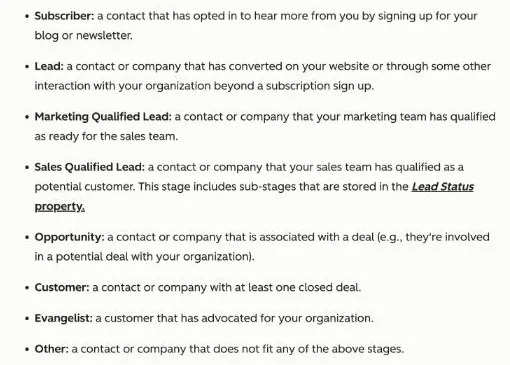 HubSpot’s lifecycle stage definitions, checked 21 October 2026. A demo request from a message ad should end up as an SQL, not stay a click.
If you want to look at this as part of a broader approach, read how we use LinkedIn for lead generation.
When does Sponsored Messaging pay off, and when does it not?
It pays off for small, known, high-value audiences. It costs you money on cold, broad ones.
When it works
It works well with a well-defined, high-value audience you already know. For example:
- an ABM list of target accounts
- an event invitation list
- a retargeting segment
Pair it with an offer that justifies a personal approach. Think of a round table, an exclusive demo or a case study for one sector.
Do bear in mind that in the EU/EEA you only reach those who opted in.
When it doesn’t
It doesn’t pay off if your audience is cold and broad, or if you simply want cheap reach.
In that case you burn your cost-per-send budget on recipients who never respond. You’re better off with Sponsored Content in the feed.
Torn between LinkedIn and search? See Google Ads vs LinkedIn Ads for B2B.
Which format for which situation?
This table sums up the choice:
| Your situation | Best format | Why |
|---|---|---|
| Known accounts, one clear offer | Message Ads | One message, one button, no distraction |
| Known accounts, mixed intent | Conversation Ads | Each button serves a different stage |
| Cold or broad audience | Sponsored Content | You pay for attention, not for every send |
| Mostly EU/EEA audience | Sponsored Content first | Only opted-in members get inbox ads |
| Handful of target accounts | ABM mix | Hand-picked accounts, message per decision-maker |
Rule of thumb: if you can’t name the accounts on the list, it’s not an inbox audience.
Three checks before you hit send
Run these before every campaign:
- Opt-in reach: how much of your list sits in the EU/EEA?
- Target CPL: what may one qualified lead cost?
- Tracking: does the Insight Tag record the form or booking?
If one answer is “don’t know”, fix that first.
Very small audiences: go account-based
For very small, high-value audiences an account-based approach often works best.
You select the right accounts by hand and sharpen your message per decision-maker. Our guide to account-based marketing explains the method.
Whoever doesn’t reply yet stays in lead nurturing, not in a second paid send.
Frequently asked questions about LinkedIn Sponsored Messaging
What is the difference between Message Ads and Conversation Ads?
Message Ads are single messages with one call to action. Conversation Ads are branched messages with multiple choice buttons, where the recipient picks their own path. Conversation Ads are a better fit when your audience has different intents.
Does Sponsored Messaging work in Belgium and the EU?
Only to a limited extent. Because of the GDPR, LinkedIn only delivers these messages in the EU and the EEA to members who explicitly chose to receive sponsored messages. Part of your European audience is therefore unreachable through this format, and certain sub-formats aren’t available in the EU, EEA and Switzerland.
How much does a Sponsored Message cost?
You pay per message sent (cost-per-send), on average around 0.26 to 0.50 dollars according to several sources. So you pay for reach, not for replies, which makes a sharp audience essential.
How do I stop my message coming across as spam?
Send only to those it genuinely concerns, write from the recipient’s point of view and build in one clear call to action. LinkedIn’s frequency cap also limits how often someone sees sponsored messages.
Can I measure conversions?
Yes. With the Insight Tag in Campaign Manager you link actions on your website (form, demo, meeting) back to the campaign, so you see the real cost per lead instead of just open rates.
Which audience is this suitable for?
For a well-defined, high-value MOFU audience you already know. For cold, broad reach, Sponsored Content in the feed is the better choice.
Want LinkedIn messages that deliver meetings?
Sponsored Messaging works if your audience is sharp, your message personal and you measure on leads instead of opens.
We’ll tell you whether this format suits your sales cycle, or whether your budget returns more elsewhere. Contact us for straight advice from a small team that moves fast.
Further reading
Free website scan
Enter your website and get an automatic scan within minutes, with concrete technical and SEO improvements. No sales pitch.
We only use your details for your scan. No spam, unsubscribe anytime.