
SEO & GEO
Attributing leads to AI searches: AI traffic attribution

Copy for AI
AI traffic attribution ties visits, leads and revenue back to AI searches.
It’s hard because assistants like ChatGPT and Perplexity often send no recognizable source on a click. That visitor shows up in your analytics as “direct” instead of as an AI referral.
The verdict: you do get leads from AI searches, but your report doesn’t show most of them. Combine a GA4 channel group, a “how did you find us” question and visibility tracking, and steer on the trend.
Below: why that happens, how to still recognize ChatGPT and Perplexity traffic, and how to tie a lead to an AI mention without kidding yourself.
What is GEO attribution?
GEO attribution is assigning visitors, leads and revenue to AI searches.
That is, to moments when a language model named or linked to your brand.
Classic vs GEO: classic attribution ties a conversion to a Google click or an ad. GEO attribution tries to do the same for answers from ChatGPT, Perplexity, Google AI overviews and comparable systems.
Why it’s fundamentally harder
An AI answer is usually “zero-click”: the user gets the answer inside the conversation itself.
They only visit your site later, or not at all.
Why it matters: the mention does its job (your brand gets considered) without a measurable click to match.
Our wiki entry on zero-click searches explains the wider trend.
Here’s what such an answer looks like. ChatGPT’s free plan answered our own test prompt without a single link:
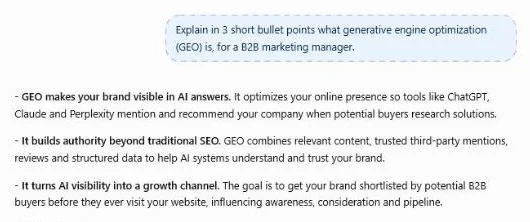 ChatGPT free (temporary chat), 17 October 2026: three bullets, about 90 words, no sources to click.
A brand named in an answer like this gets considered.
But your analytics never sees it.
What the click data shows
The data backs this up. In Pew Research Center’s 2025 browsing study, Google users clicked a regular result in:
- 8% of visits when an AI summary appeared
- 15% of visits without one
They clicked a link inside the summary itself in just 1% of visits.
Pew based this on the browsing data of 900 US adults and 68,879 Google searches. Here are its numbers side by side:
Session ends: Pew also found that 26% of visits to a page with an AI summary ended the browsing session, against 16% without one.
What it means: GEO attribution is less about recounting visitors.
It’s about reconstructing a first touchpoint that has become invisible.
How you even end up in those answers we cover in the GEO guide.
This article is purely about measuring it.
Why does AI traffic disappear into your “direct” numbers?
Because the referring source (the referrer) isn’t passed to your website on many AI clicks.
Analytics tools like GA4 need that referrer to tie a visit to a channel.
How GA4 labels a visit without a source
Google’s default channel group defines Direct as users who arrive “via a saved link or by entering your URL.”
Technically: Direct means the source is “(direct)” and the medium is “(none)” or “(not set)”.
So if no source comes along, the system sees no difference.
Someone typing your URL and someone clicking a link in an AI answer both become “direct”.
The memory effect
On top of that, many AI answers live inside an app or an embedded browser.
Example: a user reads your name in ChatGPT, remembers your brand and goes directly to your site the next day.
That visit was in a sense driven by AI.
But it leaves no digital trace. None at all.
The result: systematic underestimation
Your AI traffic is almost always bigger than your dashboard shows. That is the pattern.
That’s precisely why AI visibility deserves its own yardstick alongside your regular analytics.
We develop that point in the five key metrics of AI visibility.
Our experience: the error also runs the other way. In our log file work, some AI agents get tracked as user traffic in GA4, so exclude them properly before you trust a trend.
Here’s the gap in one picture:
How do you recognize traffic from ChatGPT and Perplexity in GA4?
Part of your AI traffic is recognizable: when the source comes along, it shows up in your referral report.
Traffic from ChatGPT carries domains like chatgpt.com, and Perplexity shows as perplexity.ai.
The problem: GA4 places those visitors among your regular referrals by default, where they get lost in the noise.
So you have to isolate them yourself.
The practical approach has three steps:
Step 1: Create a dedicated channel group
Start in the GA4 admin. Define a custom channel group “AI” that filters sources on the known AI domains.
Think of chatgpt.com, perplexity.ai and the assistant domains of the major providers.
Order: place that channel above “Referral”. Per Google’s custom channel group documentation, traffic lands in the first channel whose definition it matches.
Google’s own example does exactly this.
It builds an “AI assistants” channel with a “matches regex” condition and tells you to move it above Referrals.
Limit: a standard property gets two custom channel groups on top of the default one.
Watch out: keep the list of domains up to date, because new ones keep appearing. Google’s example regex, for instance, doesn’t include Claude.
Once it runs, the AI channel shows sessions and key events side by side. Here’s chatgpt.com in our own GA4:
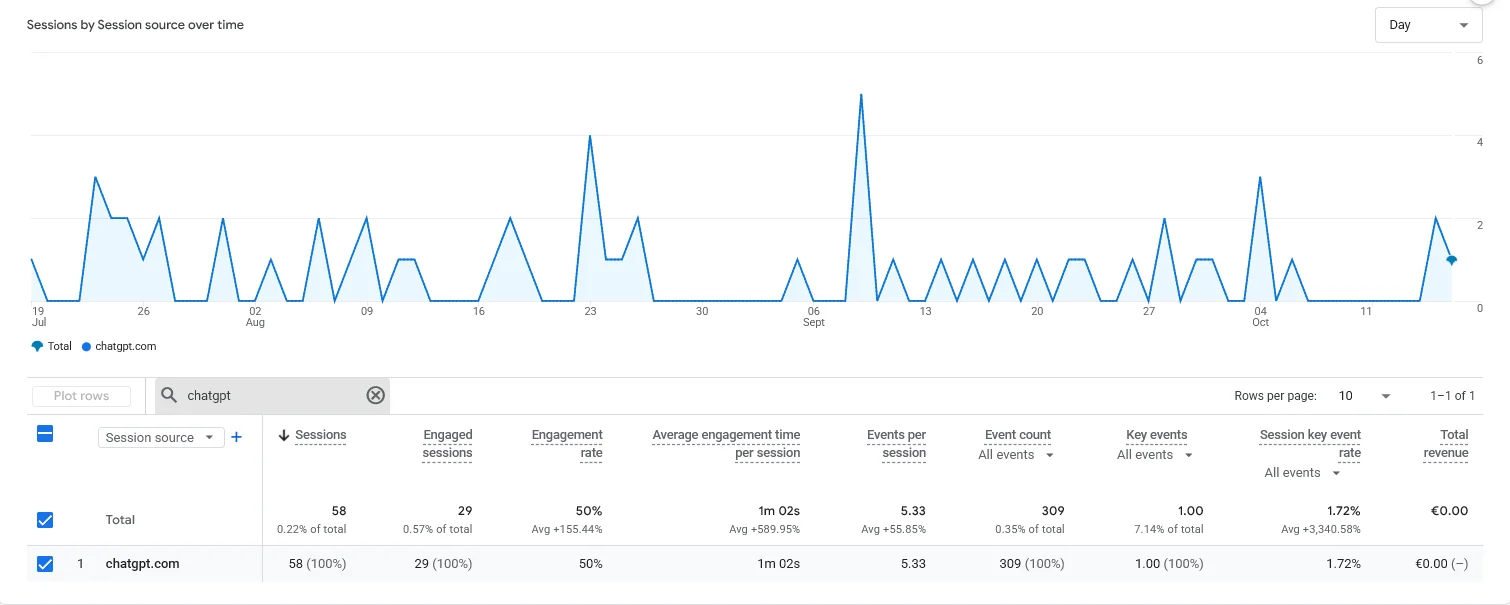 Our own GA4, October 2026: chatgpt.com brought 0.22% of sessions in 90 days, yet 7.14% of all key events.
That’s 58 sessions and one key event. Small numbers.
But a share of key events far above its share of sessions.
Our step-by-step guide on how to track ChatGPT traffic in GA4 walks through the setup screen by screen.
Step 2: Filter on the source parameter
ChatGPT attaches a recognizable source parameter (utm_source=chatgpt.com) to many of its outbound links.
That helps. But it doesn’t cover everything.
The behaviour differs per assistant and per type of answer, so don’t rely on it blindly.
Your own links: if you run your own campaigns, clean UTM parameters keep your own links from muddying the AI channel.
Step 3: Accept that this is only the visible top
Even with a perfect channel group you only measure the clicks with a source.
The zero-click mentions and the “direct” visitors stay out of view.
This number is a floor, not a total.
Perplexity: it at least shows its sources next to every answer.
That’s where a recognizable click can come from:
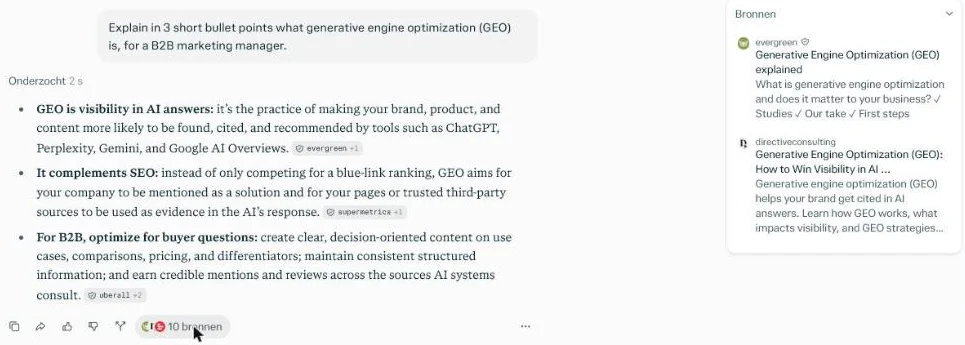 Perplexity’s sources panel for our own test prompt, 17 October 2026: 10 web pages behind one answer.
Want to understand how you even end up in these answers? Read getting found in ChatGPT and getting found in Perplexity.
Measuring only makes sense when there’s something to measure.
Which signals still tie a lead to AI?
The most reliable way is to let the visitor say it themselves.
Because the technical origin is so often missing, “self-reported attribution” isn’t a last resort for AI traffic.
It’s your primary source.
Our guide to self-reported attribution covers the method in depth.
Concretely, it works through three signals:
Signal 1: a “How did you find us?” question
Add it to your most important forms, as an open or multiple-choice field.
Use options like “via ChatGPT or another AI”, “via Google”, “recommendation” and “already knew you”.
This captures exactly the leads your analytics writes off as “direct”. It’s cheap, too.
Signal 2: the first sales conversation
B2B deals run through people. Ask them.
A simple question from your sales team (“where did you first come across us?”) often yields the answer “I asked ChatGPT”. That belongs in your CRM.
Signal 3: the content of the request
For example, someone comes in with a surprisingly well-phrased, comparative question: “do you also do X for sector Y, because that’s how it was described to me?”
That person has often been primed by an AI answer. Note it.
It isn’t hard proof, but a signal worth noting.
Combine the signals
None of these signals is watertight on its own.
Together they give a far more realistic picture than your analytics alone.
Cross the self-reported answers with your recognizable AI traffic and with your AI visibility. Then a rise in mentions, referrals and reported origin confirm one another.
Make the answers easy to collect
A few process rules keep the data clean:
- Short field: the more choices you give, the sloppier people fill it in
- Automatic sync: the answer flows into your CRM, so sales and marketing see one number
- One owner: agree who definitively records the origin of a won deal
Without that last agreement, the data dilutes within a quarter. Our guide to lead source tracking in your CRM shows the field setup.
This isn’t an analytics project. It’s a process matter.
That’s precisely what makes it feasible for a small team.
How do you measure AI attribution when traffic stays invisible?
You change the yardstick. Shift it from traffic to visibility and to the lead itself.
Instead of asking “how many visitors did ChatGPT send?”, you ask two questions:
- Am I named in the answers my buyers get?
- Is the number of leads that name AI as a source growing?
Two measurement layers side by side
Layer 1, visibility: structurally test how often and how correctly the major models name your brand. Use the prompts your audience really asks.
Specialized AI visibility tools help track those mentions across models and over time. For a quick first check, our free AI visibility checker works too.
Layer 2, the lead side: the percentage of new leads that give AI as their origin. Add how those leads convert relative to other channels.
The CI approach: sober on purpose
We don’t steer on a vanity number like “AI traffic”.
That number is by definition incomplete and easy to make look nicer than it is.
What we steer on: the combination of growing, correct mentions and qualified leads that name AI.
Promising that we can attribute every AI lead exactly would be dishonest.
The honest promise is that you map the trend reliably and can steer on it.
Why trends beat clicks in B2B
In B2B, the buying journey is long and runs across multiple touchpoints.
There, a trend-based approach is more realistic than a seemingly precise click attribution. Our piece on attribution in a long sales cycle explains why.
What does AI traffic attribution mean for your B2B reporting?
It means your reporting treats AI as a separate channel with its own honest measurement logic.
Put three numbers side by side:
| Number | Where it comes from | What it misses |
|---|---|---|
| Recognizable AI referrals | Custom channel group in GA4 | Zero-click and “direct” visits |
| AI visibility on core prompts | Visibility tool or manual prompt tests | Whether a mention leads to a visit |
| Share of leads naming AI | Form field or CRM | Leads who don’t remember or don’t say |
None of the three is complete.
But together they tell a consistent story, much closer to reality than a single number.
A GEO dashboard puts those three on one screen.
For the board version, see reporting GEO to leadership.
Adjust the expectation level internally
As long as a good chunk of AI traffic comes in as “direct”, a low AI number in your analytics doesn’t prove AI doesn’t work.
Often the opposite: it proves you aren’t measuring it well yet.
Whoever understands this stops steering on the wrong knob.
They start investing in visibility and in recording origin at the source.
Rule of thumb: if your AI referrals are flat but more leads say “ChatGPT”, believe the leads.
Frequently asked questions
Why does ChatGPT traffic show up as direct in GA4?
Because many AI clicks arrive without a referrer, for example from an app or an embedded browser. GA4 then labels the visit as Direct, the same channel as someone typing your URL.
Does ChatGPT add UTM parameters to its links?
ChatGPT attaches utm_source=chatgpt.com to many of its outbound links, but not to all of them. Treat it as a helpful signal, not as complete tracking.
How many custom channel groups can I create in GA4?
A standard property gets two custom channel groups on top of the default one. Place your AI channel above Referral, because traffic lands in the first channel it matches.
What is the most reliable way to attribute leads to AI?
Self-reported attribution: a “how did you find us” question in your forms and in the first sales conversation, recorded in your CRM. Combine it with your AI referrals and your visibility trend.
The short summary
AI traffic attribution fails by default, because ChatGPT and Perplexity often send no source.
You restore the view with a GA4 channel group for AI domains, UTM and source filters where they exist, and above all self-reported attribution.
Then: combine that with structural visibility measurement, and steer on qualified leads instead of an incomplete traffic number.
Next step: do you want to map your AI leads reliably and let your GEO visibility grow alongside your reporting? Explore our generative engine optimization (GEO) or contact us.
Free website scan
Enter your website and get an automatic scan within minutes, with concrete technical and SEO improvements. No sales pitch.
We only use your details for your scan. No spam, unsubscribe anytime.