
SEO & GEO
What Is LCP (Largest Contentful Paint)? Explanation and Benchmark

Copy for AI
LCP (Largest Contentful Paint) measures how fast your page’s largest visible element appears.
That’s usually a hero image or a large block of text. A good LCP is under 2.5 seconds.
The verdict: treat LCP as a revenue metric first and a ranking factor second. Once you’re under 2.5 seconds, further tuning rarely wins a customer.
What is LCP exactly?
It’s the moment the largest element in the visible part of the screen has finished loading.
When a visitor opens your page, the elements don’t all appear at once. LCP marks the point where the visitor feels “the page is here now”.
Which element counts
According to web.dev, Google’s source on web performance, the LCP element is usually one of these:
- a big image
- a video poster
- a large block of text
Until that element is visible, your visitor is staring at an empty or half-loaded page.
Where LCP fits
LCP is part of your Core Web Vitals, and so of your broader technical SEO.
Want to know what a faster, more findable site delivers? See our approach to SEO.
What is a good LCP score?
Under 2.5 seconds, measured at the 75th percentile of your visitors.
Google uses three thresholds:
- Good: under 2.5 seconds, where you want to be
- Needs improvement: between 2.5 and 4 seconds
- Poor: above 4 seconds, where visitors drop off
Watch out: always measure on mobile. The connection is slower there, so that’s where your score is made or broken.
Our own field data
We ran this page through PageSpeed Insights on 17 October 2026.
The field data comes from real Chrome users over 28 days. It’s at origin level, because a single page doesn’t have enough visits:
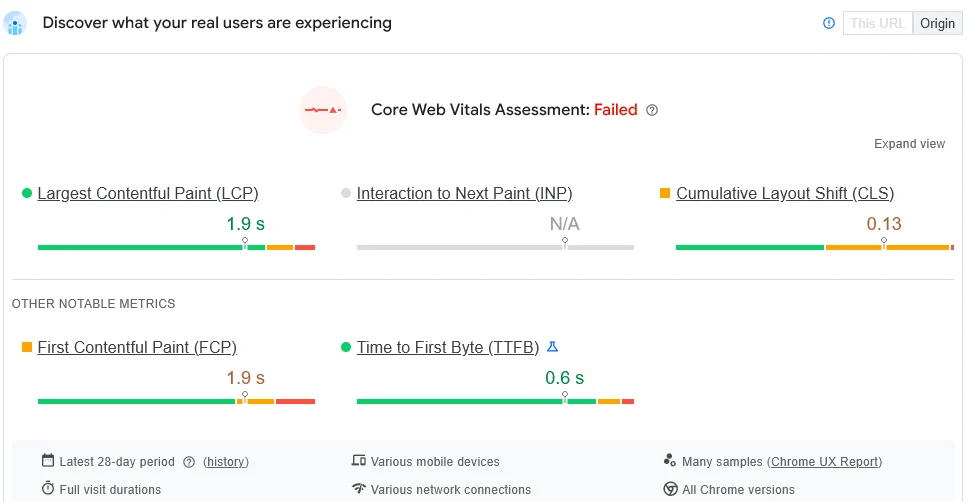 Our own mobile field data: LCP is green at 1.9 s, yet the assessment fails because CLS is 0.13. One weak metric is enough to fail.
So a green LCP alone doesn’t pass the assessment.
Where does your LCP time go?
Into four consecutive phases, according to web.dev.
Knowing where the time disappears is half the solution.
The four phases
Here’s what each phase is, and what to steer on to shorten it:
| Phase | What it is | What to steer on |
|---|---|---|
| Time to First Byte | The time until the server sends back the first piece of the page | Fast hosting, caching, improving TTFB |
| Resource load delay | The time between TTFB and the moment the browser starts fetching your LCP image | Reference your image early, no lazy loading at the top |
| Resource load time | How long it takes to download the LCP image itself | Lighter images, modern formats, compression |
| Element render delay | The time until the loaded element is actually painted | Limit render-blocking CSS and JavaScript |
What a healthy split looks like
web.dev gives guideline shares per phase. Compare them with our own lab test of this page:
The guideline puts most of the time in server response and download. Render delay should stay small.
What we usually see
In practice, the first and last phase are most often the culprits: slow hosting at the start, heavy scripts at the end.
In between, there’s usually an oversized image.
When the LCP element is text
Not every LCP element is an image. On this very page, the LCP element is the H1 headline, so there’s nothing to download.
In the lab test (throttled mobile), all of the time sits in the last phase:
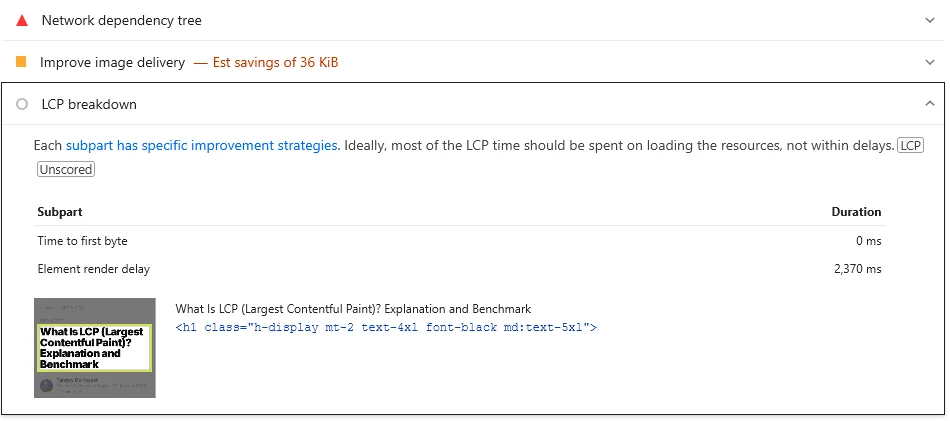 When text is your LCP element, the load phases drop out and render delay is the whole story: fonts, CSS and scripts that hold back the first paint.
So for a text LCP, look at render blockers first, such as fonts, CSS and scripts.
Why does LCP matter for your rankings?
Because it’s an official ranking signal, though its bigger effect is on revenue.
Together with INP and CLS, LCP forms the Core Web Vitals. Google says those are used by its ranking systems, within its page experience signals.
Above all a revenue factor
A page that appears slowly drives visitors away before they see your offer or form.
In B2B, where one qualified lead is worth a lot, every drop-off is lost revenue.
An example from practice
Say a B2B service provider has a large atmospheric photo at the top of its quote page. That photo is the LCP element.
Until it loads, the visitor mostly sees white space.
Now say the photo is accidentally lazy loaded, and the site runs on slow hosting. The LCP quickly creeps towards four seconds.
The prospect who just clicked your search result stares at an empty page, and is gone before your form appears.
These are exactly the pages with the highest buying intent. Compress that photo and load it immediately, and the LCP often drops into the green in one go.
How do you measure your LCP?
For free, with two Google tools.
PageSpeed Insights
Paste your URL into PageSpeed Insights. You’ll see your LCP, the LCP element and concrete improvement points.
Google Search Console
It shows the Core Web Vitals for your whole site, and which pages need attention.
Look at how it groups URLs by issue:
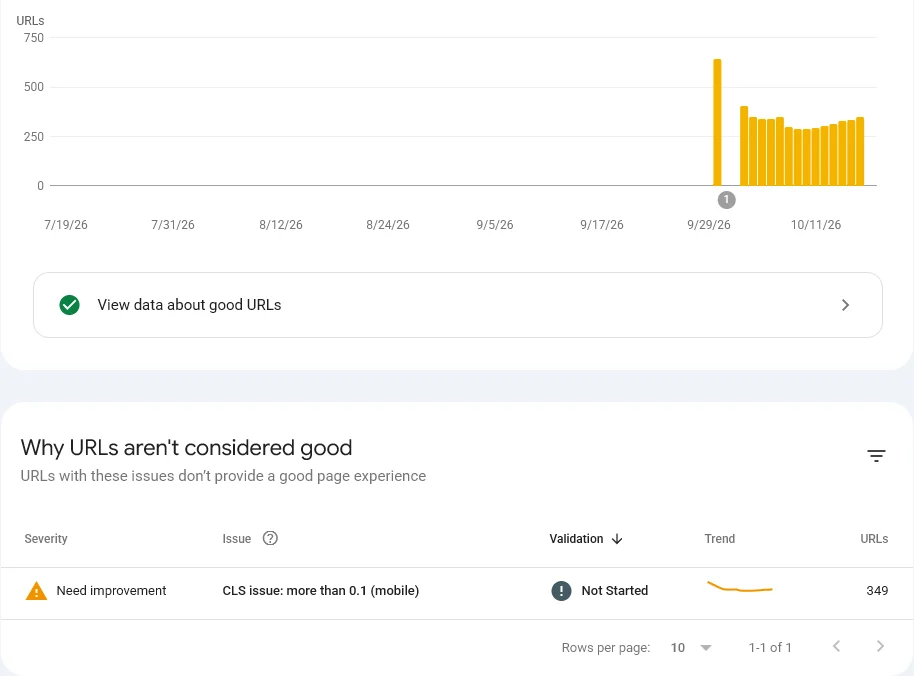 Search Console groups URLs by issue. On our site it isn’t LCP but layout shift (CLS above 0.1) that keeps 349 mobile URLs out of the green.
So on our own site, the fix to prioritise is CLS, not LCP.
Google Lighthouse
Google Lighthouse is built into Chrome, and handy while you build.
How do you improve your LCP?
Mostly with four fixes:
- Shrink your largest image: compress the hero and use modern formats, see optimising images for SEO
- Speed up the server: for example with caching, see improving TTFB
- Load the hero eagerly: use lazy loading only below the fold
- Cut render-blocking scripts and CSS: they hold up your page
A lot of this work sits under the hood.
What are the most common LCP mistakes?
A poor LCP rarely comes from one big problem. It’s usually the sum of small missteps.
1. Lazy loading your hero image
The classic. Lazy loading is fine below the fold.
But on your largest element at the top, it backfires: you delay exactly what decides your LCP.
2. Only measuring on desktop
On your fast office laptop, everything looks smooth.
Google judges you at the 75th percentile of real visitors, and they’re often on mobile with a slower connection. Measure there.
3. Serving an uncompressed photo on mobile
A few-megabyte image that’s acceptable on desktop is a millstone on a phone.
Serve a smaller version for small screens.
4. Trying to fix everything at once
Tinkering without measuring wastes time on phases that are already fast enough.
First measure where the time goes (see the table above), then tackle the biggest phase.
When is LCP a priority, and when isn’t it?
It’s a priority when your score is orange or red and you have enough traffic to notice.
When to leave it
If your LCP already sits comfortably under 2.5 seconds, further fine-tuning is rarely worth it.
Steer on content, authority and conversion instead, because that’s where your growth is.
A few tenths of a second on an already fast site won’t get you an extra customer.
Rule of thumb: steer on customers and revenue, not on a perfect score.
Frequently asked questions about LCP
What is a good LCP value?
Under 2.5 seconds is good, between 2.5 and 4 seconds needs improvement, and above 4 seconds is poor. Google measures it at the 75th percentile of your visitors, so watch your mobile scores.
What is the difference between LCP and page load time?
Full load time runs until everything is done, including things the visitor never sees. LCP measures when the largest visible element appears, which is much closer to perceived speed.
Which element usually determines my LCP?
Often your largest image at the top of the page, a video poster or a large block of text. PageSpeed Insights shows exactly which element it is in your case.
Why is my LCP poor despite fast hosting?
Often your largest image is lazy loaded, or heavy scripts and CSS block rendering. Load the hero image immediately and limit render-blocking resources.
Is your LCP scoring badly?
Fix the slowest phase first, not everything at once.
We map out what’s slowing your page down and fix it at the root, so more visitors stay long enough to become leads. Contact us.
Free website scan
Enter your website and get an automatic scan within minutes, with concrete technical and SEO improvements. No sales pitch.
We only use your details for your scan. No spam, unsubscribe anytime.