
Data & Tracking
Which Channels Bring Your Best B2B Customers? The GA4 Acquisition Report That Shows It

Copy for AI
The GA4 acquisition report shows which channels bring customers, not just traffic.
The biggest marketing problem is rarely “it doesn’t work”. It’s “I don’t know whether it works”.
The verdict: in Google Analytics 4 you read three report groups together: acquisition, audience and content. Connect them to a few key events, such as a demo request, and you’ll see which sources deliver customers.
Look beyond sessions, and put your budget where the revenue comes from.
Measure the effect: check your conversion rate with our free conversion rate calculator.
Why traffic doesn’t tell you which channels deliver customers
A channel can send thousands of visitors and still be your worst channel.
Traffic measures presence. Not buying intent.
Volume rewards the wrong channel
If you decide on sessions or pageviews, you reward the channel that supplies the most volume.
That’s rarely the channel that delivers the most paying customers. Those are often two very different channels.
B2B isn’t e-commerce
We don’t work with webshops, and that distinction matters here.
In e-commerce, volume sometimes still counts, because a fraction of many visitors will buy something anyway.
In B2B you’re not buying 50,000 anonymous visitors. You’re buying a few dozen qualified conversations that lead to a quote.
Ten visitors can beat a thousand
For example, one channel sends ten visitors a month, and three become customers. It beats a channel with a thousand visitors and zero leads.
Traffic puts those two side by side as equals. The right reports set them straight.
From sessions to customers
Read it top to bottom. Every channel delivers sessions, but only part becomes a key event, then a qualified lead, and finally a customer:
That last step is what you steer on, not the first.
That’s why good data analysis doesn’t start with “how many people came”. It starts with “which channel brought the people who made us money”.
You answer that in GA4, provided you open the right reports and connect them to a conversion that’s genuinely worth something.
Sessions are the start. Customers are the score.
Which GA4 report shows where your customers come from?
Start with the GA4 acquisition report.
It splits your visitors into standard channels: direct, organic search, referral, paid search, social and email, as Google’s documentation on the traffic acquisition report describes.
That breakdown shows how people find your site in the first place.
But the breakdown isn’t an answer yet. It’s a question: which channel delivers not the most clicks, but the most customers?
Connect key events first
You only get the answer once you connect a conversion to the report.
Set up a handful of key events that genuinely relate to money:
- form submitted
- demo requested
- quote downloaded
- contact made
To do that, you mark an existing event as a key event. A standard property can have up to 30 events marked as key events, so the limit won’t hold you back.
Our step-by-step guide to setting up GA4 conversions walks through it.
Then read sessions next to key events
Once those events run, the acquisition report shows per channel how many valuable actions it delivered.
Now it gets interesting.
Organic search might bring lots of traffic but few demos, while referral brings little traffic but converts strongly into leads.
That’s exactly the insight that justifies shifting budget.
A real example from our own GA4
Here’s that pattern in our own property. We filtered the traffic acquisition report on chatgpt.com:
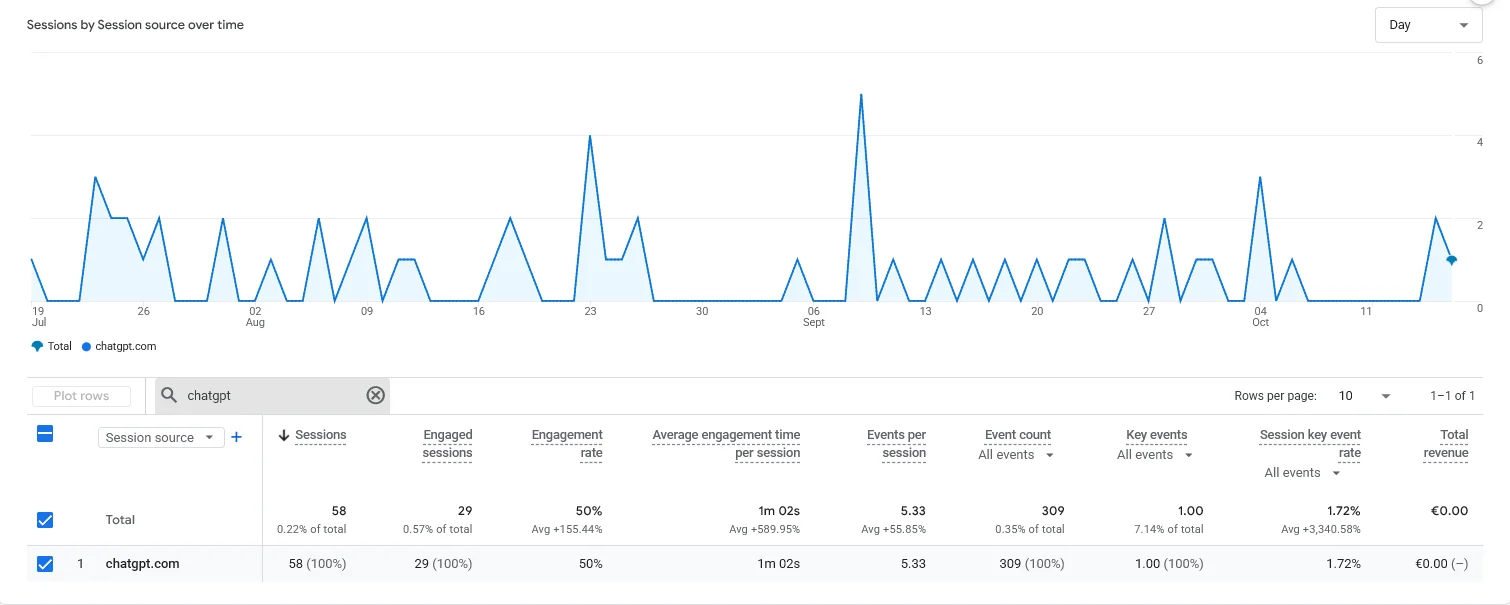 Our own GA4, October 2026, last 90 days: chatgpt.com brought 0.22% of sessions, yet 7.14% of all key events.
A tiny source by sessions carries a far bigger share of key events. Here’s the gap in one chart:
Watch out: that’s 58 sessions and a single key event, so it’s a signal, not proof. But it shows why sessions alone would rank this source last.
Our guide on how to track ChatGPT traffic in GA4 shows how to build that filter.
Traffic acquisition vs user acquisition
Watch the difference between two reports:
- Traffic acquisition: per session, which channel brought this visit.
- User acquisition: per user, which channel brought this person in first.
Google puts it plainly: the traffic report shows where new and returning users come from, while user acquisition shows where new users come from.
Why user acquisition is fairer for B2B
For B2B with long buying cycles, user acquisition is often fairer.
For example, someone finds you through a blog post (organic), returns later directly and then requests a demo.
If you only look at traffic acquisition, “direct” takes the credit.
Your content looks worthless. Yet it gave the first nudge.
Read how to capture that correctly in our guide on conversion tracking.
How do you read the audience and content reports for new customers?
The acquisition report tells you which channel customers come in through. The audience report tells you who they are.
The audience report: who converts
Here you filter your conversions on attributes:
- country or region
- device
- new versus returning visitor
For a Belgian B2B company that’s no detail.
If 80% of your traffic comes from a country you don’t serve, your traffic figures are skewed. Your best channel may be buried under noise.
The content report: where they convert
The content report closes the loop. It shows which pages bring visitors in, and which ones they view right before they convert.
Not the page with the most views, but the page that most often precedes a completed form: that’s your real workhorse.
Often it’s an unassuming case page or a specific blog article, not your homepage.
Read the three together
By reading acquisition, audience and content together, you build a chain:
- this channel brings
- this type of visitor
- to this page,
- and that’s where they become a customer.
A dashboard in Looker Studio can put that chain on one screen.
Measuring pays off
Doing this consistently pays off. Research from the Content Marketing Institute shows a sharp split.
84% of the most successful B2B content marketers say their organisation measures content performance effectively, versus only 15% of the least successful.
The pattern is clear.
Those who measure which channel and content deliver customers steer better.
Those who only look at traffic keep guessing.
Which settings hide your best channel?
Even the right reports lie if your tracking is off.
Data sampling in GA4 can also skew your numbers on lots of traffic or long periods, without you noticing.
The four usual culprits
These hide your best channel most often:
- No key events configured. Without conversions, GA4 only shows traffic. Start with three to five events that relate directly to sales.
- Spam and internal sessions counted. Your own team, bots and referral spam inflate channels that deliver nothing.
- Wrongly attributed “direct”. Visitors without a source land in direct, usually because of missing UTM parameters on campaign links.
- Only looking at last click. Standard reports credit the last channel, which undervalues early channels like organic and social.
How to fix each one
One fix per culprit:
- Key events: mark the three to five that matter; leave the rest as plain events.
- Spam and internal traffic: filter out internal visits, such as your own team’s. See referral spam in Google Analytics for bots.
- Direct: tag every campaign and email link, following our UTM parameters naming rules.
- Last click: compare with user acquisition; see attribution in a long sales cycle.
Our experience: some AI agents get tracked as user traffic in GA4. Exclude them properly, or they’ll inflate a channel that never buys.
Clean beats big
We steer on customers and revenue, not on vanity numbers.
So we’d rather have five well-configured conversions in a clean account than twenty reports on polluted data.
A small team that moves fast gets more out of one reliable acquisition report than out of a wall of dashboards nobody trusts.
If you want to know what one customer costs you per channel, your CAC is the number the acquisition report works towards. Our customer acquisition cost calculator does the sum.
How do you translate these reports into a budget decision?
A report is only useful once it drives a decision.
Put customers next to cost
The method is simple: put the number of customers (or qualified leads) per channel next to what that channel costs you.
Then decide per channel:
| What the report shows | What to do |
|---|---|
| Little traffic, high conversion into leads | Give it more budget |
| Lots of traffic, zero conversions | Scale back or rethink |
| Growing share of new customers | Protect and extend it |
| Slipping share of new customers | Find out why first |
A channel at the bottom on sessions can still deserve the most budget.
Look monthly, not daily
B2B buying cycles take weeks to months.
Daily figures fluctuate too much. Don’t steer on them.
Look at the trend across a quarter: which channel is growing its share of your new customers, and which one is slipping.
Track your conversion rate per channel instead of total traffic. You’ll spot shifts that would stay hidden behind a nicely rising visitor graph.
Our breakdown of conversion rate by lead source shows how to compare them.
Send the same signal to your ad accounts
A key event in GA4 can also steer your bidding. Here’s our contact form event, imported into Google Ads:
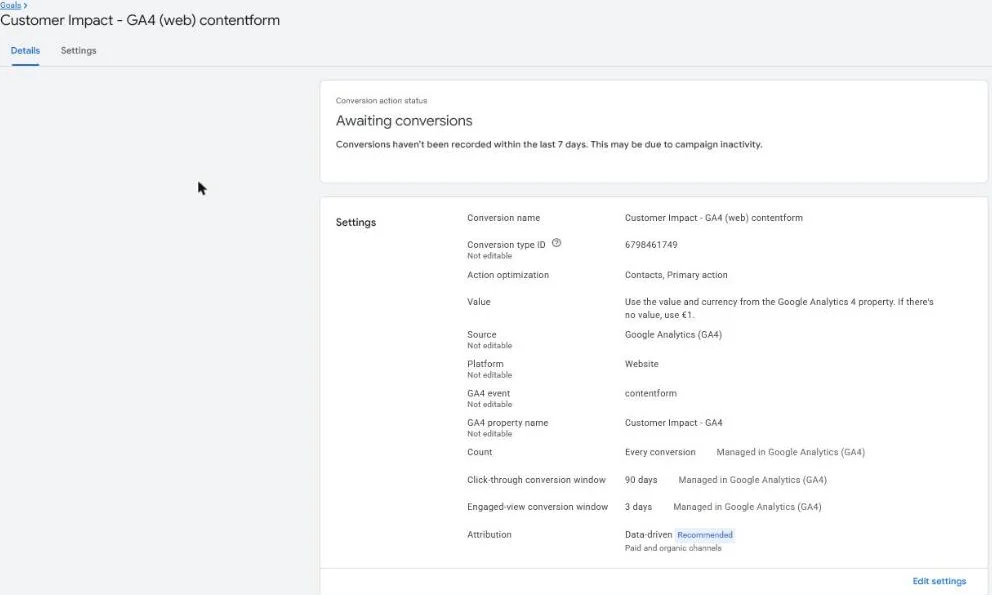 The GA4 contact form conversion action in our own Google Ads account, October 2026. GA4 is the source; Google Ads bids on it as a primary action.
So the channel report and the ad account judge on the same enquiry. Our guide on how to link GA4 to Google Ads covers the setup.
Frequently asked questions about the GA4 acquisition report and new customers
Which GA4 report do I use to see which channel delivers customers?
The acquisition report, connected to key events. It splits visitors into channels like organic search, referral, social and direct, and shows how many valuable conversions (form, demo, quote) each delivered. Without conversions you only see traffic.
What’s the difference between traffic acquisition and user acquisition?
Traffic acquisition looks per session: which channel brought this visit. User acquisition looks per person: which channel brought someone in the very first time. For B2B with long cycles, user acquisition is often fairer.
Why is “direct” such a big channel in my report?
Usually because source information is missing. An oversized direct bucket often points to missing UTM parameters on campaign and email links. That makes paid channels invisible and suggests people find you “out of nowhere”.
How often should I look at these reports?
Monthly or quarterly, not daily. B2B buying cycles take too long, and daily figures fluctuate too much. Watch the trend per channel.
Ready to see where your customers really come from?
Traffic is easy to measure. It’s hard to use.
We help you set up GA4 so your acquisition, audience and content reports show one thing: which channels deliver your best B2B customers.
Then your budget goes to the revenue, not to the numbers that happen to look good. Need the full setup? See how to set up Google Analytics 4 for B2B.
Honest advice, a small team that moves fast, and reports that drive decisions instead of filling meetings.
Free website scan
Enter your website and get an automatic scan within minutes, with concrete technical and SEO improvements. No sales pitch.
We only use your details for your scan. No spam, unsubscribe anytime.