
Advertising
Wasted Ad Spend: How to Recover Lost Google Ads Budget

Copy for AI
Wasted ad spend is Google Ads money that buys clicks but never pipeline.
No lead, no quote, no deal. It creeps in through search terms you never see, campaigns that split each other’s data, and targeting set too broad.
The verdict: your most expensive clicks are rarely your waste. Cut on what happens after the click, or you’ll trim the terms that buy deals.
Below is an audit playbook that finds budget leaks without losing your best leads.
Is an expensive click the same as a wasted click?
No: price tells you nothing until you know what the click produced.
A search term with a high cost per click can be your most profitable one. The people who click on it are ready to buy.
Cut it because the number looks scary, and you save budget while losing revenue. That isn’t a saving, it’s bloodletting.
Waste shows up after the click
You recognize real waste by what happens next, not by the price. Here’s a labelled example with made-up numbers:
| Example search term | Cost per click | Clicks a month | Spend | Leads | Deals |
|---|---|---|---|---|---|
| Cheap, broad term | €2 | 300 | €600 | 0 | 0 |
| Expensive, specific term | €18 | 40 | €720 | 5 | 2 |
The cheap term looks harmless in a CPC report. Yet its €600 a month buys nothing, while €720 on the expensive term buys 2 deals.
So wasted ad spend is always a question about the full path: from click to lead to customer.
Start with your measurement, not your campaigns
Every serious search for budget leaks starts with two questions:
- Does your account count the right conversions?
- Does it know whether a form ever becomes a customer?
An account that optimizes on form fills without knowing which become deals steers its budget toward the wrong goal.
Read up on how to measure Google Ads conversions before you prune any further.
If the goal is wrong, the whole logic is broken, not one campaign.
Where does Google Ads budget leak away?
In 4 places, once the measurement is right: search terms, overlapping keywords, broad targeting and the wrong conversion goals.
1. Search terms
This is the first place to look, and often the richest.
You bid on keywords, but you pay for the search terms people actually type. With broad and phrase matches, terms creep in that have nothing to do with your offer.
For example, a software company bidding on “planning tool” ends up paying for people who want to “print a weekly planner”.
Google’s AI Max for Search setting widens that matching even further. In our own account, it sits inside each Search campaign’s settings:
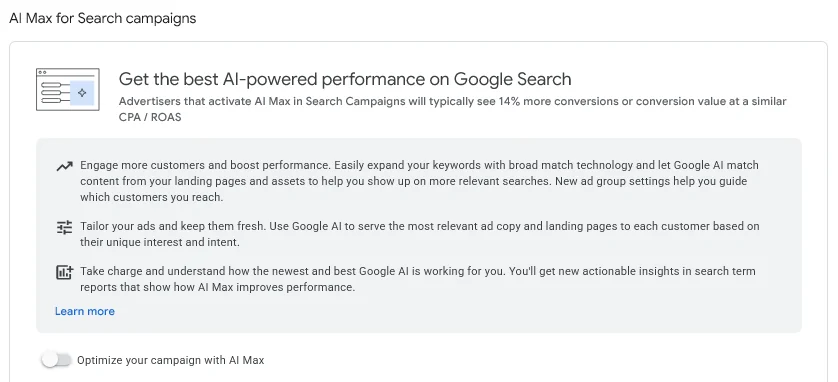 The AI Max for Search setting in our own Google Ads account, October 2026. It’s off until you switch it on, so check it before you blame your keywords.
The search terms report shows which terms cost money without ever converting. You’ll find it under Campaigns, then Insights and reports:
It isn’t complete, though.
Google omits terms without enough query activity, for privacy reasons.
Add the irrelevant ones as negative keywords.
Watch out: a term with few conversions isn’t automatically waste. Sometimes the volume is simply too small to judge.
Only cut when the pattern is clear, not on the first disappointing click.
2. Overlapping keywords
Many advertisers assume that overlapping campaigns bid against themselves. They don’t.
Google says keywords from the same account don’t compete with each other in the auction.
The real cost is subtler:
- Google picks one keyword, which may send the click to the wrong ad
- that click can land on the wrong page
- your data and budget get split across campaigns
It happens when an account has grown without anyone reviewing the structure. Spotting it means reading your account structure as a whole, not campaign by campaign.
3. Overly broad targeting
Locations, times, devices and audiences set too wide spread your budget across people who’ll never buy.
For example, a B2B service that advertises at full tilt at night and on weekends, when nobody requests a quote, pays for impressions without value.
The same goes for geographic targeting set wider than the area you actually serve.
Check where and when your conversions really happen:
Here you don’t cut keywords but reach. And you do it on where conversions come from, not on gut feeling.
4. The wrong conversion goals
This is the quietest leak of all.
If your bidding strategy optimizes toward a goal that isn’t tied to revenue, the algorithm steers your budget the wrong way. It dutifully chases the signal you chose.
So check which actions are primary. In our own account, the Action optimization column shows it at a glance:
 Goals, then Conversions, then All conversions in our own Google Ads account, October 2026. Our GA4 contact form is the only primary action, so it’s the only one that steers bidding.
Give the algorithm the wrong signal, and it works hard to reach the wrong people.
No search term cleanup fixes that, because the problem sits a layer deeper.
How do you cut wasted ad spend without losing leads?
By reading before cutting, and working from deep to shallow. The order decides whether you save budget or lose pipeline.
Here’s the order in one picture:
Step 1: Fix the goal
Check whether the account counts the right conversions, and whether they relate to real revenue.
If they don’t, fix that first. Everything afterward builds on it.
Step 2: Connect your data to the outcome
Which campaigns, ad groups and search terms produce not just leads but deals? This is where offline conversions and attribution models make the difference.
Google’s enhanced conversions for leads lets you upload hashed lead details once a lead becomes a customer. The deal is then matched to the original click.
Note: API uploads move to the Data Manager API from 15 June 2026, so plan any custom upload script for 2026.
Without that link, you see which terms generate forms, but not which generate customers. That’s exactly what decides what you may cut.
A search term that gives few leads but almost all deals, you leave alone.
Step 3: Cut, but only on evidence
Every cut needs data behind it:
- Search terms: exclude a term only when it produces nothing over enough clicks
- Overlap: untangle the structure instead of pausing campaigns at random
- Targeting: narrow it toward where your conversions demonstrably come from
If you can’t explain a change with data, don’t make it.
Step 4: Leave what works alone
During an audit, intervening everywhere feels productive. But your best campaigns have needed time to learn.
Overturn them to save a few euros, and you reset that learning.
The change then costs more than it delivers.
The art of a good audit is daring to say what isn’t broken.
Why do most audits miss the real leak?
Because many so-called savings are really shifts.
A report flags the most expensive search terms. You cut them, the account looks leaner, and nobody notices the pipeline caving in a month later.
The dashboard looks better while your business gets worse. That’s short-sightedness with a tidy chart.
Clicks or pipeline: what you look at decides
Anyone who sees SEA as a game of clicks and costs chases vanity numbers. They cut in the wrong place.
Anyone who sees SEA as the fast acquisition layer of a growth system reads the account along pipeline and deals.
Only then can you tell real waste from budget that merely looks expensive but earns its money back twice over.
So tracking down wasted ad spend isn’t a one-off cleanup but a matter of attribution.
With that visibility, every saving becomes a choice you can defend.
From budget leak to growth
At Customer Impact, we treat wasted ad spend as a diagnosis, not a cutting exercise.
We read your account along the paths that matter, connect your ads to offline conversions and lead-to-deal data, and cut only where the evidence carries it.
As a Google Ads agency, we run SEA as the fast acquisition layer of one growth engine, not as a goal in itself.
Want to know where your budget leaks before you cut? Start with a Google Ads audit.
Or get in touch via our contact page: we’ll show you where the waste is, and where your money already works.
Free website scan
Enter your website and get an automatic scan within minutes, with concrete technical and SEO improvements. No sales pitch.
We only use your details for your scan. No spam, unsubscribe anytime.