
Advertising
How to Set Up Primary vs Secondary Conversion Actions in Google Ads

Copy for AI
Primary conversion actions are counted in your Conversions column and used by Smart Bidding; secondary actions are observation only and appear in the All conv. column. That is how Google’s help article on primary and secondary conversion actions defines it. Our rule: one or two primary actions that represent pipeline, everything else secondary.
That single distinction determines what Smart Bidding trains its algorithm on, and therefore where your budget flows. Get it wrong, and the system will bid neatly and efficiently towards the wrong goal. Below you get the difference in one table, why it carries so much weight, and the setup in five steps, including two screenshots from our own Google Ads account. This is part of our broader explanation of what SEA is.
How we checked: Google Ads Help pages and the screenshots in this article were checked on 17 October 2026, in the English (United States) interface of our own Customer Impact account.
What is the difference between primary and secondary conversion actions?
Since Google restructured its conversion settings into goals, you classify every conversion action as either primary or secondary. The difference is fundamental and frequently misunderstood.
A primary conversion action counts towards your bidding strategy. If you use an automated strategy such as Target CPA or Target ROAS, the algorithm trains itself on exactly these actions. It looks for people who are likely to complete a primary conversion and bids on them. Primary actions also appear in your main “Conversions” column.
A secondary conversion action is measured, but it does not steer your bids. Google calls it “observation only”: you see the data in the All conv. column, you can analyse it, but the algorithm ignores it when bidding.
| Primary | Secondary (observe only) | |
|---|---|---|
| Counted in the “Conversions” column | Yes | No |
| Counted in the “All conv.” column | Yes | Yes |
| Used by Smart Bidding | Yes, when its goal is used for bidding | No (exception: an action inside a custom goal) |
| Default for actions imported from Google Analytics | No | Yes, until you change it in Google Ads |
| Typical use in B2B | Quote request, qualified lead, offline sale imported from your CRM | Newsletter sign-up, PDF download, phone number click, video view |
In other words: primary is the steering wheel, secondary is the speedometer. Both give you information, but only one determines direction. And that is exactly where things go wrong, because many accounts have ten primary actions that have nothing to do with each other. The About “All conversions” help page confirms the reporting side: All conv. includes everything in Conversions, plus secondary actions and view-through conversions.
Why does this setting carry so much weight?
Picture this: you sell a B2B service with a sales cycle of several weeks. The action that genuinely has value is a quote request from a qualified prospect. But your account also has a newsletter sign-up, a PDF download and a click on your phone number set as primary conversions. To the algorithm, those are all equally valuable goals.
So what happens? Smart Bidding optimises towards the most easily achievable volume. Newsletter sign-ups and downloads happen more often and faster than a carefully considered quote request. So the system learns: “this is where the conversion volume is”, and steers your budget towards traffic that downloads but does not buy. Meanwhile your reporting shows a lovely, rising conversion curve. Everything looks like it is working. Only your sales team notices that the leads are not coming in.
That is the treacherous thing about this setting. A wrong bid you fix in a day. A wrong goal lets you accelerate in the wrong direction for weeks, while the dashboard turns green. It is exactly the kind of vanity metric we want to get rid of in paid campaigns: not steering on the number of conversions, but on the conversions that build pipeline. The difference between micro and macro conversions is the same idea, seen from the funnel side.
What role does Smart Bidding play?
Automated bidding is only as smart as the signal you feed it. The algorithm has no idea what a quote request is worth compared to a download, unless you tell it. You tell it through two levers: which actions are primary, and what conversion value you attach to them.
The first lever is the primary/secondary choice we are covering here. The second, and even more powerful one, is passing on conversion values. If a qualified lead request gets a higher value than a download, you can even bid with Target ROAS and let the system understand that not every conversion is equal. Anyone who ties those values to what actually happens after the click, a quote that becomes a deal, gives the algorithm the sharpest signal there is. That is the essence of offline conversion measurement: feeding the outcome from your CRM back to the campaign that brought the lead.
But the basics stand: only set your real value action to primary. Only once that is right does conversion value optimisation make sense. Our guide to Smart Bidding covers the strategies themselves.
How do you set up primary and secondary conversions? (5 steps)
Follow these steps when you structure your account. Each step shows where the setting lives in the Google Ads interface (English, United States). Menu names follow the current Google Ads layout with the Goals menu in the left sidebar.
Step 1: Identify your real value action in the conversion summary
Ask yourself which action represents pipeline or revenue. For most B2B companies that is a quote request or a completed contact form from a qualified prospect, not every micro-action on the site. Open the summary to see every action in one place, grouped by goal, with its optimisation status next to it.
 Goals > Conversions > All conversions in our own Google Ads account. The Action optimization column shows at a glance which actions steer bidding: here our GA4 contact form is the only primary action.
This summary is the first screen to open in any audit: if the column shows more than two primary actions per goal, that is the first thing to fix.
Goals > Conversions > All conversions in our own Google Ads account. The Action optimization column shows at a glance which actions steer bidding: here our GA4 contact form is the only primary action.
This summary is the first screen to open in any audit: if the column shows more than two primary actions per goal, that is the first thing to fix.
Step 2: Set only that action (or those actions) to primary
Keep it narrow. One or two primary actions that carry genuine value give the algorithm a clear goal. Ten mixed actions dilute the signal. Google’s own route, per its help article: go to Summary under Conversions in the Goals menu, find the goal that contains the action, click Edit goal, choose Primary or Secondary (observe only) under “Conversion action optimization” and click Save.
Step 3: Set the rest to secondary, and check each action’s own setting
Microconversions such as downloads, video views, scroll depth and newsletter sign-ups are valuable observation data. Let them be measured, but do not let them bid. They tell you something about behaviour in the funnel, and that is exactly where they belong. You can also check the setting inside one conversion action: click the action name in the summary and look at its settings.
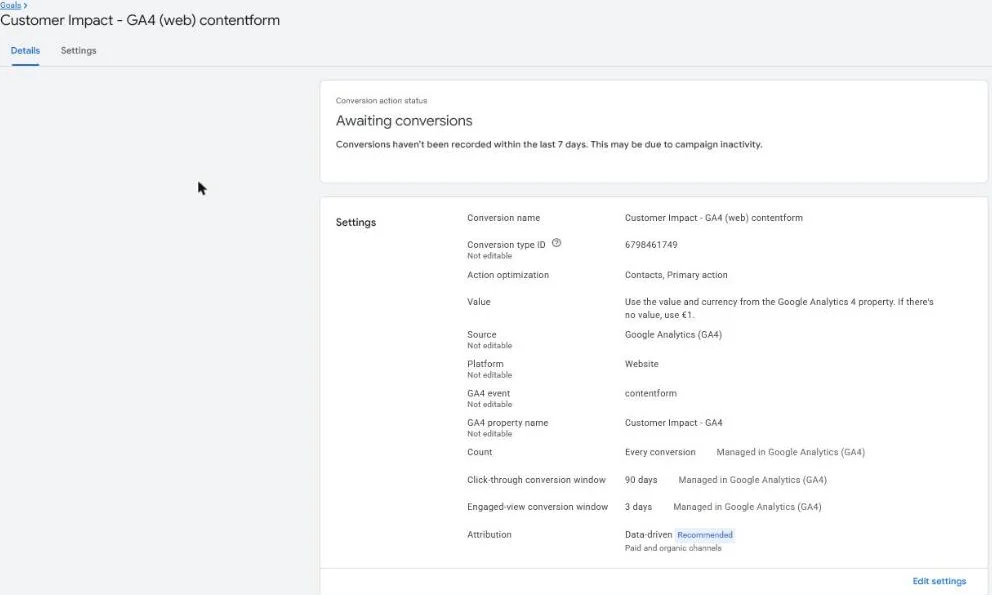 The details of one conversion action in our own account. A real lead like this contact form stays primary; a micro conversion such as a page view or download belongs on secondary.
Step 4: Assign conversion goals deliberately per campaign
Since the introduction of conversion goals at campaign level, you can choose per campaign which goals count. By default a campaign uses every goal marked as account-default. With campaign-specific goals you select the goals yourself, as described in Google’s article on conversion goals. A lead gen campaign should bid on requests, a brand campaign perhaps on something else. Do not let campaigns inherit all account goals without thinking it through.
Step 5: Verify in your reports with Conversions next to All conv.
Add both columns to your campaign report: click the Columns icon above the table and add “Conversions” and “All conv.”. The gap between the two is your secondary (and view-through) activity. If an action you set to primary does not show up in Conversions, or a microconversion still inflates it, you see it here first. Check this before you optimise anything else: fine-tuning keywords, bids and copy makes little sense if the foundation, your goal, is skewed.
A well-structured account starts with the right conversion logic. A google ads specialist checks this setting before touching a single bid, precisely because everything afterwards builds on it.
Which mistakes should you avoid?
A few pitfalls keep coming back. Setting everything to primary “just to be safe” is the most common one: it feels safe, but it dilutes your signal into noise. Double counting happens when the same action is measured through multiple conversions, for example a thank you page and a button click that represent the same event; our guide on cleaning up false conversions shows how to spot them. Leaving outdated actions in place is a third one: a conversion action for a form that no longer exists sometimes keeps counting for years.
A fourth, more subtle mistake is setting microconversions to primary because there is too little volume. If your real value action only happens a few times a week, the temptation is strong to add downloads or sign-ups so the algorithm gets “enough data”. That does not solve the volume problem, it moves it. You get more conversions in your report, but fewer of the conversions that move your business forward. A better solution when volume is low is to bid on an action higher in the funnel that does correlate with your value action, or to switch to a bidding strategy that copes with less data, rather than diluting your goal.
A fifth one: forgetting custom goals. Actions inside a custom goal are used for bidding whether they are set to primary or secondary. If you use custom goals, the primary/secondary label alone no longer tells you what the campaign bids on.
This setting is closely tied to your account structure and your quality signals. If you want to dig deeper into how the auction and your position come about, also read Ad Rank vs quality score and how a well-considered account structure influences your quality score. Together they form the foundation that smart bidding rests on.
How often should you review this?
Conversion settings are not a one-off setup. Your website changes, your forms shift, your offer evolves, and with every change a conversion action can become outdated or start double counting. So schedule a fixed review moment, for example at every quarterly review of your account, or run a full conversion tracking audit. Then go through your conversion actions one by one: does this action still measure what it is supposed to measure, is it at the right level (primary or secondary), and does it still match what your sales team considers a real lead?
That last question is the most important one. The alignment between what you count as a conversion in Google Ads and what your sales team sees as a qualified opportunity is where most accounts drift apart. Keep that conversation alive and your conversion setting stays an honest compass instead of a dashboard that reassures you while your budget heads the wrong way.
Frequently asked questions about primary and secondary conversions
Do secondary conversion actions affect Smart Bidding?
No. Secondary actions are observation only and are not used for bidding, even when their goal is used for bidding. The one exception is an action inside a custom goal: those are used for bidding regardless of their primary or secondary status.
Where do I see secondary conversions in my reports?
In the “All conv.” column and the related columns such as all conversion value. The “Conversions” column only contains primary actions. Add both columns to your campaign view to see the gap.
Why is my Google Analytics conversion set to secondary?
Conversions imported from Google Analytics are secondary by default. You can only change them to primary inside Google Ads, under Goals > Conversions > Summary, via Edit goal.
Should I wait after changing a conversion action to primary?
Yes. Google describes a learning phase of roughly 7 to 14 days for Smart Bidding, and frequent changes to conversion goals during that period reset it. Make the change once, deliberately, and judge the result after the learning period.
How many primary conversion actions should a B2B account have?
As few as possible: one or two per goal that represent real pipeline, such as a qualified quote request or an offline sale imported from your CRM. Everything else stays secondary.
Why does this matter for your growth?
Paid search is the fast acquisition layer of your growth engine: it buys visibility where you need it today. But speed without the right direction burns budget. The primary/secondary setting is the compass that determines whether that speed takes you to pipeline or to empty conversion numbers. It is not an advanced tactic, it is hygiene. And it is exactly the kind of detail that makes the difference between an account that buys clicks and an account that feeds deals.
Not sure whether your conversion actions are classified correctly, or has your campaign perhaps been bidding towards the wrong goal for weeks? Get in touch with us and we will look at it together.
Free website scan
Enter your website and get an automatic scan within minutes, with concrete technical and SEO improvements. No sales pitch.
We only use your details for your scan. No spam, unsubscribe anytime.