
Advertising
Click fraud in Google Ads: how to spot it, protect your campaigns and get your money back

Copy for AI
Click fraud is fake clicking on your ads to drain your budget.
It’s often done by competitors or bots, and it never produces a customer. The good news: Google detects and filters out the overwhelming majority of those invalid clicks automatically.
The verdict: you prevent click fraud in Google Ads with clean data and a few free settings. Paid tools only pay off for big or risky accounts.
Below, you’ll see how to spot fake clicks in your data, protect your campaigns and build a case to claim your money back.
The common thread: steer on qualified enquiries, not on chasing every suspicious click.
Planning your budget: calculate clicks, leads and cost per lead with the free Google Ads budget calculator.
What exactly is click fraud?
Click fraud is the deliberate clicking of a pay-per-click ad, manually or through software.
The aim is to make you pay unnecessarily as an advertiser. The definition of click fraud on Wikipedia lines up with this.
Click fraud vs invalid clicks
Click fraud is intentional and malicious.
That’s what sets it apart from an invalid click, where there’s no bad intent involved. Think of someone who accidentally clicks twice, or an SEO tool crawling your ad.
Google treats both the same way on your invoice: “You won’t be charged for invalid clicks or impressions” (Google Ads help on invalid clicks).
Who benefits from fake clicks?
Usually your competitor.
They want to burn through your budget, so their ad replaces yours once your daily budget runs out early in the day. Our guide to the Google Ads daily budget explains how that pacing works.
Other suspects:
- Publishers of ad space who earn per click
- Affiliates who are paid per click
- A resentful ex-employee, sometimes
Not all fraud is about money. Some of it is personally or politically motivated.
How fake clicks are made
The techniques vary:
- Botnet clicks: a network of hijacked computers mimics real behaviour, sometimes even submitting fake forms.
- Click farms: low-paid people click by hand.
- Ad stacking: ads piled on top of each other.
- Domain spoofing: junk sites posing as premium domains.
For you as a B2B advertiser, the distinction matters less than the effect.
You’re paying for traffic that will never become an enquiry.
How much damage does click fraud really do?
Less than the scare figures suggest, and reliable numbers are scarce.
Many of the percentages doing the rounds come from vendors of anti-fraud tools. They have an interest in making the problem look big.
Why one fraud rate doesn’t exist
The scale depends heavily on three things:
- Your platform: search, display or social
- Your industry: the higher the CPC, the more attractive you are as a target
- Your location: some regions attract far more bot traffic
Sticking one exact number on “the” click fraud rate is therefore misleading.
The hidden cost: polluted data
The damage doesn’t stop at the wasted budget. Fake clicks also pollute your data.
They inflate your click-through rate for keywords that in reality produce no leads. That nudges you into investing in the wrong things.
Bot traffic and fake conversions also pollute the learning data of Google’s algorithms. Smart bidding can then send you even more unwanted traffic.
Watch out: the indirect cost (bad decisions) often weighs heavier than the direct one.
When it’s worth intervening
For a small team the practical lesson is simple: a few suspicious clicks a month are noise, not a disaster.
It becomes worth intervening only when the pattern does one of two things:
- it structurally skews your conversion data
- it systematically exhausts your daily budget too early
Our list of causes of wasted Google Ads spend is a better first check.
Most budget leaks aren’t fraud at all.
How do you spot click fraud in your data?
You don’t feel click fraud, you see it in your numbers.
Watch for these six signals in your campaign data:
- Sudden spikes in clicks without new bids, keywords or a promotion.
- A rising CTR while your conversions stay flat. More clicks, the same enquiries.
- Clicks from unusual locations, such as countries where you don’t sell.
- High bounce rates with sessions under one second. Even an accidental click lingers a moment.
- Odd spending patterns, such as a daily budget that’s gone by 9 in the morning.
- Deviant device or OS usage, such as a flood of clicks from one phone type.
One signal isn’t proof
If you see two or three together, it’s time to act.
Here’s how we weigh the signals:
Conversion tracking is your best friend
Solid conversion tracking makes deviant behaviour stand out.
If you know exactly which clicks become enquiries, a spike without enquiries is obvious. Without proper measurement you’re chasing shadows.
Check which actions actually count as conversions. In our own account, a single primary action under the Contacts goal does that job:
 All conversions in our own Google Ads account, 1 to 16 October 2026. One clean primary action makes clicks without enquiries easy to spot.
Fake form fills are another trap. Our guide to cleaning false conversions shows how to keep them out of your bidding.
Compare campaigns side by side
A spike is easiest to see next to comparable campaigns or accounts.
A table with clicks, CTR, cost and conversions per row shows which one runs out of line:
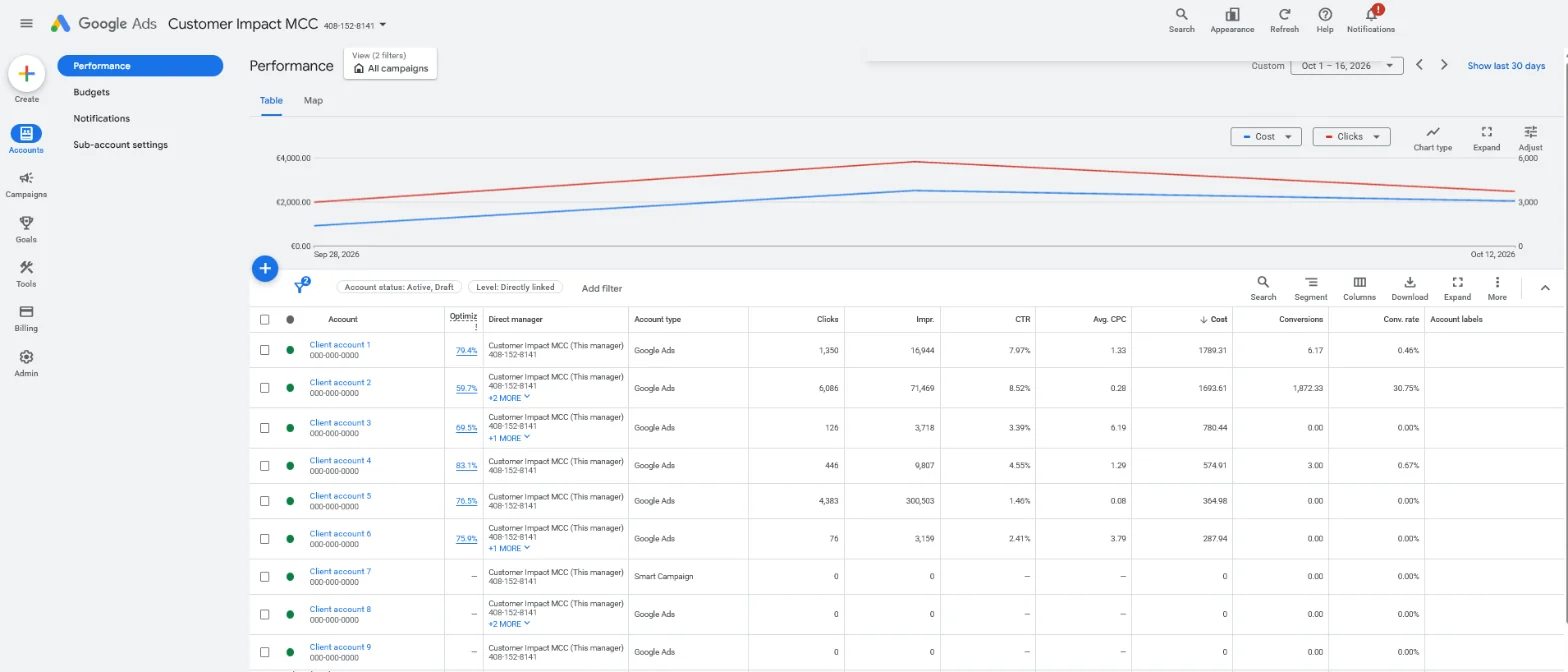 Our own manager account (MCC) in Google Ads, October 2026. Client names and IDs are replaced. A row with many clicks and no conversions is where you’d dig first.
The defence cycle
Spotting it is only one link in the chain.
In practice you keep click fraud under control as a recurring cycle: you measure, spot, protect and learn, and then start again.
Here’s the cycle:
What do you do if you suspect an attack?
First, stop the bleeding.
Pause the suspicious campaign or ad group immediately to prevent further losses. If you can’t pause it, cut the budget sharply to limit the damage.
Then inform your client or manager about the suspicion and the steps you’ve taken.
Step 1: Gather evidence
You’ll need it for a possible refund and to prevent a repeat.
Note down in a simple overview:
- Campaign and keywords involved
- IP addresses: many clicks from one IP or a series of similar IPs is suspicious
- Timestamps of the clicks
- Placement URLs where your ads appeared
Server logs are the most accurate source. The reports in Google Ads and Google Analytics 4 are more accessible for most teams.
Tip: Google’s investigation team also asks for your 10-digit customer ID, the exact date range and, if you have them, logs with GCLIDs (Google Ads invalid traffic investigations).
Step 2: Clean up your data
Annotate the period of the suspected attack in Google Analytics.
Then filter the fraudulent traffic out of your analyses, based on IP or date for example. Rebuild your remarketing lists on healthy traffic.
If you don’t, you’ll be optimising your campaigns for bots.
Fake sessions in GA4 behave a lot like referral spam, and you filter them the same way.
Do you get your money back from Google?
Often largely automatically, and that’s the part many people don’t know.
Google monitors your traffic and detects invalid clicks. Those clicks are “filtered out of your campaign metrics and removed from your billing”, and if you were already billed, you get a credit on your next invoice (Google Ads help on invalid clicks).
Check your billing overview first
On your billing overview you can see how many clicks Google filtered out as invalid before you paid for them.
Check that first. Often the problem has already been largely dealt with without you doing a thing.
You can also add the invalid clicks columns to your campaign view:
Request a manual investigation
If you don’t get the refund automatically, submit your gathered evidence to Google support.
Google lets you “submit an invalid traffic investigation request for activity within the last 60 days”, through its Click Quality form (Google Ads invalid traffic investigations). So don’t wait too long.
Be realistic about the timeline
Google typically replies within several business days. A full investigation can take multiple weeks.
Advertisers report that in practice it often takes longer and involves a lot of back and forth.
A full refund isn’t guaranteed either.
Our advice: manage your expectations.
Put your energy into prevention, not into a long case over a small amount.
How do you protect your campaigns preventively?
Complete immunity doesn’t exist, but you can substantially reduce both the odds and the damage.
The following measures are largely free. They mainly cost you a bit of time in your account settings.
Exclude IP addresses, locations and devices
Block IPs that showed up in earlier attacks, locations where you don’t sell anyway, and device types your buyers barely use. Base it on data, not on a gut feeling.
Limit: Google lets you exclude up to 500 IP addresses per campaign, with an asterisk to block a range (Google Ads IP exclusions).
Account-level exclusions also cover Performance Max, which campaign-level exclusions don’t.
It feels like a game of whack-a-mole, because every blocked range gets replaced by a new one. But it’s an essential part of your defence.
Limit when and where your ads appear
Run them during your business hours, when real B2B buyers are online.
Many bot attacks happen at night, so an ad schedule prevents your budget from being empty before your working day starts.
Also consider switching off the Display Network and search partners. Google explains where search partner ads appear and how to remove them.
Both are known for weak placements and are a common source of bot traffic. Our guide to display network targeting shows how to tighten placements if you keep Display on.
Split your campaigns into tight themes
Build your Google Ads campaign around tightly themed ad groups.
That way you isolate an attack faster: you pause one group without taking your whole account down. Our explainer on Google Ads account structure shows the setup.
Keep your keywords clean
A well-considered list of negative keywords doesn’t just keep consumers and job seekers out.
It also shrinks the surface area fraud can latch onto. Less irrelevant traffic means less room for abuse, and it immediately helps to reduce your CPC.
Tip: check the search terms report weekly. Odd queries often show up there before the clicks do.
Which measure fixes which signal
Here’s how the free measures map to the signals from earlier:
| Signal | Free measure |
|---|---|
| Clicks from countries you don’t serve | Location exclusions |
| Budget gone by 9 in the morning | Ad schedule on business hours |
| Many clicks from one IP or range | IP exclusions, up to 500 per campaign |
| Junk placements | Display Network and search partners off |
| Irrelevant queries | Negative keywords and a weekly search terms check |
At Google Ads we see that these basic measures are more than enough for most B2B accounts.
No heavy artillery needed.
Do you need a click fraud tool?
Usually not.
For a typical B2B account with a limited budget and solid conversion tracking, a paid anti-fraud tool adds little on top of what Google already does for free.
You’d be paying to fight a problem that’s already largely being handled.
When a tool does make sense
A tool only becomes interesting once your situation meets a few conditions:
- You spend heavily per month
- You run on risky networks such as Display or social
- You lose hours every week to manual checks
Those tools analyse every click and block suspicious IPs in real time, including IPs that attacked other campaigns.
What to look for in a tool
If you’re considering one, look for these five features:
- real-time blocking
- automatic alerts
- integration with your platforms
- adjustable sensitivity
- detailed reporting for your reclaim cases
And always test it first via a free trial on your own campaigns before you pay.
Do the maths first
The trade-off stays level-headed: a tool that costs more than the fraud it stops is a loss-making investment.
For example, say a tool costs more per month than the invalid clicks you see in your account. Then it can’t pay for itself, even if it blocks every fake click.
Do the maths based on what Google already filters out, not on scare figures.
Frequently asked questions about preventing click fraud
What’s the difference between click fraud and invalid clicks?
Click fraud is deliberate and malicious: someone clicks knowingly to harm you. Invalid clicks are broader and often innocent, such as an accidental double click or a bot crawling your site. Google filters out both categories largely automatically.
Should I worry about click fraud in B2B?
Rarely to an extreme degree. B2B budgets and search volumes are generally smaller than those of large webshops, which makes you less of a target. Keep an eye on your data, take the free preventive measures, but don’t lose any sleep over it.
Does Google really filter out click fraud automatically?
Yes. Google detects invalid clicks and either doesn’t charge for them or credits them back afterwards. On your billing overview you can see how many clicks were filtered out as invalid. That’s your first check before you take any further action.
How do I know whether it’s really fraud and not a normal fluctuation?
Look at combinations of signals, not at isolated numbers. A spike in clicks without matching conversions, clicks from countries where you don’t sell and near-instant bounces occurring together point to a problem. A single busy day is just noise.
Ready to protect your Google Ads budget?
Click fraud is real, but for most Belgian B2B companies it’s no reason to panic.
Google already catches the bulk of it, and a handful of smart settings covers the rest. The real gain is in campaigns that steer on qualified enquiries and revenue.
Want us to review your account for wasted traffic and point your budget at traffic that turns into customers? Contact us and we’ll start with your search terms and settings.
Free website scan
Enter your website and get an automatic scan within minutes, with concrete technical and SEO improvements. No sales pitch.
We only use your details for your scan. No spam, unsubscribe anytime.