
Leadgeneratie
The on demand webinar as an evergreen lead channel

Copy for AI
An on demand webinar is a recorded session prospects watch whenever it suits them.
A live webinar is an event: it happens once, and then it’s over.
An on demand webinar turns that around. You record once and leave the session permanently open.
The verdict: an on demand webinar is a strong evergreen lead channel, but only with a sharp registration page and a follow-up flow. The recording alone delivers nothing.
It keeps working long after the live broadcast, without you stepping in front of the camera again.
That makes it a steady way to build more leads.
This page belongs with the live variant, but it deliberately sits next to it.
Blindly copy a live playbook into an on demand setup and you leave most of the return on the table.
What exactly is an on demand webinar?
It’s a pre-recorded session you keep available through a registration page.
It’s also called an evergreen webinar.
The visitor signs up, gets access to the recording and watches it when they choose.
For you, the work is mostly one-off.
You make the content properly once, and the page collects registrations while you do other things.
Where it sits in the funnel
It usually sits in the middle of the funnel.
Someone who signs up for a webinar knows their problem and is looking for a solution.
That sets it apart from a quick download.
Whoever gives half an hour to your content is moving towards a decision.
Compare the signal each format sends:
- Gated guide: shows interest in a topic.
- Webinar: shows time invested in your view.
- Demo request: shows buying intent.
More on the first format in gated content.
Key point: the difference with a live session isn’t the content.
It’s the timing and the way you follow up.
For the content side, see our guide to evergreen content.
On demand or live: when do you choose what?
It depends on your goal.
A live webinar has energy, interaction and a built-in deadline.
People register because it happens at that 1 moment, and scarcity drives attendance.
An on demand webinar lacks that urgency.
But it wins on scale and convenience: it runs day and night, even when you’re on holiday.
Your audience already watches this way
In ON24’s 2025 Digital Engagement Benchmarks, 45% of attendees opted to watch webinars on-demand.
Here are the ON24 numbers in 1 view:
Nearly half your audience already prefers to watch later.
An on demand version simply meets them there.
Live and on demand work together
In practice they complement each other.
Many companies start with a live edition and measure which topic resonates.
Then they open the best recording permanently as an evergreen channel.
You use the live energy for the first batch of leads.
The same content then keeps working for years.
The broader playbook for the live variant is in the B2B webinar as a lead engine.
Not every topic is evergreen
Be realistic: some content ages fast.
Sessions that lean on current figures, news or examples need maintenance that eats up the return.
Best for: questions that stay relevant to your audience year after year.
For example, “how to calculate the cost of a bad hire” or “how to set up a CRM pipeline”.
How do you build the registration page?
Just as with live, your on demand webinar stands or falls with the registration page.
No registrations means no leads, however good the recording is.
So keep the page focused on 1 action:
- 1 clear promise: what the viewer learns and which problem it solves.
- Value, not running time: people register for an outcome.
- Few fields: name and email are often enough.
- Instant access: say clearly there’s no waiting.
- Short proof: who’s speaking, and why they’re credible.
Sell instant access, not a date
The difference with a live page sits in that timing block.
With live, you sell a date.
With on demand, you sell instant access.
Play that as your trump card: there’s no reason to wait, the viewer can start right now.
Use the thank-you page
The moment after registration is when interest peaks.
Use it for 3 things:
- a big “start watching now” button
- 1 related resource for later
- a calendar link for viewers who already want to talk
That last link lets hot leads skip the queue.
Check where visitors drop off
A heatmap tool shows how far visitors scroll before they leave.
Microsoft Clarity is free, and its dashboard shows it at a glance:
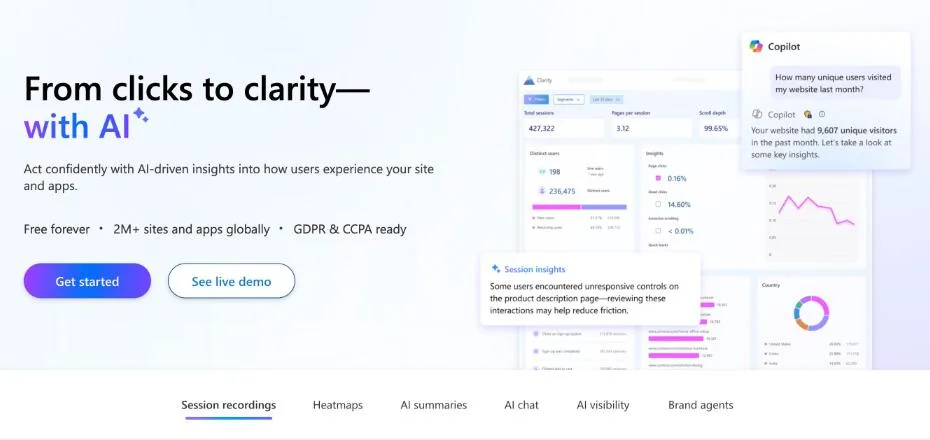 Microsoft Clarity’s homepage, October 2026. The demo dashboard shows scroll depth, the number that tells you how many visitors leave the first screen.
If most visitors never reach your form, move the promise and the form higher.
More layout tips are in how to create a landing page and form conversion optimization.
Why does the follow-up make the difference here?
Because the follow-up replaces the deadline a live date gives you for free.
With a live session, the fixed date creates a natural peak.
Everyone watches at roughly the same moment, and your follow-up hooks into that.
With an evergreen webinar, that peak disappears.
Everyone watches at a different moment, and attention fades faster.
Build the urgency into your emails
You close that gap with a well-designed email flow.
It pays off measurably. The same ON24 release reports that businesses using automated nurture sequences drove 69% higher on-demand attendance and 32% more webinar attendees overall.
This follow-up is your lead nurturing: you guide the prospect step by step towards a next action.
The 4 emails that matter
A basic on demand flow has 4 parts:
- Confirm access right after registration, with the viewing link.
- Remind non-viewers. Without a fixed date, people simply forget.
- Follow up on behaviour. A full viewer is warmer than someone who left after 5 minutes.
- Offer a concrete next step: a call, an audit or a demo.
For example, say someone watched 40 minutes of a 45-minute session. Send a call invitation within a day.
Someone who left after 5 minutes gets a short case study instead.
How to build such a flow step by step is in how to build an email nurture flow.
Add a light deadline
Consider a bonus or offer that expires a few days after registration.
That gives the evergreen flow the nudge the live date normally provides.
For example, offer a free 30-minute review of the viewer’s own setup, available for 7 days after registration.
What do you steer on?
On leads who take a follow-up call and become customers. Not on views.
This is where we look at it differently from many agencies.
With an on demand webinar, it’s tempting to report the number of plays.
That number grows by itself and feels good.
But it says nothing about revenue. Play counts are a vanity metric.
Watch out: most webinar platforms put plays and registrations on their main dashboard. Deals only show up once you connect your CRM.
The metrics that count
Steer on these instead:
- how many qualified leads the webinar delivers
- how many of them take a follow-up call
- how many eventually become customers
For example, an evergreen webinar with 30 viewers a month, of whom a few book a meeting, beats 1,000 plays that lead nowhere.
Connect registrations to your CRM
Tip: add 1 qualifying question to the form, such as company size, but only if sales really uses the answer.
Then track each registration all the way to the close. HubSpot’s lifecycle stages give you that ladder:
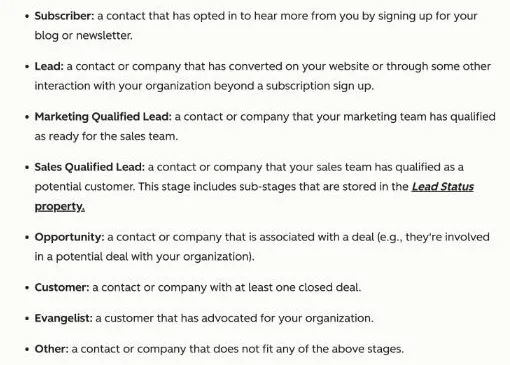 HubSpot’s lifecycle stage definitions, captured 18 October 2026.
HubSpot defines an SQL as a contact “your sales team has qualified as a potential customer”.
That’s the stage your webinar report should count.
Use lead scoring to rank viewers by watch time and fit.
Then lead-to-deal attribution shows which webinar produced revenue.
Here’s the path every registration should be measured on:
Part of a growth engine
Lead generation isn’t a loose bag of tricks.
It’s the capture layer of 1 broader growth engine.
An on demand webinar works best when your lead generation strategy, your SEO and your ads feed it. Not as an isolated channel.
How to set up that whole is in the pillar What is lead generation?
Which mistakes cost you the most return?
An evergreen webinar looks low-maintenance.
That’s exactly where most companies go wrong.
Because the channel keeps running by itself, they forget about it.
The page stays up, but the follow-up waters down and the content ages unnoticed.
Avoid these 4 pitfalls.
1. Letting the recording stand on its own
Without an email flow, an on demand webinar is just a video on a page.
The value sits in what happens afterwards, not in the recording itself.
2. Leaving outdated examples in
Mention a current year or a temporary campaign, and the recording feels dated after a while.
Keep the content deliberately timeless. Put dated details in the follow-up emails, which are easy to change.
3. Not sending any traffic
An evergreen page doesn’t fill itself.
Lead visitors to it consistently through your SEO, your ads and your emails. Otherwise it stays quiet.
Remember the 95-5 rule: the LinkedIn B2B Institute says 95% of your potential buyers aren’t ready to buy today. An evergreen webinar catches them when they’re ready.
You can also cut the recording into short clips and articles. See content repurposing.
4. Not measuring through to the deal
Whoever stops at the number of registrations never knows if the channel delivers customers.
Or just a full dashboard.
Which tool setup do you need?
Most webinar platforms can run an on demand session. Check that yours can do 4 things:
- keep registration open after the live date
- send viewers to the recording automatically
- pass watch time to your email tool or CRM
- trigger emails on viewing behaviour
Here’s what that setting looks like in a typical platform:
If watch time can’t reach your CRM, your follow-up can’t react to behaviour. That’s the step to fix first.
Rule of thumb: an on demand webinar isn’t set-and-forget. It’s set-and-keep-feeding.
Frequently asked questions
What is the difference between an on demand webinar and a live webinar?
A live webinar happens once at a fixed time, with interaction and a built-in deadline. An on demand webinar is a recording that stays open behind a registration page, so people watch whenever it suits them and your email flow has to create the urgency.
Does an on demand webinar still generate leads?
Yes, if you set up a sharp registration page and a follow-up flow. ON24 reports that 45% of attendees chose to watch webinars on demand, so the demand is there. The leads come from the follow-up, not from the recording itself.
How often should you update an evergreen webinar?
Review it at least once a year, and sooner if it mentions figures, tools or examples that have changed. Topics that stay relevant year after year need the least maintenance.
How do you turn it into an evergreen lead engine?
Get 3 things right: a sharp registration page, a follow-up flow that replaces the missing urgency, and steering on lead-to-close.
Do that work once, and the session keeps paying off for years. Tools that send those flows are part of our marketing automation work.
Want to know whether it fits your offer? Contact us and we’ll tell you plainly.
Free website scan
Enter your website and get an automatic scan within minutes, with concrete technical and SEO improvements. No sales pitch.
We only use your details for your scan. No spam, unsubscribe anytime.