
Growth & Strategie
Mapping the buying committee: you sell to a group chat, not to a company

Copy for AI
In B2B you never sell to a company. You sell to a group chat.
That group has to agree among themselves before anything gets signed.
The verdict: a typical B2B deal depends on four to seven key roles per account. Most ABM campaigns fail because they reach only one or two of them.
So mapping the buying committee, also called the decision making unit or DMU, is the work that decides the deal. You do it account by account, role by role.
And you tailor your message per role instead of sending everyone the same whitepaper.
Do the maths yourself: calculate what one lead is worth with our free Value-per-lead calculator.
What exactly is a buying committee?
It’s the group inside an account that decides on a purchase together.
Buying committee, DMU, buying group
You’ll also hear it called the decision making unit or DMU. LinkedIn calls it a buying group.
The point is the same: a single person rarely signs alone. And whoever puts their name on the contract is almost never the one using the solution day to day.
A role isn’t a job title
In Belgian B2B with a long sales cycle, you typically see four to seven roles around the table.
Not all of them have an impressive title.
A role is a function in the decision process, not a job title.
Watch out: one person can fill two roles, and one role can be split across two people.
So you aren’t mapping an org chart. You’re mapping a decision dynamic.
Which roles sit in the decision making unit?
Five roles show up in virtually every B2B deal. Before you work an account, you need to know who you’ll run into.
1. The economic buyer
Role: signs and carries budget responsibility.
Thinks in business case, payback period and risk.
Wants to know what it delivers, not how it works.
2. The champion
Role: your internal ambassador who defends the solution inside the company.
Feels the pain most sharply and has a stake in making it work.
Give this person ammunition to sell you internally.
3. The end user
Role: works with it every day.
Couldn’t care less about ROI. Cares about ease of use and a lighter job.
Don’t underestimate their influence. A user who drags their feet can quietly let a deal bleed out.
4. The technical evaluator
Role: judges whether it fits within security, integrations and existing systems.
Looks for reasons to say no, not yes.
Reassuring with evidence works better than convincing with promises.
5. The blocker
Role: has no decision power, but does have veto power.
This could be procurement, legal or compliance. Ignore this role and you’ll discover them too late, right before the signature.
Roles beyond the core five
For each account, you fill in these roles with real names.
Often one or two more show up, such as an external adviser or a second user group. Four to seven names per account is a realistic range to start with.
Tip: HubSpot’s ABM tools have a “buying role” contact property for exactly this, with options such as Decision Maker, Budget Holder and Blocker (HubSpot’s ABM setup guide).
A contact can hold more than one role, and several contacts can share one.
Why do ABM campaigns fail at mapping the buying committee?
Because they aim at one or two people per account, and the rest of the group chat sees nothing.
One contact isn’t an account
That’s exactly what account-based marketing is supposed to protect against.
Yet campaigns often target the person with the highest title, or whoever happened to fill in a form.
Here’s what that gap looks like, with example figures:
What happens to the deal
Your champion is enthusiastic.
But the technical evaluator has never heard of you.
Then the blocker pops up at the last moment, with objections you could have anticipated.
The deal doesn’t stall because your story was bad. It stalls because the story only reached a fraction of the decision makers.
Leads aren’t account coverage
That’s why channel tactics fall short.
Strong LinkedIn lead generation or a good ad campaign gets you individual contacts. ABM is about account coverage.
How many of the relevant roles within an account have you reached and moved? That’s a different game from collecting as many individual leads as possible.
Our comparison of ABM vs lead generation explains that difference in full.
How do you track down the right people?
Mapping starts with research, not with guessing.
Three sources do most of the work in Belgian B2B.
LinkedIn Sales Navigator
Filter per account on function and seniority. LinkedIn says Sales Navigator has “50+ filters like function, seniority level, years at company” (LinkedIn Sales Navigator).
Same data as your ads: it’s the same dataset that LinkedIn Ads runs on, so your targeting connects seamlessly.
That’s how you reconstruct who probably fills which role. Combine titles with department to tell the end user and the technical evaluator apart from management.
Here’s what that filter view looks like for one account:
Our LinkedIn Sales Navigator guide walks through the filters one by one.
Job-change signals
Someone who just stepped into a relevant role often has the budget and the mandate to change things.
A new manager is a natural entry point for your champion story. Sales Navigator can alert you to “a job or role change” for leads you’ve saved.
First-party behaviour
Who from the account visits your site, opens your emails or downloads something? That reveals where the interest really sits.
Connect that to your lead scoring so you can see which roles are already awake and which aren’t.
For example, say three people from one account read your pricing page in a week. That’s a stronger signal than one form fill.
Further signal: our guide to intent data in B2B covers the external signals you can add.
You don’t need an expensive ABM stack
For a small team, a shared sheet works perfectly well to get started. Keep one row per role per account, with:
- the name and role
- the status
- the last interaction
Discipline matters more than the tool.
Once you outgrow the sheet, any CRM with company records can hold the same fields:
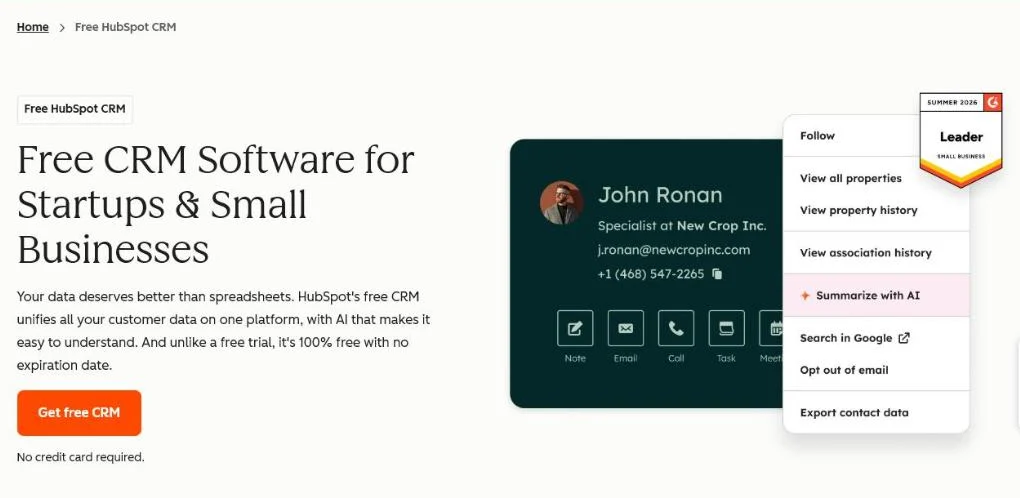 HubSpot’s free CRM page, October 2026. Any CRM with company records can hold the roles per account.
How do you tailor your message per role?
Give every role its own angle, because every role has its own pain.
Sending everyone the same whitepaper is the fastest way to lose your entire committee.
The message per role
Here’s what each role needs to hear:
| Role | What they care about | What you send |
|---|---|---|
| Economic buyer | Business case, payback period, risk control | Revenue and cost, not features |
| Champion | Selling you internally | A short one-pager or a worked example to forward |
| End user | A lighter working day | A demo that shows rather than claims |
| Technical evaluator | Integration and security | Implementation details that take away doubt |
| Blocker | Purchasing terms, contracts, compliance | Early reassurance on terms and compliance |
Our guide to ABM personalization shows how far to take this per tier.
Reserve it for Tier 1 accounts
That sounds like a lot of work.
For an account you don’t really want to win, it isn’t worth it.
Reserve this per-role approach for your Tier 1 accounts. For the broader list, a lighter variant will do.
Rule of thumb: HubSpot sorts accounts into three ICP tiers, where Tier 1 is a strong fit and Tier 3 is lower priority. Do the full role map only for Tier 1.
Want to know how that tiering fits into the bigger picture? Read our lead generation strategy and the approach around demand generation.
How do you know if it works?
Measure engagement per account, not individual clicks or impressions.
Clicks say nothing about whether the right group is moving. The meaningful measure is how many of the mapped roles respond to your message.
Engagement per account
You can follow that in your CRM by tracking the lifecycle stage of the company, not only of the contact:
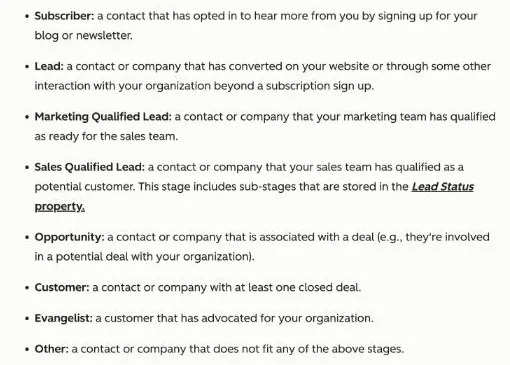 HubSpot’s lifecycle stage definitions, checked 21 October 2026. Most stages apply to a contact or a company, so you can follow a whole account.
The benchmark: twenty to thirty percent
A healthy benchmark sits around twenty to thirty percent account coverage.
For example, say you’ve mapped six roles in one account and two of them respond. That’s roughly a third, so you’re on track.
When coverage stays low
Structurally well below that? Don’t push harder.
It’s a signal to revisit your targeting or your offer.
Perhaps you’re chasing the wrong accounts, and it’s worth sharpening your ideal customer profile.
Or perhaps your message doesn’t hit the real pain. Our overview of ABM metrics and KPIs lists what to track next.
Bottom line: steer on account movement towards a genuine sales conversation, not on a full dashboard.
Frequently asked questions about the buying committee
What is the difference between a buying committee and a DMU?
Nothing essential. Buying committee and decision making unit (DMU) are two names for the same group of people that decides together on a B2B purchase.
How many people are in one on average?
Count on four to seven key roles per account in a typical B2B deal. For bigger or more complex purchases that number can climb.
Do I need expensive software to do this?
No. For your first Tier 1 accounts a shared sheet with one row per role works excellently. An ABM platform only becomes interesting once you want to run this at scale and across many accounts.
What do I do if I cannot track down a role?
Ask your champion. An internal ambassador usually knows exactly who is part of the decision and who can quietly block it. That’s often more valuable than external detective work.
Is this only for enterprise accounts?
No. Even at smaller Belgian B2B companies a single person rarely signs alone. The committee is simply smaller, but the principle of working multiple roles still holds.
Getting started with your own accounts
Start small and concrete. Pick ten to twenty accounts you genuinely want to win.
Map the four to seven roles per account and write down per role which pain you’re hitting. That’s more work than a generic campaign, but it’s the difference between collecting leads and winning deals.
For the broader game of landing large organisations, read our guide on enterprise sales.
Want to spar about how to set this up for your market, without a heavy stack? Contact us.
Free website scan
Enter your website and get an automatic scan within minutes, with concrete technical and SEO improvements. No sales pitch.
We only use your details for your scan. No spam, unsubscribe anytime.